16
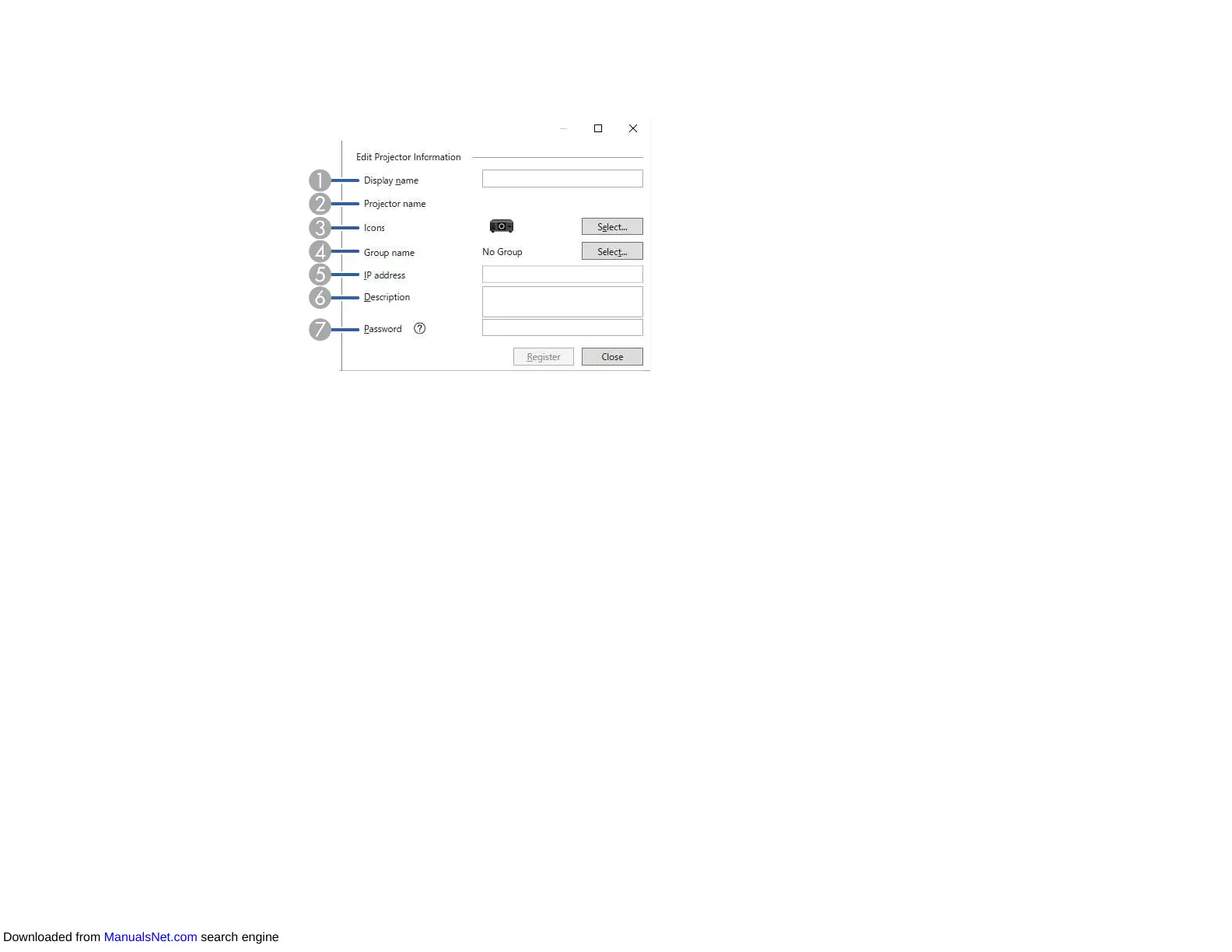
6. Select the necessary settings for each projector.
1 Enter the name of the projector. This name is displayed in the Epson Projector Management
main screen. You can enter up to 64 characters.
2 Displays the name that has been registered to the projector.
3 Select the icon.
4 Select a group if you want to register the projector to a group.
5 Displays the projector's IP address.
6 Enter notes about the projector, such as its location, if necessary. Notes entered here are
displayed in Projector properties. You can enter up to 60 characters.
7 If a password has been set for the projector, enter the password here. If you do not enter the
correct password, you cannot monitor or control the projector, even after registering the
projector. For more information about passwords, see your projector User's Guide.
7. Click Register.
8. To register additional projectors, repeat steps 5 to 7.
You see the registered projectors in the Epson Projector Management main screen.
Downloaded from ManualsNet.com search engine



 To Next Page