27
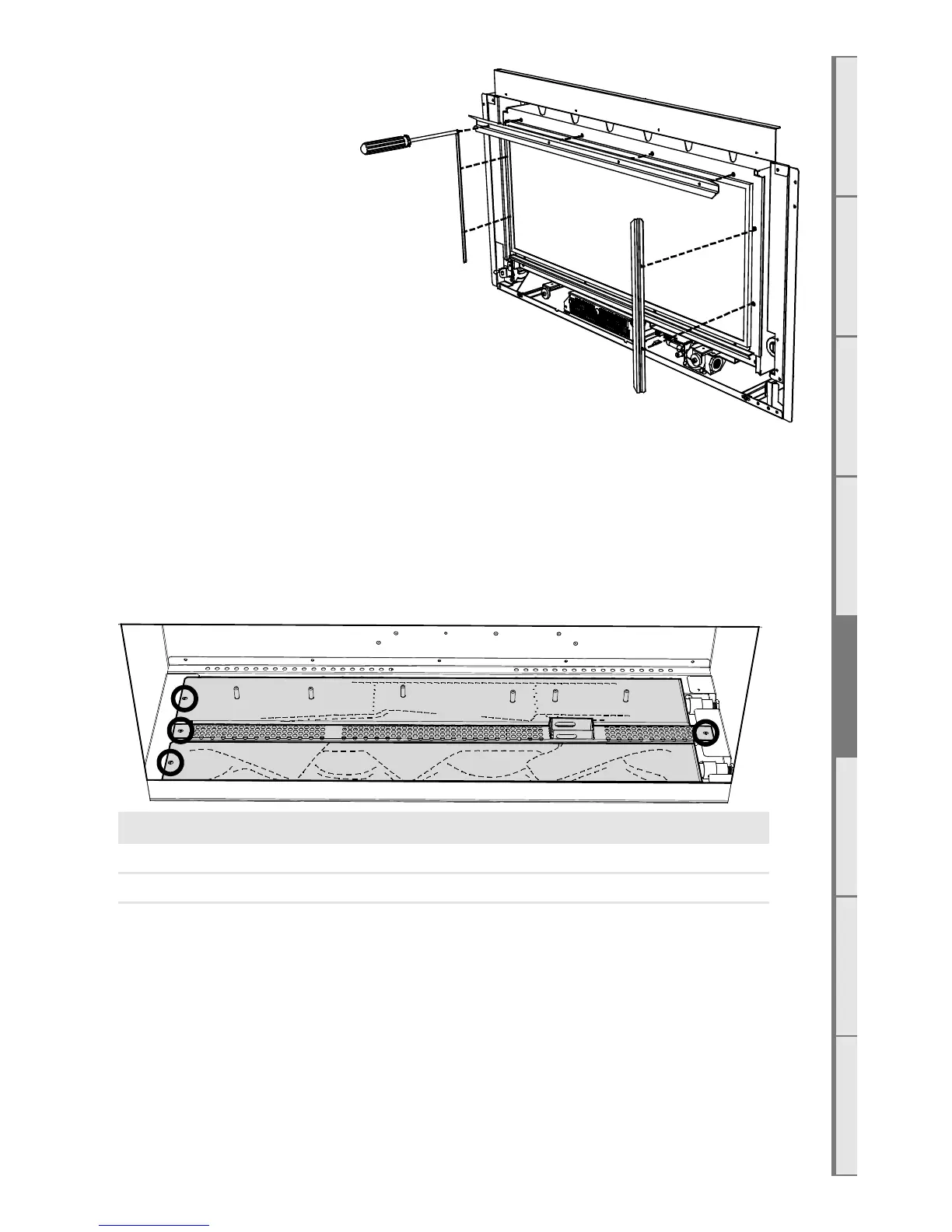
E7 Removing the Glass
Unscrew the top glass retainer
bracket and the two side glass
retainer brackets. Take care that
the glass does not fall forward at
this stage.
Pull the top of the glass toward
you slightly and lift the glass out
of the bottom glass retainer.
You may need to tilt the glass to
achieve this.
Place the glass carefully aside.
Note that the fibreglass tape
around the glass can mark carpet
and furnishings.
E8 Converting the Appliance Gas Type
This appliance has been factory set to operate on Natural Gas only. To convert the appliance to
operate on propane or ULPG, proceed as follows:
□ Remove the small perforated shroud on the right hand side of the firebox.
□ Remove the 2 screws securing the burners in place and lift out the burners as shown.
□ Remove the 2 screws securing the pilot guard shown below and lift it out.
Jets DL850 Front DL850 Rear DL1100 Front DL1100 Rear
NG Ø2.45mm Ø2.3mm Ø2.6mm Ø2.6mm
Propane Ø1.4mm Ø1.3mm Ø1.4mm Ø1.3mm
ULPG Ø1.2mm Ø1.1mm Ø1.3mm Ø1.2mm
□ Remove the front burner jet and replace with the correct jet as stated in the above table.
□ Remove the 2 screws securing the Pilot Cover Plates and slide these out as shown on
following page.
□ Remove the 4 screws securing the pilot bracket and lift out the bracket and pilot hood
assembly.
□ Remove (unscrew) the existing pilot jet and replace with the jet marked red supplied in the
conversion kit.
□ Refit the pilot bracket / Hood assembly and pilot cover plates.



 To Next Page