52
S7 Replacing Electronic Drawer
ISOLATE THE POWER TO
THE FIRE BEFORE THIS
PROCEDURE.
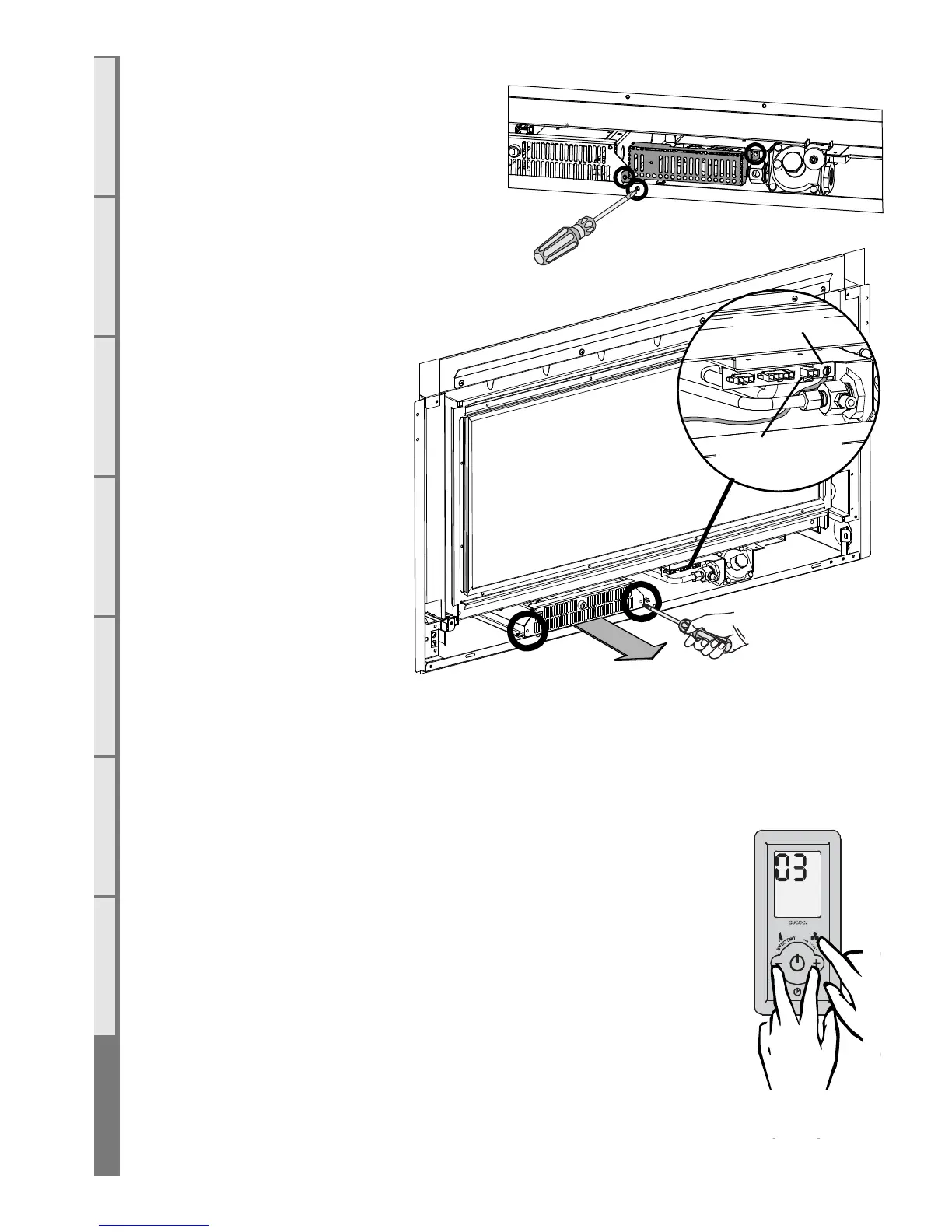
All of the electronic components
of the heater have been located on
a removable drawer. This
drawer is located under
the firebox, near the front
left of the appliance. On
the back of the drawer are
two large connectors that
unplug as the drawer is
removed.
Remove the protective
grill from infront of the
electrical connections
(shown in first diagram)
and unplug electrode wire
from firebox and remove
screw holding earth strap
to firebox. Take out the two
screws at each end of the
electronic drawer and pull
drawer outwards and up
slightly to clear the chassis
lip. If an ethernet / network cable is connected the lid of the drawer will have to be removed and
the cable unplugged before the drawer is completely extracted from the fire.
Reverse this procedure to refit. Ensure drawer is fully seated into the draw housing.
S8 Replacing a Wireless Control
If the wireless control becomes lost or damaged, a new one can be
ordered from any Escea retail agent. When you have the new remote, the
following procedure needs to be followed to “teach” the remote to only
communicate with that fire.
1. Ensure the fire and remote are set to “O” (only the time is displayed
on the remote).
2. While the remote is in its “OFF” mode with only the time showing
on the display, press the MINUS (4), PLUS (8) and FAN BOOST (7)
buttons simultaneously (as shown right) until the characters “03” light up
on the display. Release the buttons and the remote will count down and
display “GO”. The screen will then display all characters. This will put the
remote into test mode and the two big temperature digits should begin
counting from 0 to 99 repeatedly.
Spark Electrode
Earth Strap



 To Next Page