Chapter 3 Operation Instructions SuZhou Eshine Elevator Components Co., Ltd.
―22― YS-K01 Door Controller User Manual
Figure 3-26 Description of input terminal state
Display parameter at editing state
At stop, run or fault alarm state, press to enter function parameter editing state.
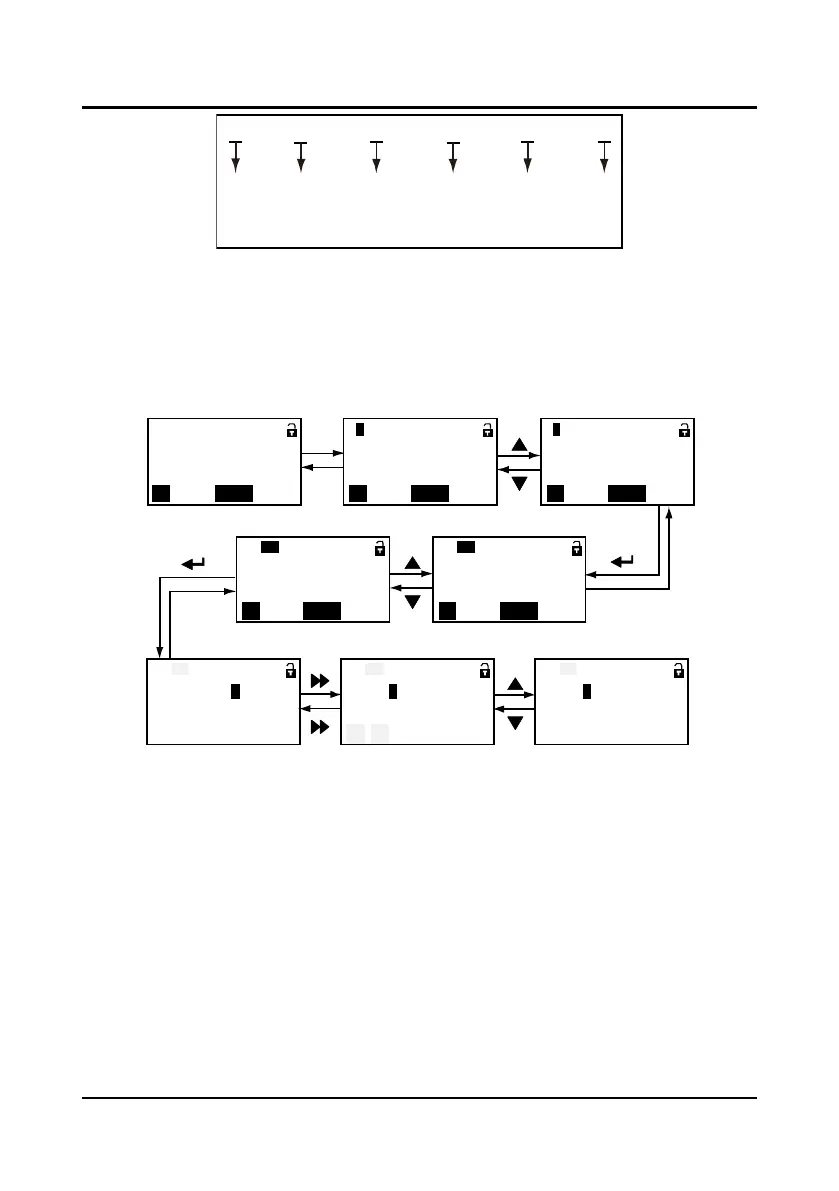
The panel uses third-level menu configuration for parameter setting or other operations. In turn:
function parameter group setting (first-level menu)
→
function parameter setting (second-level
menu)
→
parameter setting (third-level menu). Which is shown in Figure 3-27 and the description
of the keys is shown in Table 3-7.
Figure 3-27 YS-P03 display at editing state
In the setting third-level menu situation, if the parameter is not in anti-color displaying, it indicates
that this parameter can’t be modified. The possible reasons are as follows:
• The function parameter can’t be modified, such as the actual detected parameters or recorded
parameters etc.
• Only when the drive stops can it modify the function parameter.
• Only input the correct password can it edit the function parameter due to the valid password.
Display faulty state
If the controller is faulty, the panel will be flashing to display the fault code. After troubleshooting,
press key to reset and the panel restores to stop state. Refer to Chapter 6.
0 0 0 0 0 0
X4
X3
X2
X1
CD OD
X4,X3,X2 are reserved in K01;
X1 is corresponding to SS in K01;
CD is corresponding to CDin K01;
OD
is corresponding to OD in K01
.
PRG
PRG
Basic parameters
QUICK
CDOD BASIC
P
0
Running parameters
OD/CD arrival signal
= 001 0 1
QUICK
CDOD BASIC
OD curve parameters
QUICK
CDOD BASIC
P
3
OD start distance
QUICK
CDOD BASIC
P3.
00
PRG
OD speed
QUICK
CDOD BASIC
P3.
03
= 3 6. 0 0 Hz
OD speed
P3.
03
OD speed
P3.
03
= 3 6. 0 0 Hz
OD speed
P3.
03
= 3 7. 0 0 Hz
PRG
Range: 0.00~P0.07 Range: 0.00~P0.07
Range: 0.00~P0.07
: :
:
:
:
:
:
Running state First-level menu First-level menu
Second-level menuSecond-level menu
Third-level menu Third-level menu Third-level menu



 To Next Page