Home
Eureka
Measuring Instruments
MANTA+
Page 16 (Cthe Manta Control Software)
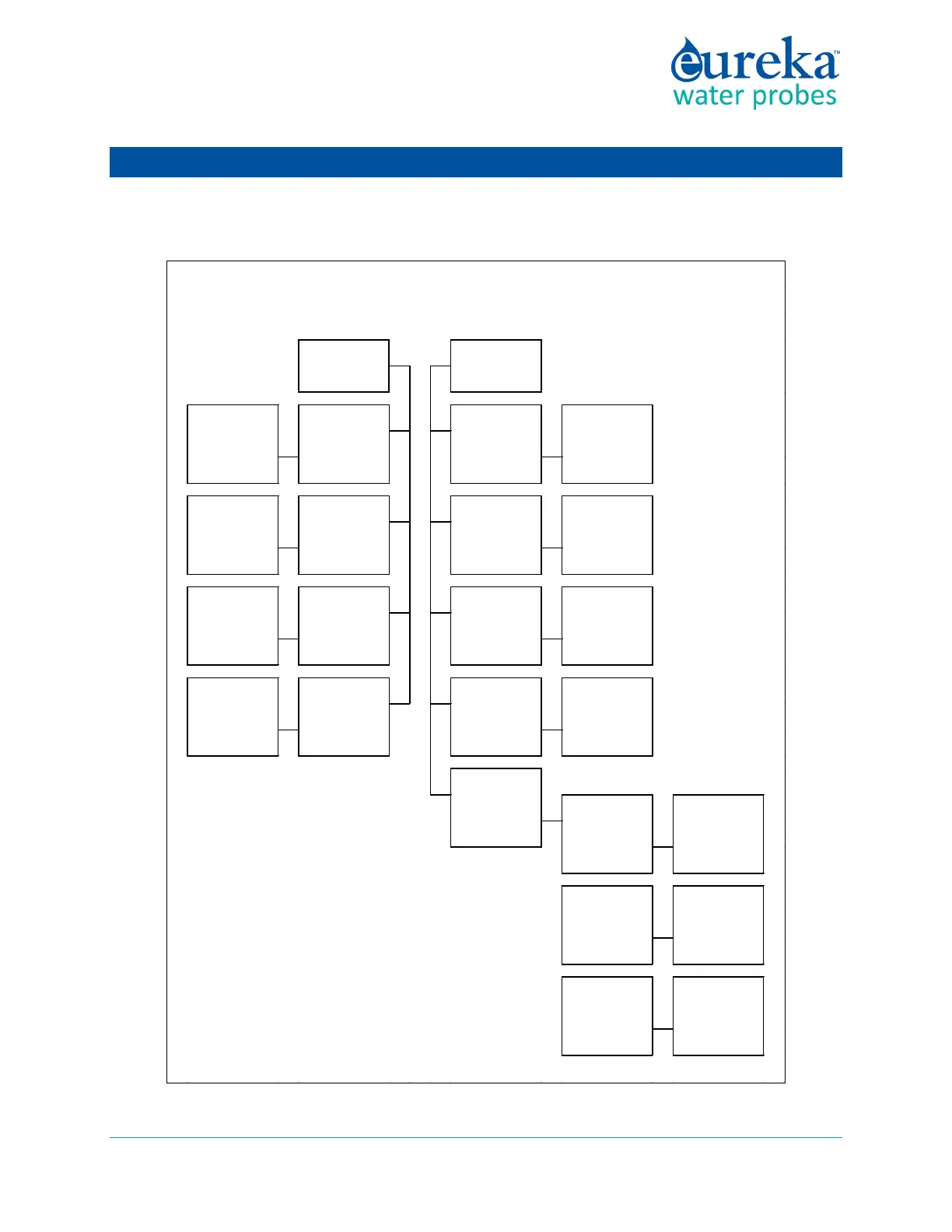
Eureka MANTA+ - Cthe Manta Control Software; Manta Control Software Map
67 pages
Manual
Save Page as PDF
To Next Page
To Next Page
To Previous Page
To Previous Page
Loading...
Eureka Manta
Manual
Page
16
of
67
C
THE
MANT
A
CON
TRO
L
SOFTW
ARE
C.1
Mant
a Control Softw
are Map
Graphing
Calibration
R
e
co
rd
Ma
n
ta
Mind
er Men
u
F
low Ch
a
rt
PC
or
Am
phibian
Manta 2
Se
t
PC o
r
Am
phibian
Sc
rol
l I
nt
e
rval
Manage
Manta
2 F
ile
s
s
elec
t y
ou
r
ch
oic
e
of
s
cr
o
lling
inter
v
als
f
r
om th
e
char
t
v
iew
or
d
elete
Man
ta 2
f
iles,
o
r
expo
r
t Manta
2
files
to
y
ou
r P
C
Time
&
Date
SC
in uS/
cm
, pH
(2-
point)
, D
epth …
al
l
the param
erte
rs
for
whi
ch your m
anta 2
is enab
led
No
te: A
ll Ma
nta
Min
der
s
c
r
eens
ha
v
e
"O
K", "
Cance
l", and "Help" butt
ons.
Click
o
n "
O
K
" to
implem
ent w
ha
tever
change
s y
ou have made
; cl
ick on
"
Can
cel"
to g
o b
ack
to th
e Main
Sc
r
een
w
itho
ut imp
lementin
g an
y
ch
ang
es
; clic
k
on
"
Help"
to
get,
w
ell, h
elp.
fo
llow
th
e
pa
r
amet
er
-
s
pec
ific
ins
tr
u
ction
s
f
or
calib
r
atio
ns
ty
pe in th
e
co
rr
ec
t time and
da
te,
or
sy
nchronize with
your
PC
s
elec
t an
y
of
thr
ee m
etho
d
s
fo
r
telling
yo
ur
Man
ta 2
the lo
cal
BP
Calib
rate
B
arome
t
ric
Pre
ssu
re
s
elec
t y
ou
r
ch
oic
e
of USB ports
from
the
chart
v
iew r
ea
l-time
da
ta in g
r
aph
ica
l
form
MS Windows
s
tandard "
Sav
e
As
"
f
un
ctio
n
s
elec
t y
ou
r
ch
oic
e
of
p
ar
am
eter
s
,
and the
ir or
der of
appearance, f
rom
the
chart
v
iew d
etails
o
f a
ll
calib
r
atio
ns
ma
de
to y
ou
r
Man
ta 2
s
elec
t y
ou
r
ch
oic
e
of loggi
ng
inter
v
al,
tur
b
idity
wipes, and Manta
2
f
ile na
mes
COM
Ports
Se
nsors and
Param
e
te
rs L
ist
Choose
a Fi
le
f
or S
torin
g Y
our
Snapshots
Loggin
g Set-Up
15
17
Table of Contents
Main Page
Default Chapter
2
Table of Contents
2
Learning the Manta in 30 Minutes
6
See Your Manta
7
Talk to Your Manta
8
A Short Exercise
10
Bmanta Basics
12
Deployment Specifications
12
Manta Control Software Flow Chart
12
The Manta Has Four Basic Applications
12
Underwater Cables
13
Operating the Manta with Eureka's Amphibian2
13
What Do the LED Lights Mean
14
The USB Converter
14
Accessories
15
Flow Cell
15
Routine Maintenance
15
Cthe Manta Control Software
16
Manta Control Software Map
16
Home Page
17
Hot Buttons
18
PC" Pull-Down Menu
19
Manta" Pull-Down Menu
20
C.5.A Manage Manta Files
21
C.5.B Logging Setup
21
C.5.C Calibration Log
22
C.5.D Sensors and Parameters List
22
C.5.E Calibrate
23
C.5.F Manta Version
24
C.5.G Create a Custom Parameter
24
C.5.H Delete a Custom Parameter
24
Software Update of November 2018
24
Dsensors and Calibrations
26
The Difference between Sensors and Parameters
26
Basics of Parameter Calibrations
26
Choosing Calibration Standards
27
Calibration Record ("Cal Log")
28
Sensor Response Factor (SRF)
29
Temperature
29
Dissolved Oxygen
29
Conductivity
31
Reference Electrode
33
Oxidation-Reduction Potential (ORP)
34
Depth and Vented Depth (Stage)
34
Turbidity
35
Fluorometers
37
Ion-Selective Electrodes (Ise's)
38
Total Dissolved Gas (TDG)
39
Par
40
Set Barometric Pressure and Set Time and Date
41
Edata Logging
42
What's the Difference between "Logging" and "Snapshot
42
Why We Do Logging the Way We Do
42
Sensor Warm-Up
42
Setting up Logging Runs, Logging File Management, Logging Interval
42
Activating Manta Logging
43
Am I Using Battery Pack Power or Cable Power
43
Logging with an Internal Battey Pack
44
E.7.A Changing IBP Batteries in Manta 20, 25, and Trimeters and Activating Logging
44
E.7.B Changing IBP Batteries in Manta 30 and Activating Logging
45
E.7.C Changing IBP Batteries in Manta 35 and 40 and Activating Logging
45
Logging with an Enternal Battery Pack
46
E.8.A the External Battery Pack
46
E.8.B Changing EBP Batteries and Activating Logging
47
E.8.C Installing and Removing the EBP
48
Batteries and Battery Life
49
Logging Redundantly with Telemetry
50
Controlling Sensor Fouling
50
Pipe Kit
51
Fsmall-Screen Data Displays
52
Small-Screen Data Displays
52
Connecting the Amphibian2 with a Cable
52
Bluetooth Battery
52
Establish Bluetooth Communication
53
F.4.A Connect to the Amphibian2 with Bluetooth for the First Time
53
F.4.B Connect to "Classic Bluetooth" Android Data Displays
54
F.4.C Connect to "Bluetooth Low Energy" (BLE) Data Display (Including Iphone)
54
Example Screens from Small-Screen Data Displays
54
Gfrequently Asked Questions
59
Our Three Most-Frequently Asked Questions
59
Sensors
59
Calibration and Maintenance
61
Communication and Software
64
Deployment and Applications
65
General Faq's
66
Related product manuals
Eureka MANTA2
67 pages
Eureka Manta 2
51 pages



 To Next Page