Eureka Manta Manual Page 21 of 67
C.5.a Manage Manta Files
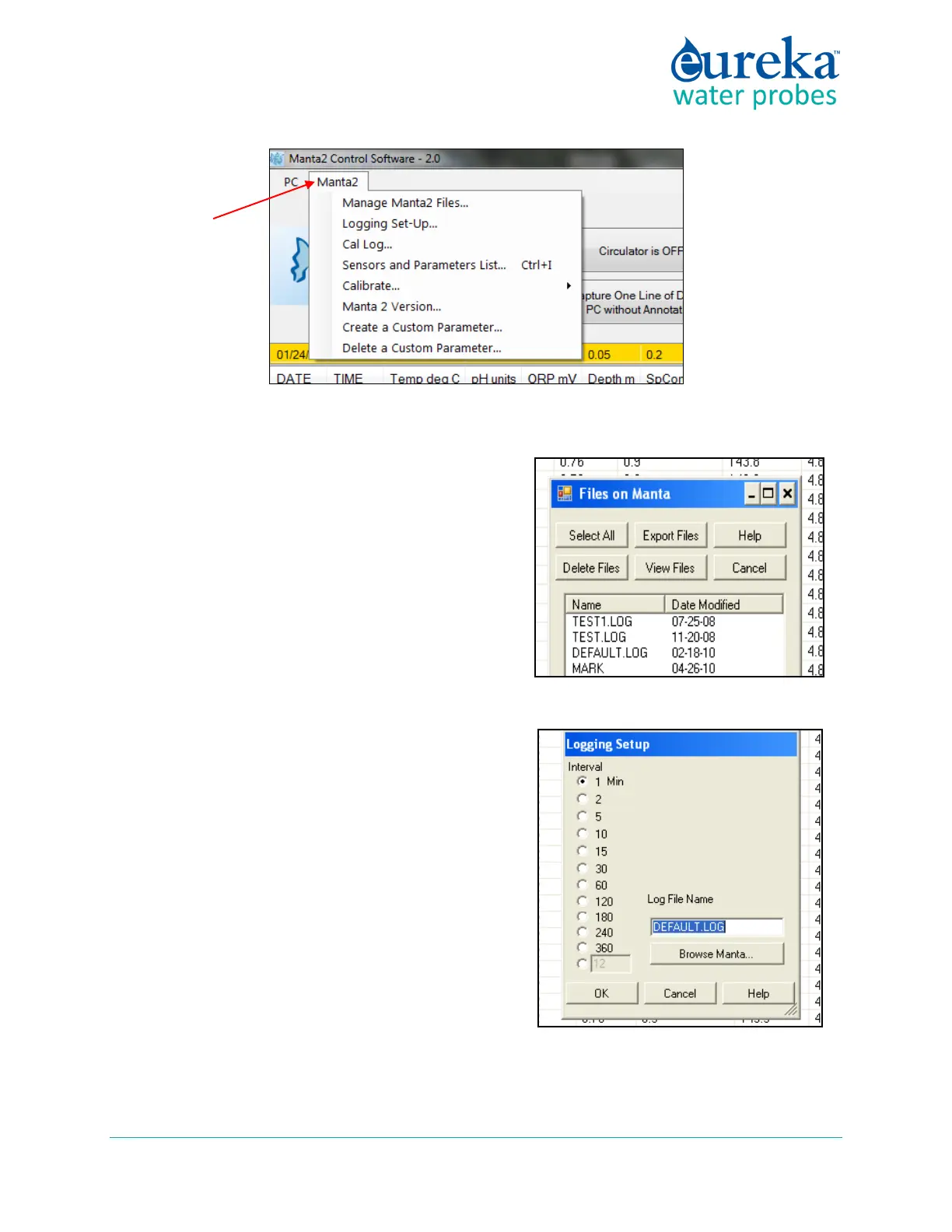
Click on Manage Manta Files to see the names of all the
data files that are stored in your Manta. Highlight the file
you’re interested in by clicking on it. Then, with the other
buttons on the screen, you can then view that file on your
Data Display screen, delete that file, or export it to your
Data Display (via the Save As function standard to
Windows).
You may highlight multiple files to select for export.
C.5.b Logging Setup
All Mantas include data memory and software that
automatically logs (stores) a line of data any time you want.
The Logging Set-Up screen lets you change the instructions
the Manta will follow when Logging. You can click on your
preferred Logging interval. You can also elect to append
any new data to a file that already exists in the Manta by
clicking “Browse Manta”, then selecting a file and clicking
on “OK”, or you can create a new Manta logging file by
typing the new file name under “Log File Name”.
For your convenience, the active logging file name is
displayed in the bottom line of the Home Page.



 To Next Page