Eureka Manta Manual Page 41 of 67
sensor away from the multiprobe, re-install the dummy plug, and re-install the locking sleeve. The dummy
plug seals the PAR port, so you can submerge the multiprobe without the PAR sensor attached.
The PAR sensor is made of acrylic plastic for optical reasons. Acrylic is somewhat brittle, so don’t step on
the sensor. It’s also rather soft, so clean the sensor only with soapy water and a soft, wet cloth.
A copy of LI-COR’s PAR instruction manual is included with the PAR sensor; it’s well-done and worth
reading.
D.18 Set Barometric Pressure and Set Time and Date
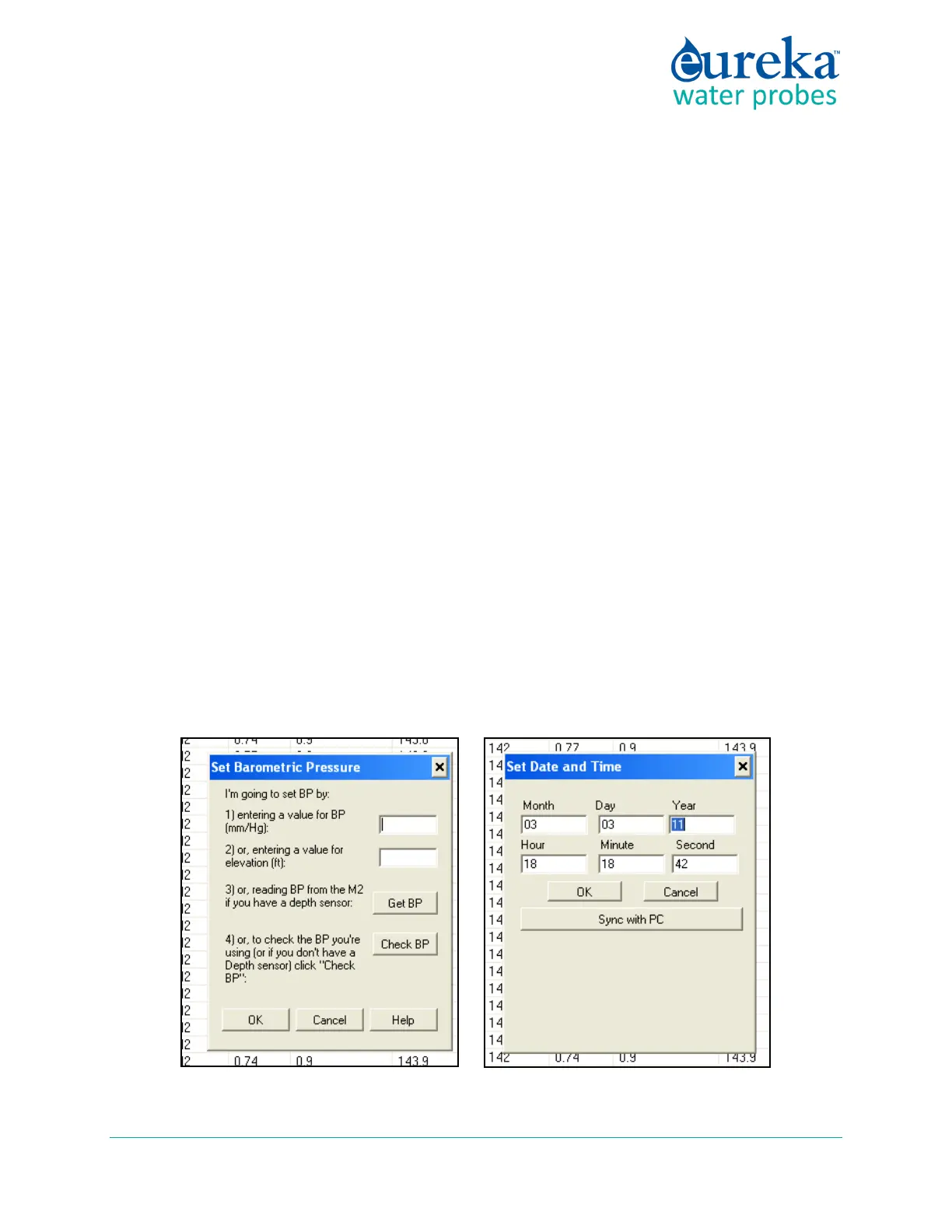
Your Manta needs to know the local Barometric Pressure (BP) if you have a Clark or Optical Dissolved
Oxygen sensor, so click on the Set Barometric Pressure button (it’s in the Calibrate menu). You can set the
BP by typing the correct value (in mm Hg) in the first box of the Set BP screen (below, left). Or, you can
set the approximate BP by typing your altitude (in feet) in the second box. Notice that if you type in BP,
altitude is automatically calculated, and vice-versa. The third method for setting BP is asking your Manta
the value (if your Manta is equipped with an un-vented depth sensor). If you choose this method, remove
the calibration cup from the Manta and make sure the depth sensor is exposed to air. The correct values
will automatically appear in the BP and altitude boxes.
Click on the Set Time and Date button to see the Manta’s opinion on time and date. If you wish to change
any of those values, just type the new value in the appropriate box or click the box at the bottom of the
screen (above, right) to synchronize the Manta time and date with that of the device you’re using to read
the Manta, i.e. your PC or Amphibian.



 To Next Page