Eureka Manta Manual Page 23 of 67
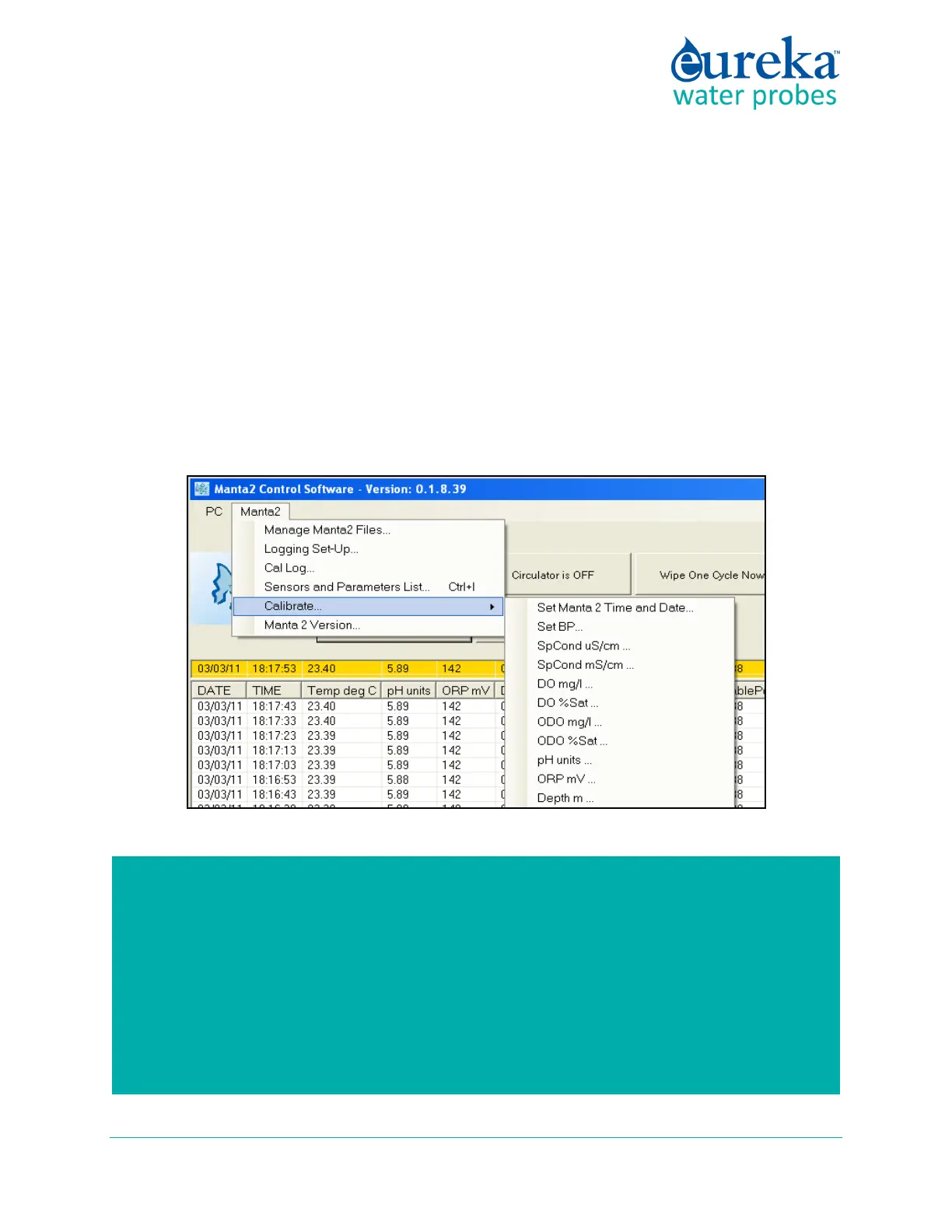
C.5.e Calibrate
Click on the Calibrate button in the Manta pull-down menu to get a screen listing all the parameters that
can be calibrated in a Manta. Click on the parameter you wish to calibrate to see its Calibrate screen. This
screen has calibration instructions for the specific parameter and shows the current reading for that
parameter.
If your calibration requires a calibration standard, type your calibration standard value where it says
“enter calibration value”. When the parameter reading has stabilized in the calibration solution, click on
the OK button. If your calibration has an acceptable SRF (Sensor Response Factor, an indication of the
sensor condition (D.4); the calibration will be accepted, and you will be returned to the Home Page. If
you click on “OK”, the calibration will be accepted despite a deviant SRF, and you will be returned to the
Home Page). If you click on “Cancel”, you’ll go back to the Calibrate screen.
How do I know if I need to calibrate?
The simple answer is that frequent calibration will give you better data. The more
meticulous you are with calibration, the better data you will gather. If you are uncertain
whether you need to calibrate, check your sensors against a known sample. If the reading is
within the accuracy specification and/or your accuracy expectations, there is no need to
calibrate.
Experience and your program’s accuracy expectations will help determine calibration
frequency for the various sensors. If, for instance, your reservoir discharge is hovering near



 To Next Page