113
Figure 60 : DO Calibration Report in Concentration Mode
2.2 Set Salinity
This option allows you to set the salinity (in ppt) for your solution, as the
dissolved salts alter the relationship between the partial pressure of oxygen
and the oxygen concentration in water. By setting the salinity, the meter will
compensate for the impact of salinity on the partial pressure/oxygen
concentration relationship of your sample. The salinity can be set from 0 to
50 ppt.
2.2.1 Auto Salinity Compensation
If auto salinity comp. is enabled, the meter will automatically compensate
for salinity for determining dissolved oxygen concentration of the sample.
Auto salinity compensation will be applicable only in multi measurement
mode and only if one of the measurement selected is conductivity related.
This option is activated only in CD650 & PCD650. Otherwise, a manually
set salinity value will be applied.
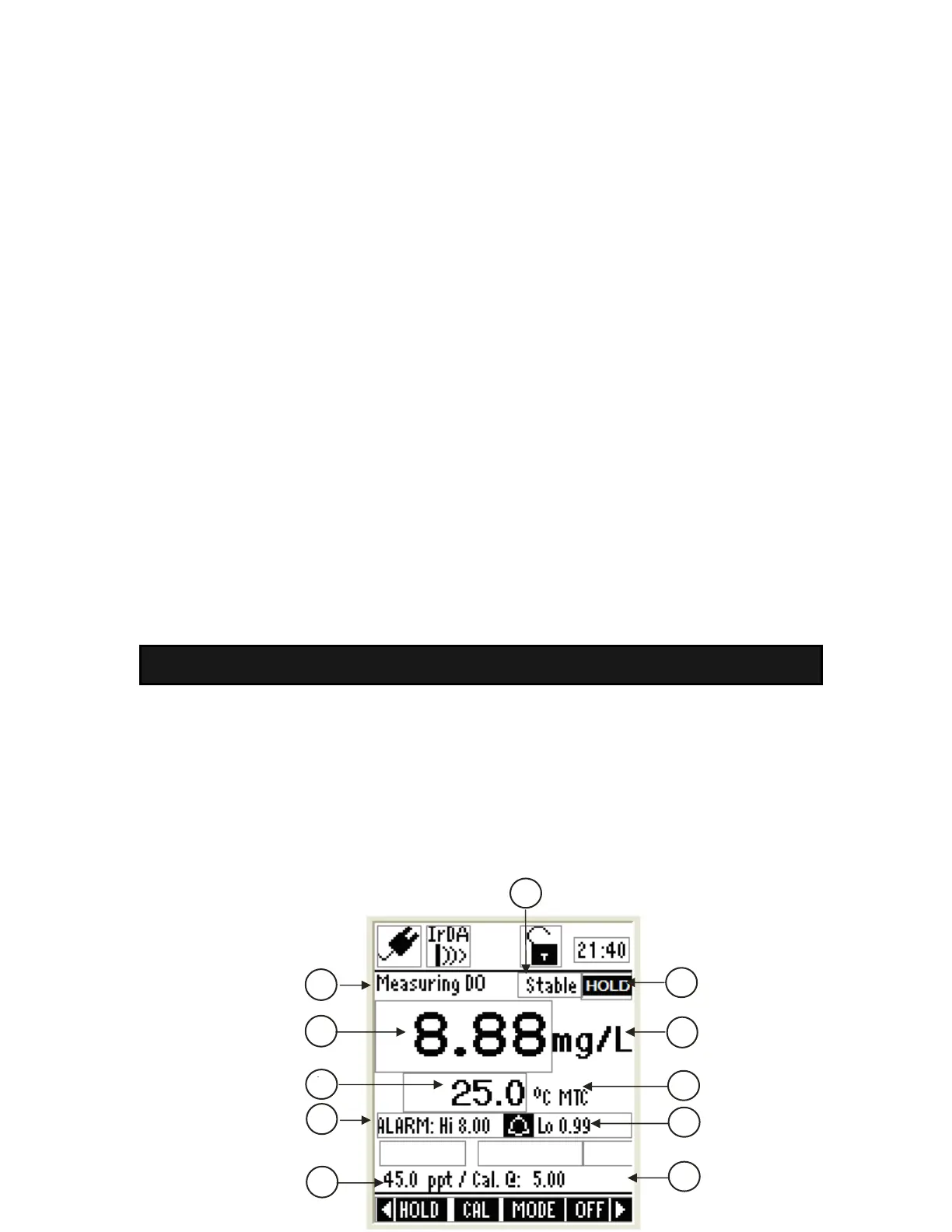
3. Concentration in Measurement Mode
In concentration measurement mode, the meter displays concentration and
temperature readings. The LCD shows related information for the concentration
measurement such as temperature compensation mode, stable indicator, salinity
value, probe condition, response time of the DO probe and alarm conditions. You
can customize or enable/disable some of these indicators in the Setup mode.
3.1 Indicators in concentration measurement screen
1
4
6
3
2
11
7
8
9
10
5




 To Next Page