5
1.4 FRONT PANEL
Your primary interaction with your new DVR will be through the Front Panel buttons and their
corresponding buttons on the included IR Remote Control. Take a moment to learn where the keys are as
the remainder of the manual will refer to them often.
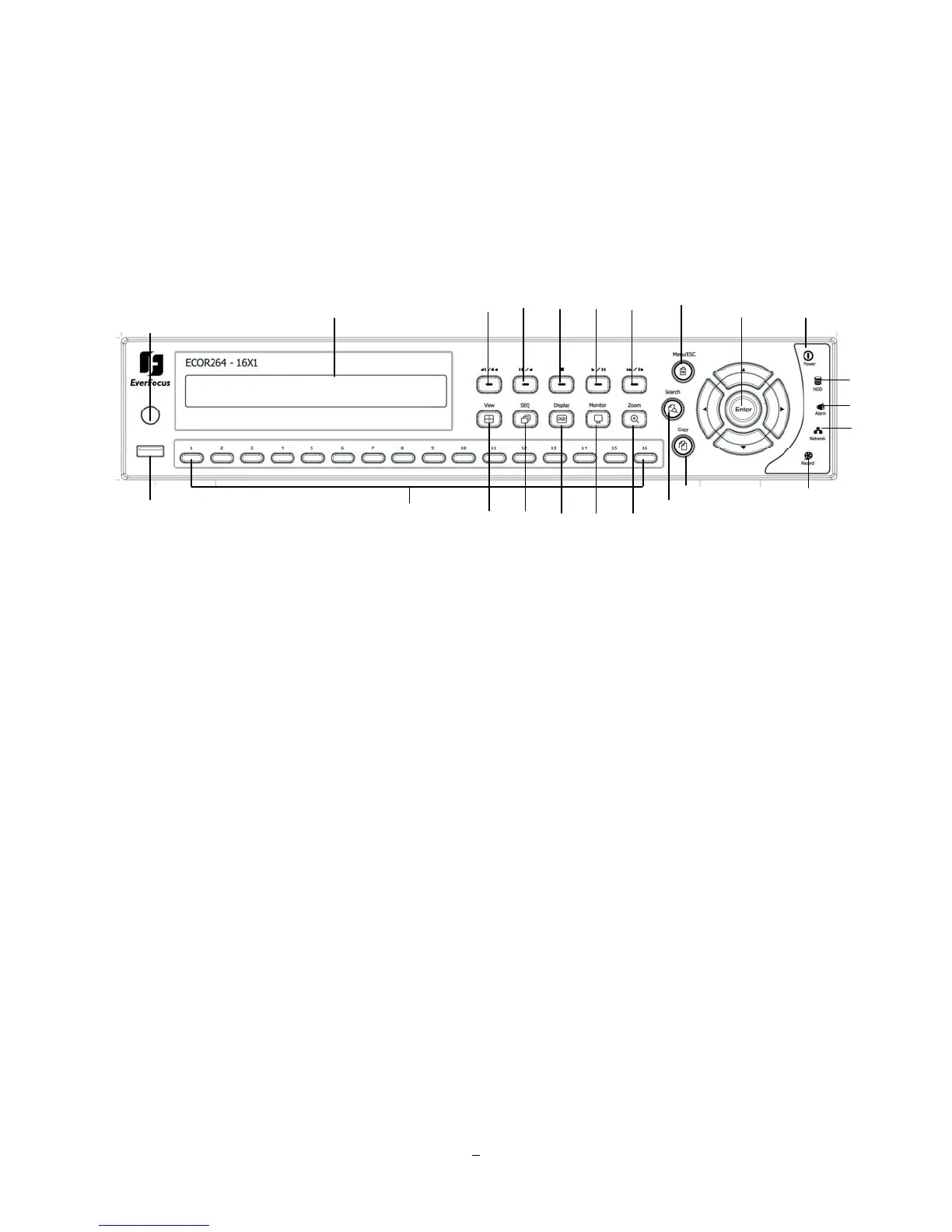
Figure 1-1 Front Panel
1) Remote Control Receiver: Receiver for IR remote control.
2) USB 2.0 (front): For connecting USB-Flash-Drive to copy/archive video or for firmware upgrades.
3) DVD+RW: DVD+RW burner for DVD model. (D models only) (Replaced by hot swap drive on
“R” models).
4) Channel keys 1~16 (1~9, 1~4): Press channel key (CH1~CH16) / (CH1~CH9) / (CH1~CH4) to display
that channel in full screen view.
5) ◄I /◄◄: Fast reverse playback or step reverse playback depending on playback mode.
6) I I / ◄: Reverse playback or pause
7)
■ Stop playback
8) ►/ I I: Forward playback or pause
9) ►►/I►: Fast Forward playback or step forward playback depending on playback mode.
○
1
○
3
○
9
○
6
○
5
○
7
○
8
○
16
○
18
○
19
○
20
○
21
○
22
○
2
○
4
○
10
○
15
○
11
○
12
○
13
○
14
○
17
○
23















 To Next Page