66
4.6 SCHEDULE SETTING
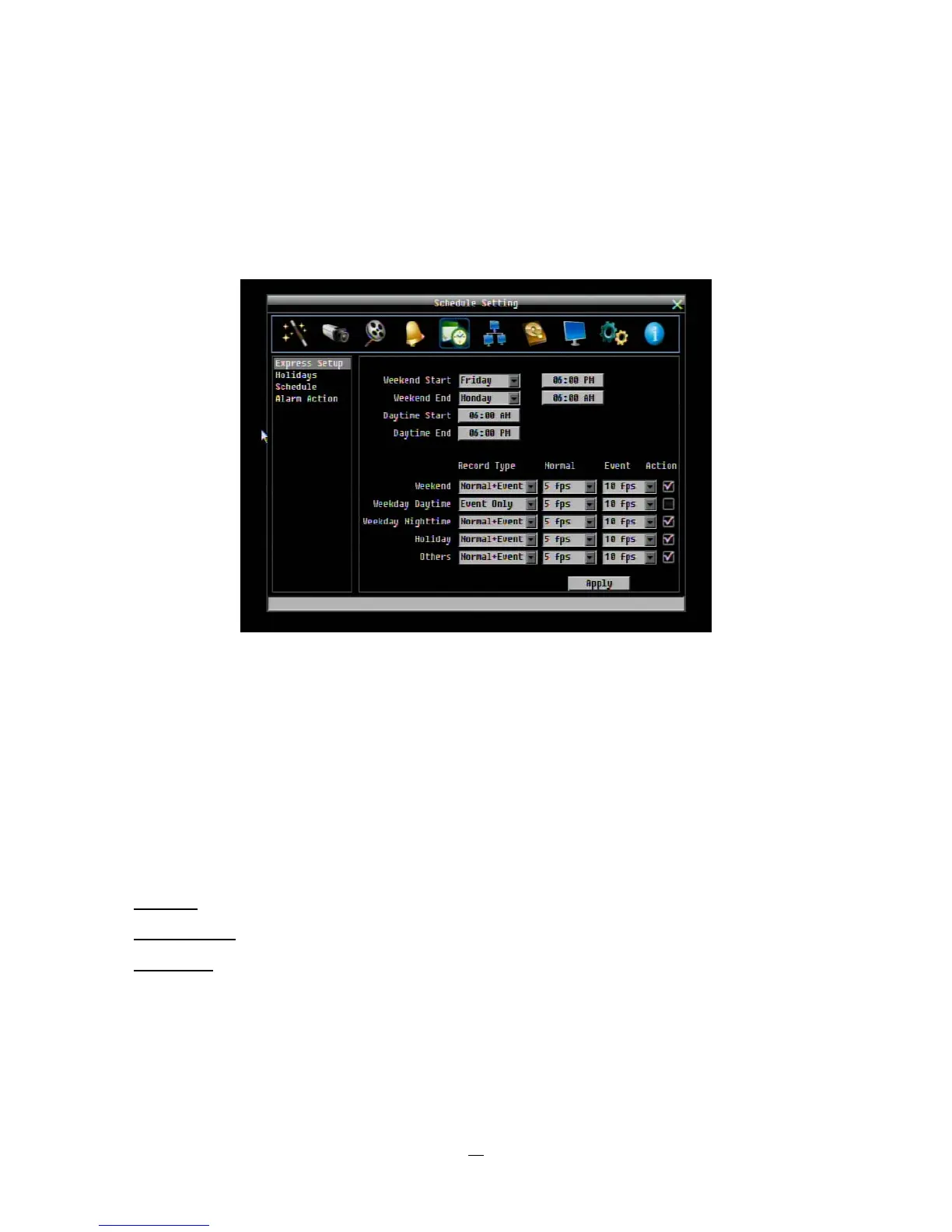
Figure 4-20 is a screenshot of the SCHEDULE SETTING MENU. In this menu you can set a unique
configuration to enable recording during a specified time periods. This menu is used to configure Express
Setup, Holidays and detailed Schedule settings.
Figure 4-20 Schedule Menu-Express Setup
4.6.1 Express Setup
Weekend Start: Select day and time when weekend starts.
Weekend End: Select day and time when weekend ends.
Daytime Start: Select weekday daytime starting time. (Nighttime schedule ends when Daytime begins)
Daytime End: Select weekday daytime ending time. (Nighttime schedule begins when Daytime ends)
Record Type: Select the type of recording for each time period.
Disabled:
No recording during scheduled time period
Normal+Event: Continuous and Event recording
Event Only:
Event recording only
Normal Frame Rate: Continuous FPS recording rate for the scheduled time period. The maximum rate is
limited to the DVR’s maximum recording rate divided by the number of active cameras. Selectable frame
rates include 30fps, 15fps, 10fps, 7.5fps, 5fps, 1fps or 0fps (0fps means no continuous recording).















 To Next Page