EMR User's Guide
High Density Modular Audio Router (AES, Analog, MADI, TimeCode, Data)
Page 110 Revision 1.8 SYSTEM OVERVIEW
TDM
TDM TDM
IN OUT
EMR-PR48
1
2
3
4
1
2
3
4
TDM TDM
IN OUT
EMR-PR48
1
2
3
4
1
2
3
4
TDM
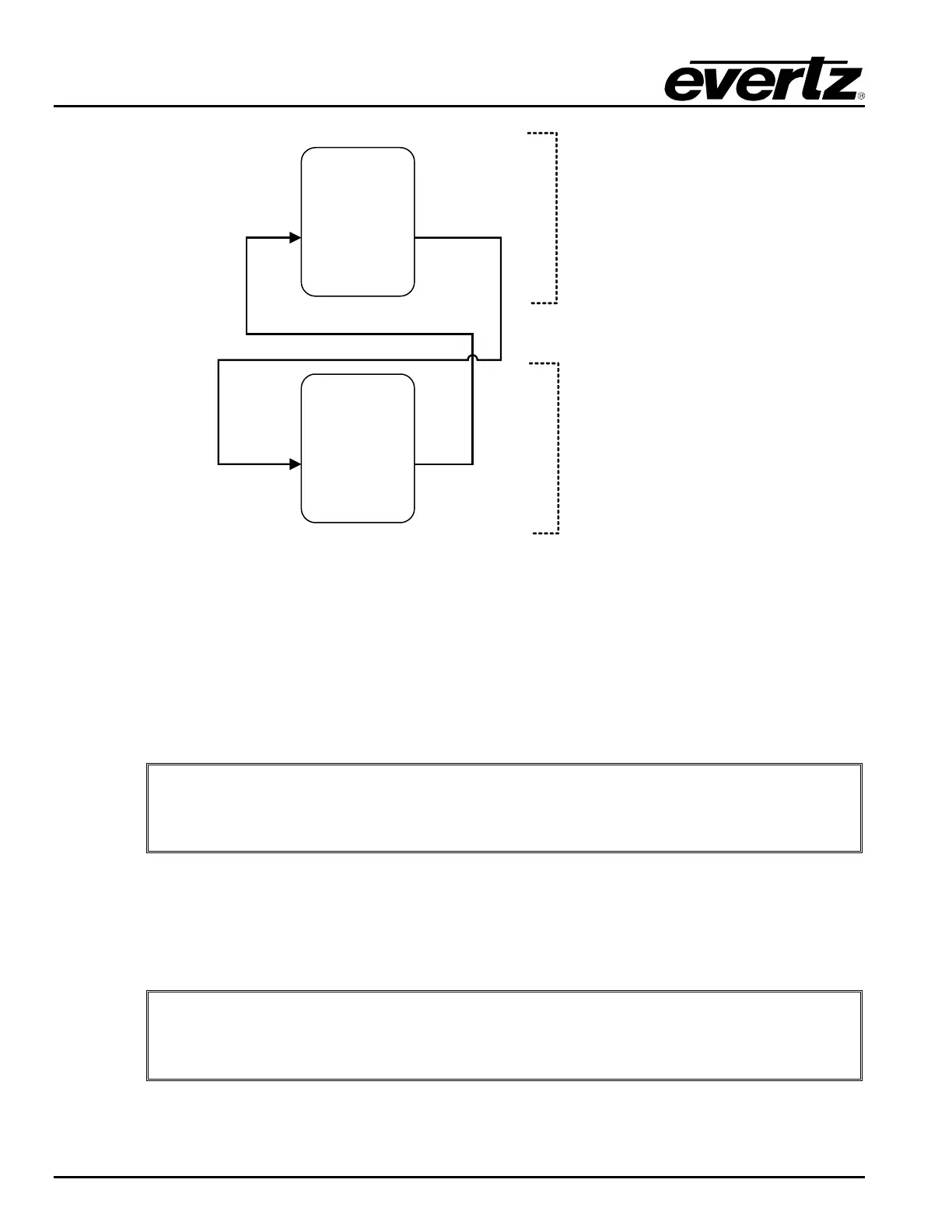
Ports 1 - 48
Ports 49 - 96
Figure
4-8: 96 Port Configuration
4.3.1. Configuring the Data Port Router
To configure the EMR data port router in a system that does not have an ADMX crosspoint, each of the
output cards must be given a specific Card ID to identify the sequence of ports. The Card ID is set by
accessing the configuration menu through the front serial port or through a telnet session.
Once the menu is accessed, the Card ID is set by going to menu item 3, then menu item 5.
Note: Each module in an EMR data port routing system must be configured with a
unique Card ID to define the sequence of ports in the system.
4.3.2. Referencing
A common video reference must be applied to all frames in which the data port cards within a system are
installed. This ensures that the TDM signal that is used to distribute the data signals is synchronized
amongst all of the cards. The reference must be a bi-level analog video signal.
Note: When using the EMR for data port routing solutions, the EM
locked to a common bi-level video reference.


 To Next Page