51 05 2013 4365 00
BOARD FUNCTION
CONFIGURATION OF ELECTRONIC
BOARDS
The electronic boards are designed to be used on sev-
eral models of machines.
In case of replacement, or in order to change the per-
formance of the machine, it will be necessary to verify
the conguration of the boards and load the adequate
software.
The boards are accessible by removing the cover of the
electrical panel or the door cover.
poWer supply and fuses
The fuse on the power supply network is accessible
without removing the cover.
The transformer which provides voltage to the boards
and the corresponding protection fuses are accessible
by removing the containers and moving away the door
after loosening a screw
Important!
the Covers need to be removed after disCon-
neCting the maChine from the poWer supply.
T 16A
ATTENZIONE
TOGLIERE TENSIONE
PRIMA DI MUOVERE
LA COPERTURA
ATTENZIONE
TOGLIERE TENSIONE
PRIMA DI MUOVERE
LA COPERTURA
ATTENZIONE
TOGLIERE TENSIONE
PRIMA DI MUOVERE
LA COPERTURA
ATTENZIONE
TOGLIERE TENSIONE
PRIMA DI MUOVERE
LA COPERTURA
8 7 6 5 4 3
1
2
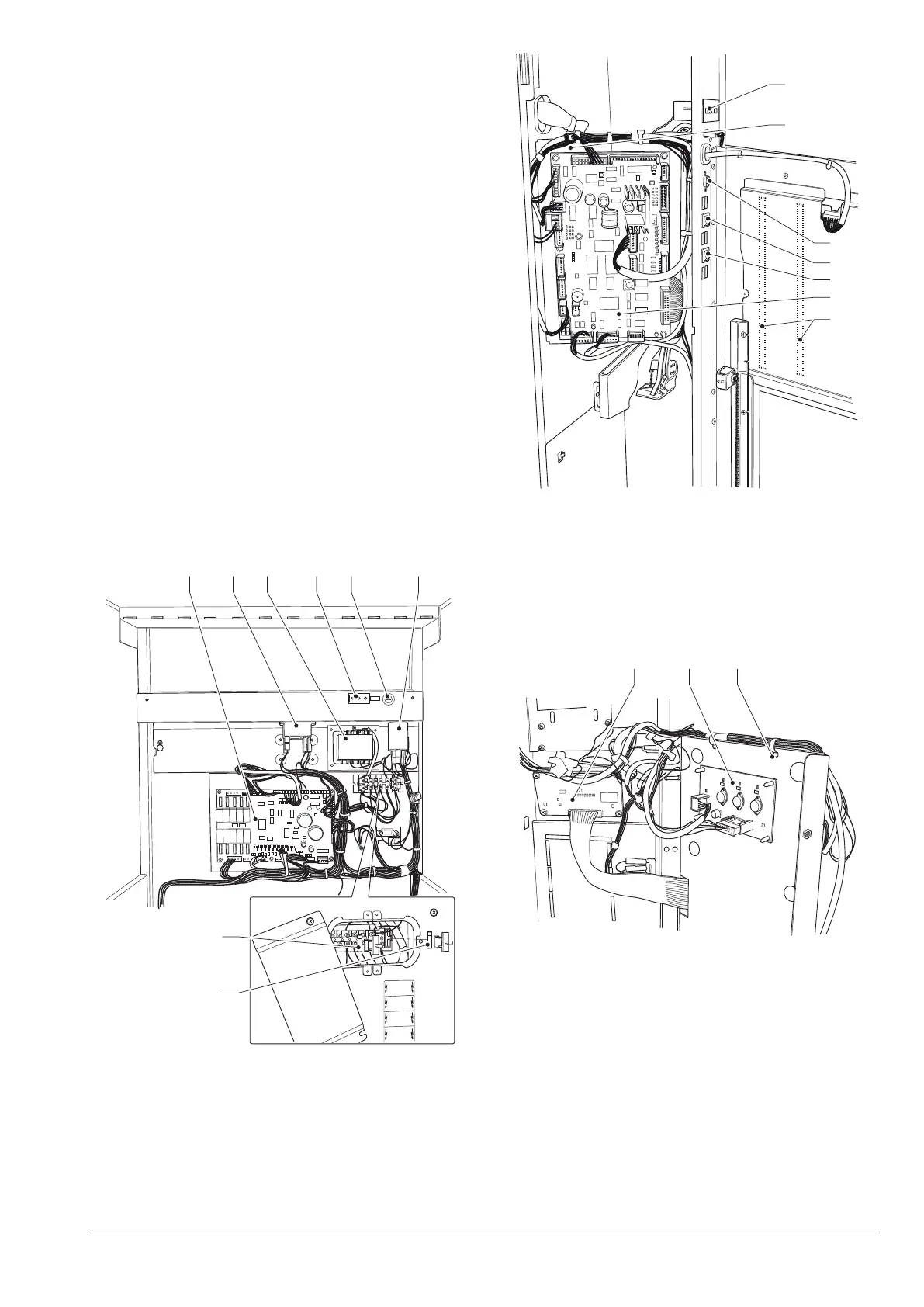
Fig. 36
1- Transformer secondary fuses
2- Transformer primary fuses
3- Noise Filter
4- Mains fuse
5- Voltage outlet
6- Transformer
7- Boiler control relay
8- Activations board
9- Fuse access door
7
6
5
4
3
2
1
Fig. 37
1- Selection tag lighting LEDs
2- CPU board
3- “Programming” button
4- Mixer wash button
5- RS232 connector
6- Opening card support
7- Mechanical stroke counter (if present)
Fig. 38
1- Graphic dD
2- LED power supply board
3- Opening card support



 To Next Page