Functional characteristics
MIG/MAG welding
50 Item No.: 099-005073-EWM01
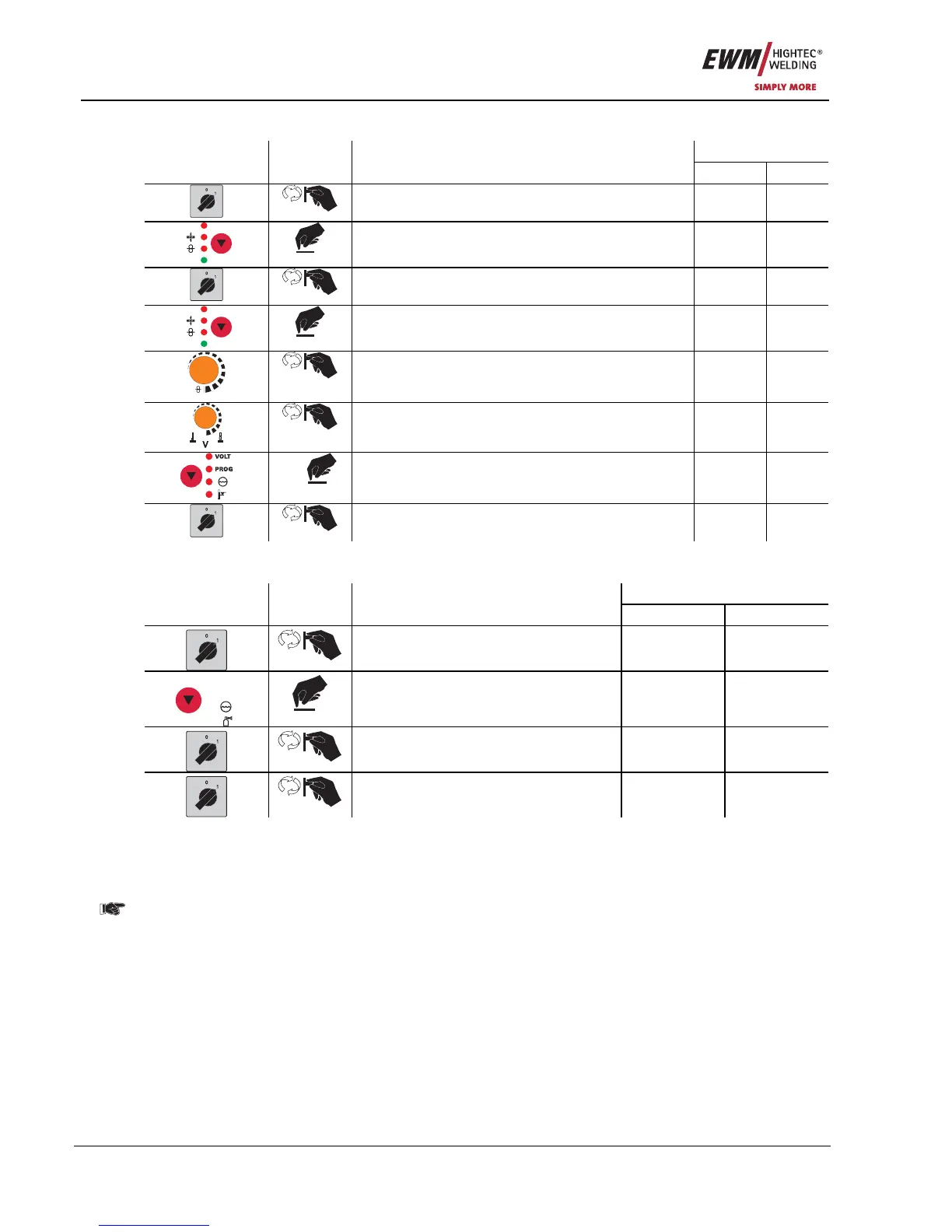
5.2.11.2 Selecting, changing and saving parameters
Display
Operating
element
Action Result
Left Right
Switch off the welding machine - -
HOLD
AMP
Keep the key button pressed - -
Switch on welding machine - -
HOLD
AMP
Release the key button P 1 Value
m/min
Parameter selection
(see list of special parameters)
P 1-x,
SCH
Value
Parameter setting
(see list of special parameters)
P x Value
1 x
Saving the special parameters PHO 371
Switch of the welding machine and restart in order
to put the modifications into effect
- -
5.2.11.3 Reset to factory settings
It is possible to reset all special parameters back to the factory settings.
Display
Operating
Element
Action Result
left right
Switch off the welding machine - -
VOLT
PROG
Press and hold button - -
Switch on the welding machine t1 on
Switch welding machine off and back
on again to activate the changes
- -
5.2.11.4 Ramp time for wire inching (P1)
The wire inching starts with a speed 1.0 m/min for 2 secs. It is subsequently increased to a ramp function
to 6.0 m/min. The ramp time can be set between two ranges.
5.2.11.5 Program "0", releasing the program block (P2)
In previous versions of the M3.70/M3.71 control system the block is dependent on the key switch
setting. With this version a block will only be effective when the locked status is active.
The program P0 (Potentiometer program) is blocked. The operation is possible only with P1...P15.
5.2.11.6 Display mode torch power control (P3)
The display of the torch power control shows program number or Up-Down setting in the normal
condition. It can be switched over to a blinking display. Then the program number and the welding type
(normal/pulse) are displayed alternately in the program operation. In Up-Down operation the Up-Down
settings and the Up-Down symbol are displayed alternately.










 To Next Page