30
EXCELL PRECISION CO., LTD.
ZSME200000051
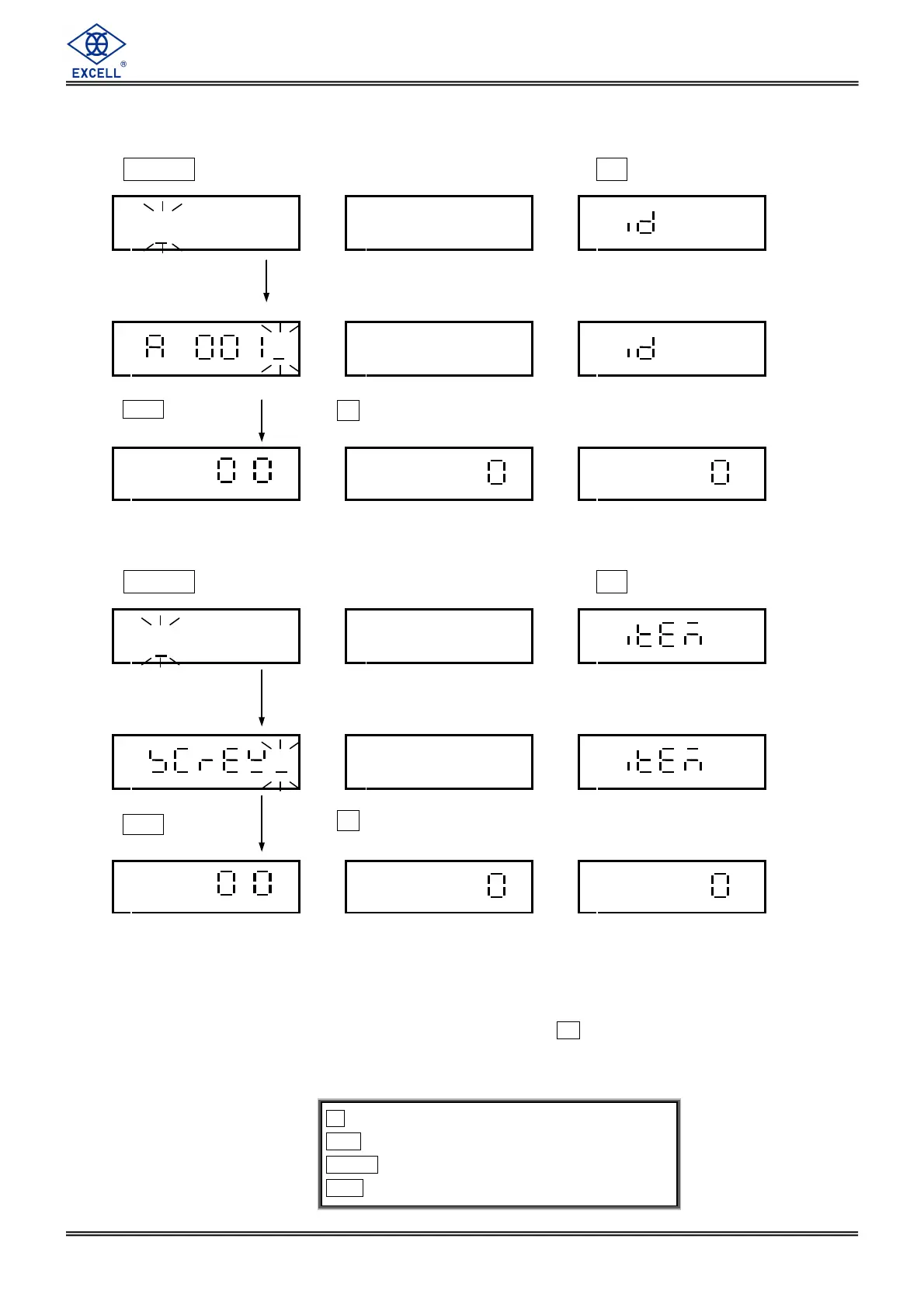
2-11 ID Input
Press ZERO key, and the screen displays “ - - - - - - ”. Press 0 key before it disappears.
→
→→
→0←
←←
←
.
Stable
2-12 ITEM Input
Press ZERO key, and the screen displays “ - - - - - - ”. Press 2 key before it disappears.
→
→→
→0←
←←
←
.
Stable
Input of ID & ITEM is applied in PRINTER printing output. (FIX FORMAT or FREE FORMAT)
ID & ITEM could be set as 12 digits at most. They can be set as numbers ( 0 ~ 9 ), English letters ( A ~ Z ), or space ( ).
Numbers/English letters inputted operation: Press number key and the digit will be flashing. Press the same key , and the
display will show the number/English letter in cycle. When the entered number/English flashed for 2 seconds, the setting
will be confirmed and moved to the right place by 1 digit. Example: Press 1 key continuously, and the screen will display
1,P,Q,R,S flashing in cycle.
If the entered data for ID & ITEM is not saved in the location of unit weight pre-set, the data will be cleared after
power off.
key ⇒
⇒⇒
⇒ Exit
CE key ⇒
⇒⇒
⇒ Move the cursor leftward
TARE key ⇒
⇒⇒
⇒ Move the cursor rightward
MC key ⇒
⇒⇒
⇒ Enter
Input ID with number keys.
ID could be set up to 12 digits. They can be numbers ( 0 ~ 9 ), English letters
Press MC key to
confirm the data entered.
Press
.
key to quit setting.
Input ITEM with number keys.
ITEM could be set as 12 digits at most. They can be set as numbers ( 0 ~ 9 ), English letters
Press
MC
to confirm.
Press
.
key to quit setting.


 To Next Page