40
EXCELL PRECISION CO., LTD.
ZSME200000051
3-1-7
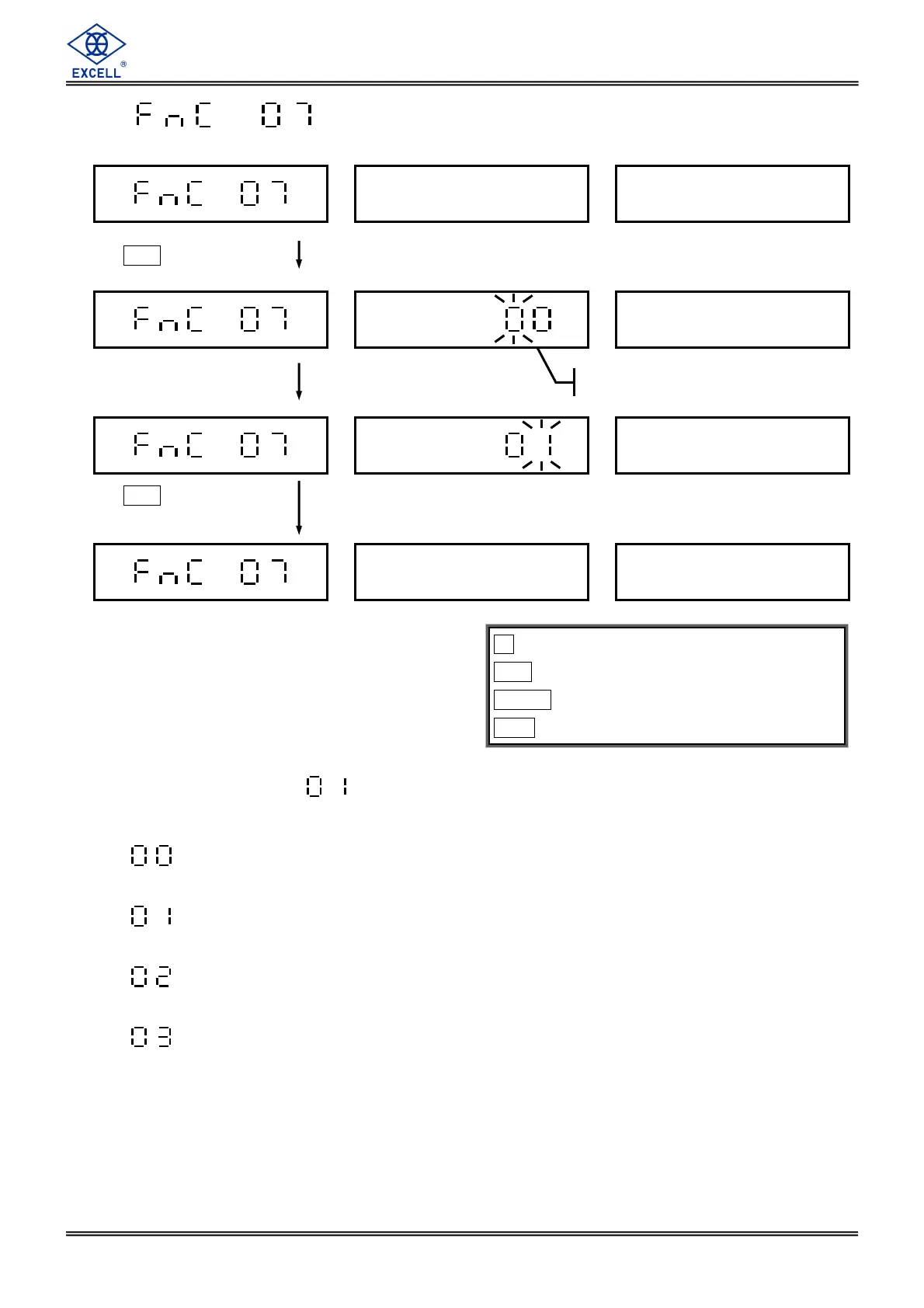
Zero Tracking Range Setting
The default setting is
.
⇒ After weight keeps stable continuously for over 1 second, it could track ±1/4d
(external value is 1/4 bit).
⇒ After weight keeps stable continuously for over 1 second, it could track ±1/2d
(external value is 1/2 bit).
⇒ After weight keeps stable continuously for over 1 second, it could track ±1d
(external value is 1 bit).
⇒ After weight is being stable continuously for over 1 second, it could track ±2d
(external value is 2 bits). (d=division)
Only if GROSS = 0, zero tracking function will be started.
key ⇒
⇒⇒
⇒ Exit
CE key ⇒
⇒⇒
⇒ Move the cursor leftward
TARE key ⇒
⇒⇒
⇒ Move the cursor rightward
MC key ⇒
⇒⇒
⇒ Enter
Press
MC
Enter parameter 00 ~ 03
according to demand
Previous setting
Press
MC
key to save
setting data


 To Next Page
 Loading...