Fiber Inspection Probe 123
7 Troubleshooting
Solving Common Problems
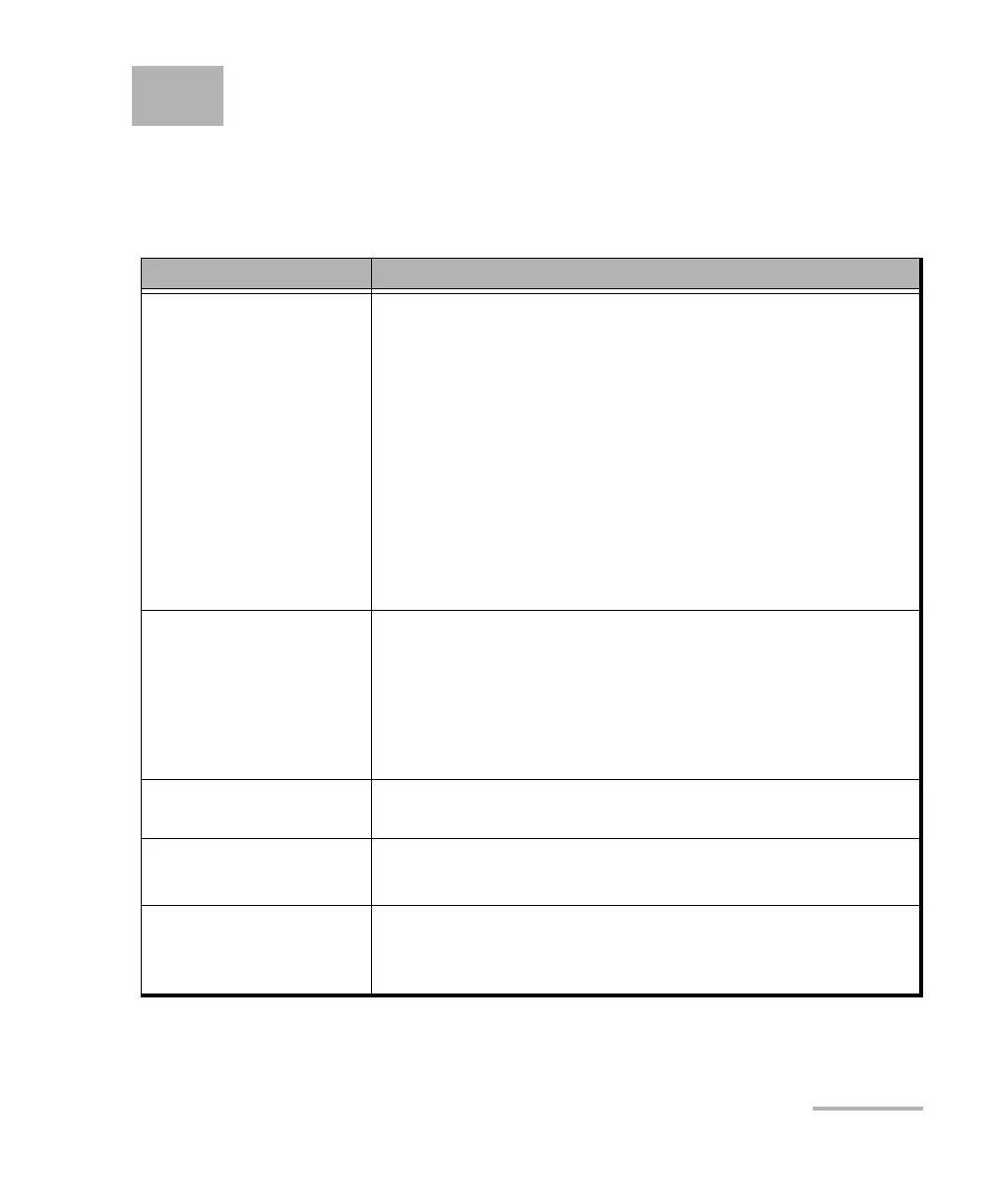
The table below presents common problems and their solutions.
Problem Solution
I cannot analyze an
image.
The image is not focused properly; use the focus knob on
the probe until the focus indicator displays the best value
available. Yellow indicates an acceptable range, and
green shows the preferred range.
Ensure that the connector is aligned properly. When
testing a multifiber connector with an MF-Ready probe,
ensure that the key of the nozzle is properly aligned with
the notch of the inspection tip (see Changing the FIP
Nozzle (MF-Ready Probes Only) on page 28 for details).
Ensure that the focus value is sufficient to perform the
analysis.
Ensure that you are using a high magnitude level.
I cannot see the fiber
on-screen.
Verify the probe connection status to see if
ConnectorMax2 Mobile is detecting the probe properly. If
the probe is connected properly, close ConnectorMax2
Mobile and open it again.
Ensure that the Wi-Fi is on.
Ensure that the probe is on.
The FIP internal
temperature is too high.
Let the FIP cool down.
The auto centering does
not function properly.
Clean the connector.
Adjust the image focus.
A connection error
occurred.
Ensure that the probe is not currently in use by another
application.
Try to connect to the probe again.



 To Next Page