EasyManua.ls Logo

FINAPRES NOVA - 5.4.4 Actions During a Measurement

FINAPRES NOVA
98 pages
Print Icon
To Next Page IconTo Next Page
To Previous Page IconTo Previous Page
Loading...
6
Basic user manual
Finapres Nova
32
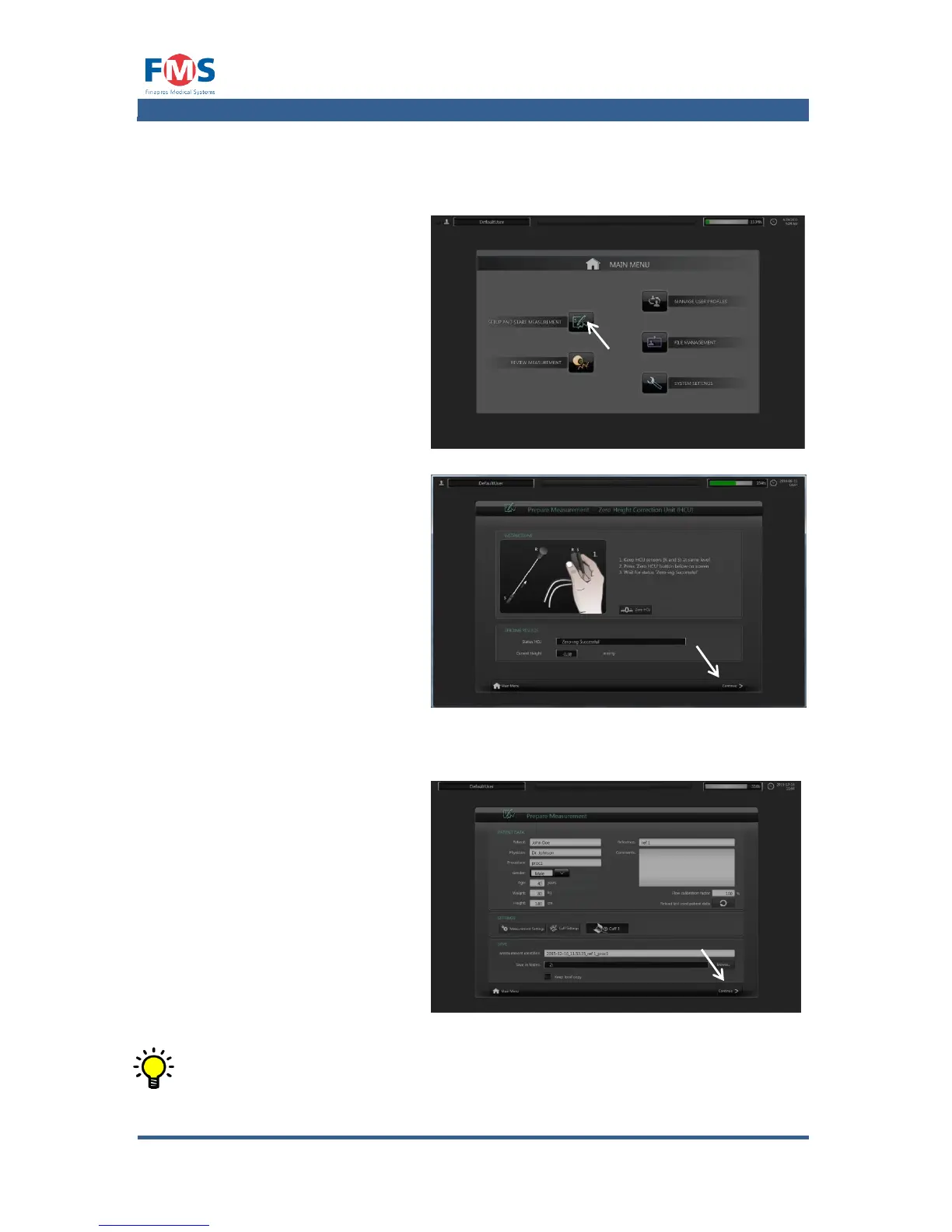
5.4.3 Starting a measurement
To start a measurement:
1. Press the “SETUP AND
START MEASUREMENT
button on the MAIN
MENU screen.
If the HCU is connected for
the first time after the
Finapres Nova is started up
the “ZERO HEIGHT
CORRECTION UNIT” screen
appears:
2. Follow the instructions
on the screen and wait
for the status “ZEROED”
to show up.
3. Press the “CONTINUE”
button.
The “PREPARE
MEASUREMENT screen
appears.
4. Fill in the patient data.
5. Press the “CONTINUE”
button.
The “MEASUREMENT
screen opens.
The on screen keyboard shows up automatically as soon as a text field is
touched.

Table of Contents

Related product manuals