Version date: 04 April 2016
In the “MEASUREMENT SETTINGS” screen, settings for “WAVEFORM GRAPHS”,
“TREND GRAPHS”, “NUMERIC VALUES”, “SIGNAL SETTINGS” and “MARKER
DEFINITIONS” can be made (A1.4.4).
If the measurement settings are changed, the new settings will be
stored to the currently active user profile and will immediately be visible
in the “MEASUREMENT” screen.
For all available signals and numeric values, see Appendix A2.3
“Signals”. Additional signals may be available depending on the
presence of hardware modules and software applications
5.8 File management
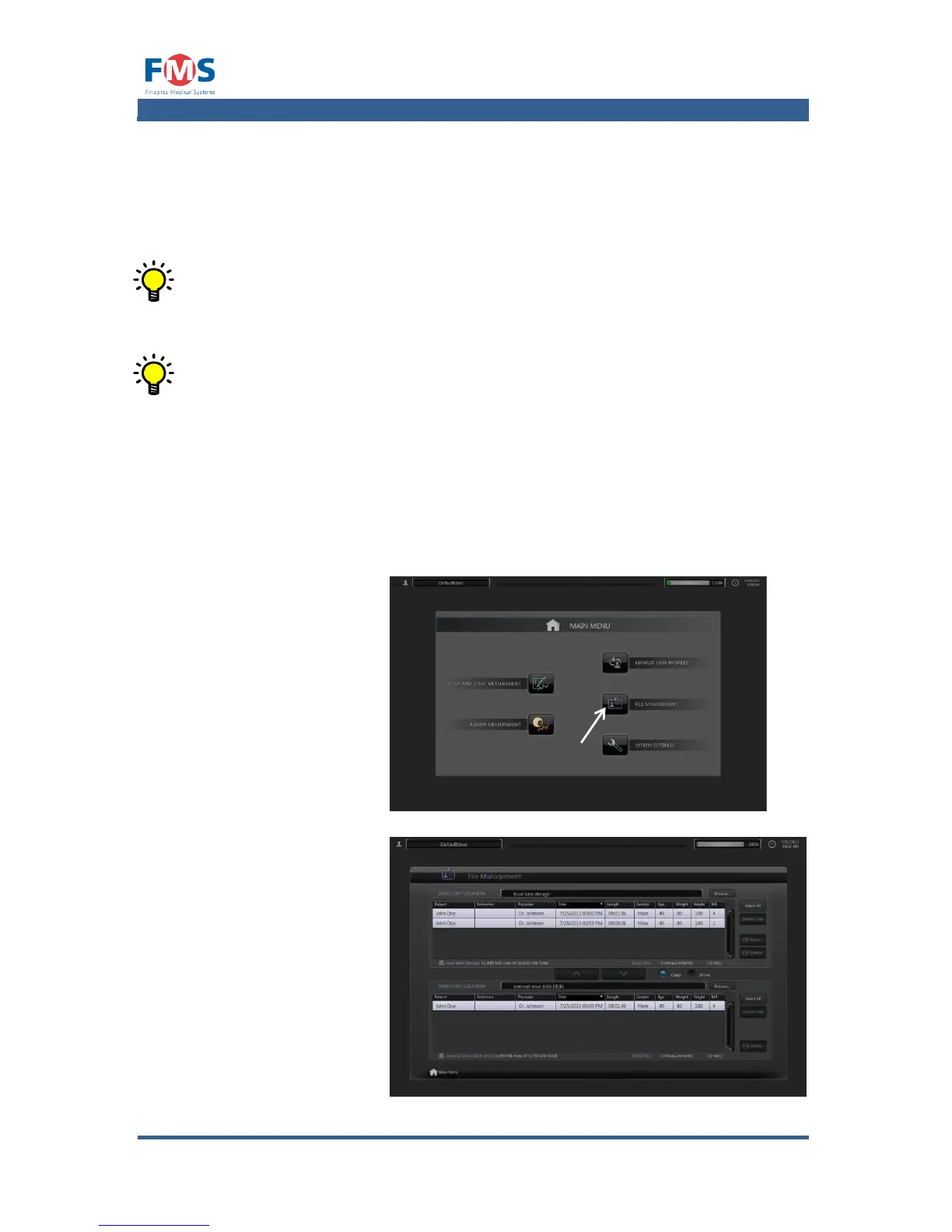
The measurements stored on the hard disk can be opened, deleted and moved or
copied via the “FILE MANAGEMENT” screen.
The “FILE MANAGEMENT” screen can be opened as follows:
1. Press the “FILE
MANAGEMENT”
button of the “MAIN
MENU”.
The “FILE
MANAGEMENT”
screen appears.
Refer to A1.4.5 on
opening, deleting
moving or copying
files.



 To Next Page