EasyManua.ls Logo

FINAPRES NOVA - 5.6 Selecting a User Profile; 5.7 Measurement Settings

FINAPRES NOVA
98 pages
Print Icon
To Next Page IconTo Next Page
To Previous Page IconTo Previous Page
Loading...
6
Basic user manual
Finapres Nova
36
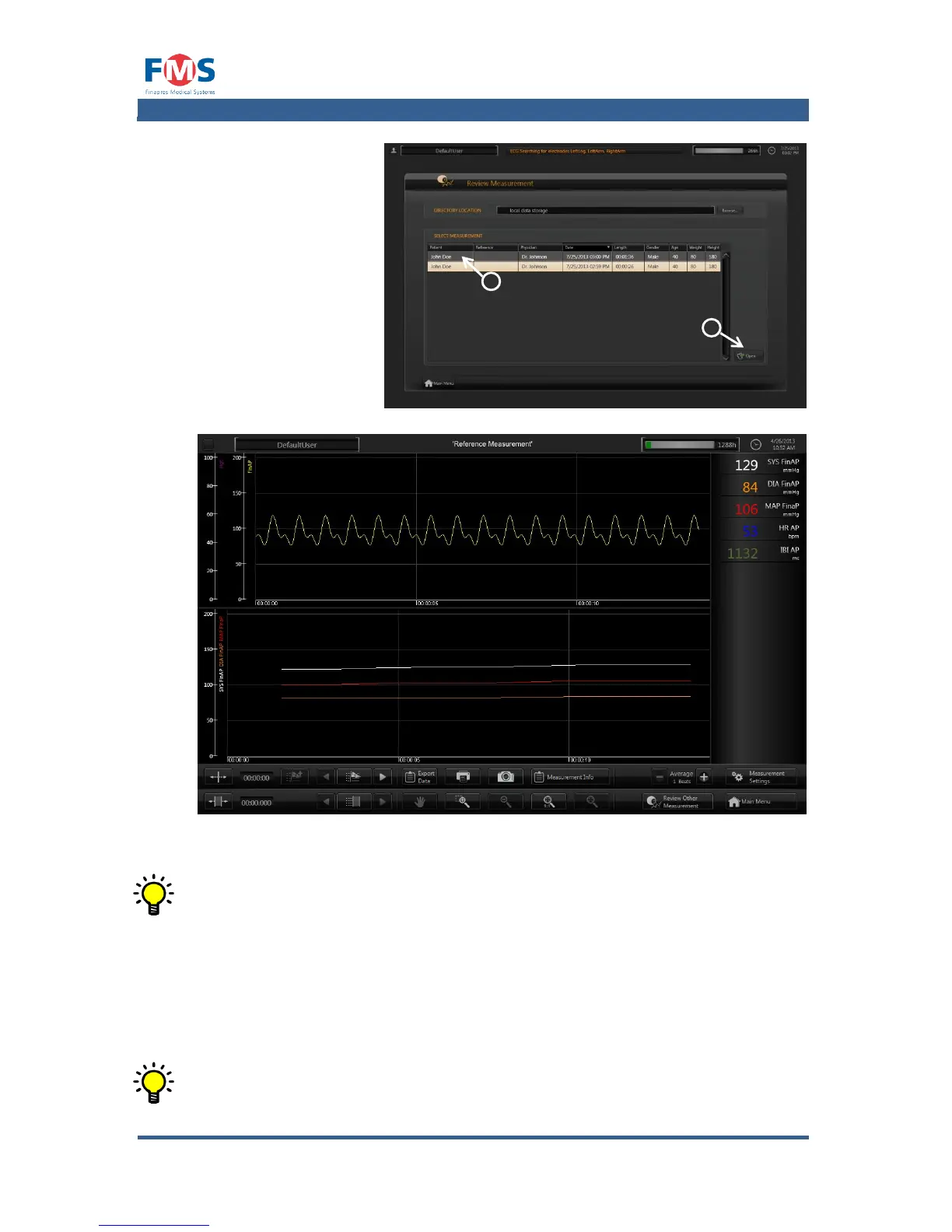
2. Select a file.
3. Press the “OPEN”
button.
The “REVIEW
MEASUREMENT
screen is opened
and the data of the
selected file is
loaded.
Figure 5-2: “REVIEW MEASUREMENT” screen with a measurement loaded
When a measurement is opened it is fully zoomed out so that the entire
measurement is visible.
While in review mode several actions are possible by means of the buttons at the
bottom of the screen (e.g. adding or removing signals, creating, editing and
removing markers, zooming in and out, moving through the graphs, making
prints and screen shots, exporting data, etc.). The functions of these buttons are
explained in more detail in A1.4.1.
In general the button has to be selected and subsequently the graph has
to be clicked in order to perform the action

2
3

Table of Contents

Related product manuals