178
Discovery, Discovery LXE, Pace Arrow, and Pace Arrow LXE
Direct Current Components and Status
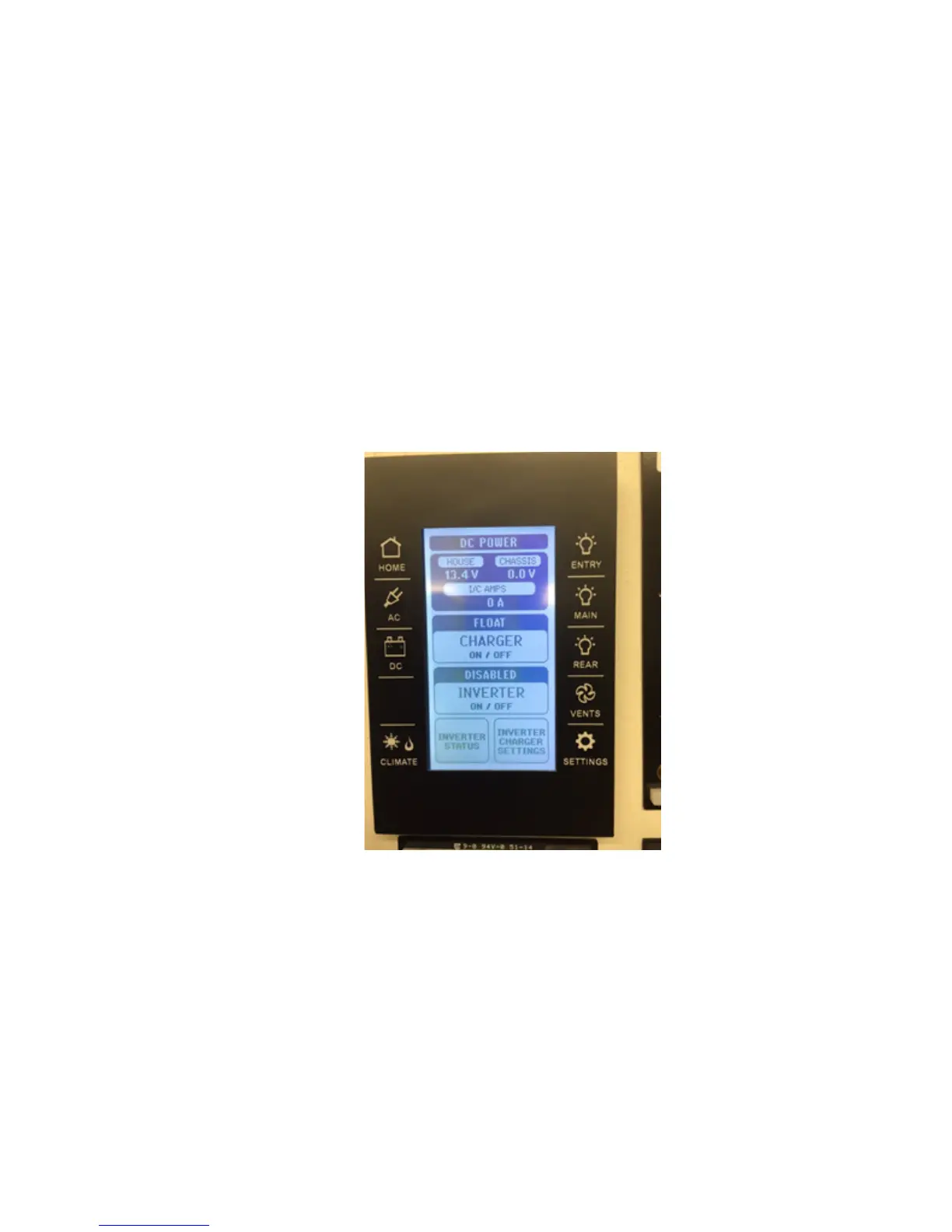
By depressing the Icon that looks like and “Battery” with the letters “DC” underneath the LCD screen will change to look like Figure III. This screen tells
you the status of the “Direct Current” or 12 volts electrical system. Of particular importance on this screen is the battery “voltage and current”, whether or
not the “Inverter” (charger) is ON of OFF, what state the inverter is in (meaning the type of charging; FLOAT: a “trickle” charge used to maintain the batter-
ies, ABSORBATION: signicantly higher rate of charge, used to charge batteries for a long time and not damage them, BULK: used to charge the batteries
that are signicantly discharged). This screen is also used to set the charging parameters, battery type (lead acid, AGM, etc.). It is recommended to leave
the inverter/charger to the DEFAULT settings since it has its own software and can detect if the batteries need charged and at what rate provided the inverter
is enabled and ON.
Figure III
Direct Current Components and Status



 To Next Page