FT-107 Weighing Terminal, Technical Manual, Rev. 1.0.0, August 2019 Page 18 of 46
Gross / Net Function
You can use the Gross/Net function at any time to switch the display between the net and gross weight, if you
programmed one of the function keys as G/N key. After the G/N key is pressed, the display shows the
gross weight for a few seconds and then automatically goes back to the net weight indication.
Printing
You may connect your indicator to the printer and adjust the RS 232C serial data output related parameters.
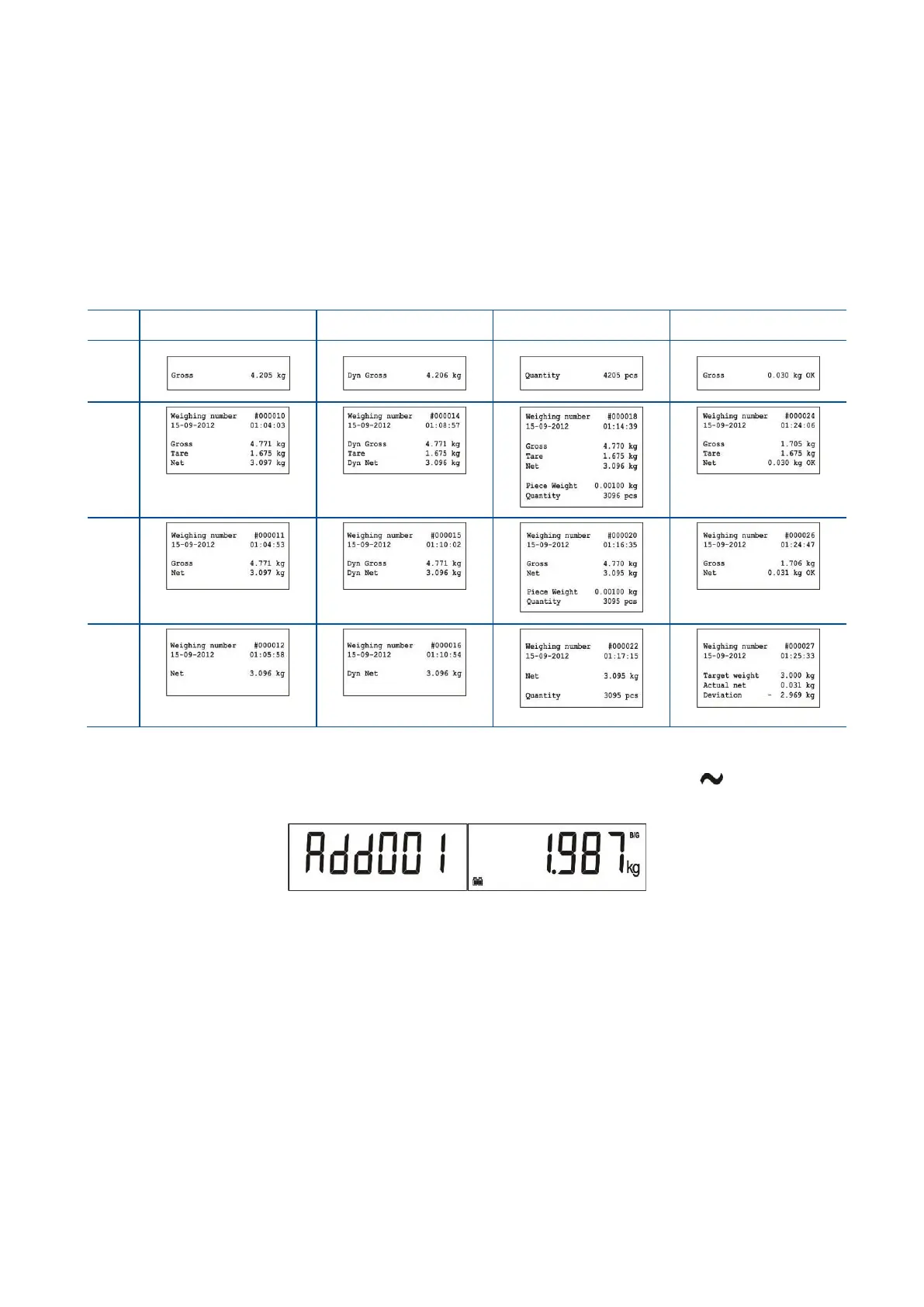
Select the printout ticket form from the table below. Press Enter key to print the ticket if the indication is
stable after loading.
The table below shows different printouts for various operation modes (Page 27). For 16-character printers,
select small printer format which has abbreviated data names.
Total memory at weighting
To accumulate the weighing values, put an object on the platform, if the scale is stable ( symbol off ),
and press M+ key to add the weight value to the total.
The weight value will be added and accumulation quantity increased. Press M+ for further accumulations.
To see the total value, press MR key and the accumulated value will be displayed.
To print the accumulated value, press Enter key if the accumulated value is displayed. To erase the
accumulation, press MC and accumulated value will be deleted after your confirmation.



 To Next Page