FT-107 Weighing Terminal, Technical Manual, Rev. 1.0.0, August 2019 Page 32 of 46
6.2 Checkweighing (+/-)
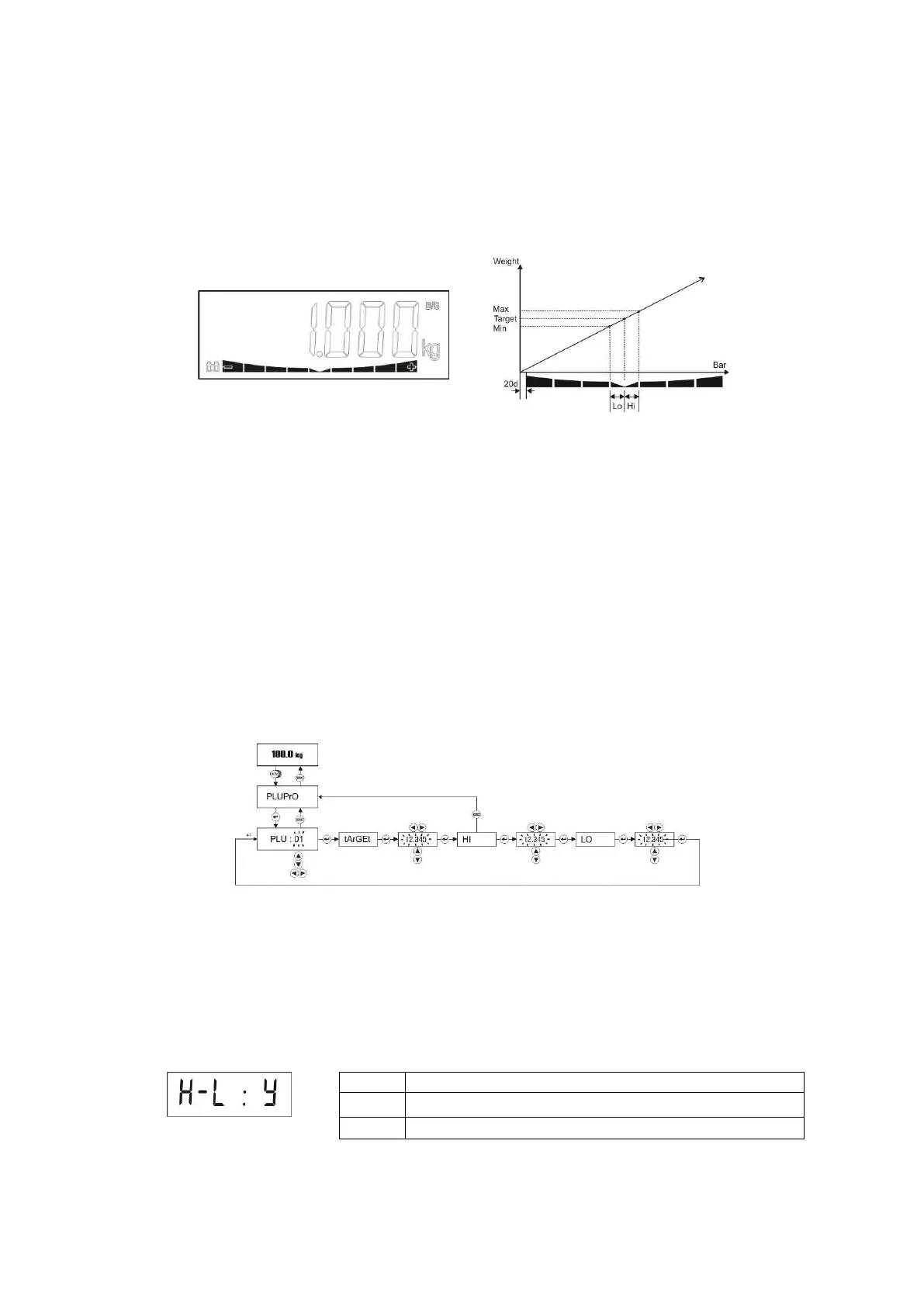
This function is used for classifying products. The check weighing bar on the bottom of the display helps the
operator to indicate the deviation from target weight. In the Figure 6.1 the bar indicates the status of the
tolerance during the check weighing. The indicator is also programmable for acoustic check weighing warning
(Page 20).
Check weighing operation requires the nominal weight and tolerance values entry into the PLU memory.
Figure 6.1 – Check weighing bar
Data entry to Checkweighing memory PLU and Checking in quantity memory ALU
Warning: The PLU memory data entries are done in power on unit.
In Checkweighing mode, FT-107 offers PLU storage space for 100 different materials and in Piece counting
100 ALU storage space for checking in quantity.
For data entries to the PLU / ALU memory press ADV key longer than one second in Advanced function.
Follow the diagram below to entry the data into the PLU or ALU memory. Here, the Target is the nominal value
of the material. Hi and LO are the “+ tolerance” and “– tolerance” of the material in sequence.
For example, if the target is 1000 g and the weight limits are 950 and 1100 g in checkweighing enter:
Target = 1000 g, Hi = 100 g and Lo = 50 g.
The values are entered in quantity to the ALU memory entry.
PLU / ALU code increases or decreases by pressing ▲ or ▼ keys. The values for Target, Hi and Lo are
selected by pressing ► or ◄ keys.
Checkweighing operation (+/-)
Checkweighing is used to check if the weight of an object is in tolerance. The back-light color changes
automatically to indicate if the load is under, over or in tolerance. Refer to page 22 to adjust this feature.
1. Press H-L key longer than one second until the message H-L : Y appears.. The letter on the right
indicates the check weighing is enabled or not.
2. To enable the checkweighing operation, press ▲ key, select “ Y “ and then press Enter key.
3. The PLU memory number appears on the display as [ PLU :01 ]
4. Change the PLU record number by using navigation keys and press the Enter key to start operation
or press Esc key to return to operation without saving the PLU code.
5. The Target, Hi and Lo values display automatically before checkweighing operation.



 To Next Page