FT-107 Weighing Terminal, Technical Manual, Rev. 1.0.0, August 2019 Page 25 of 46
Tare
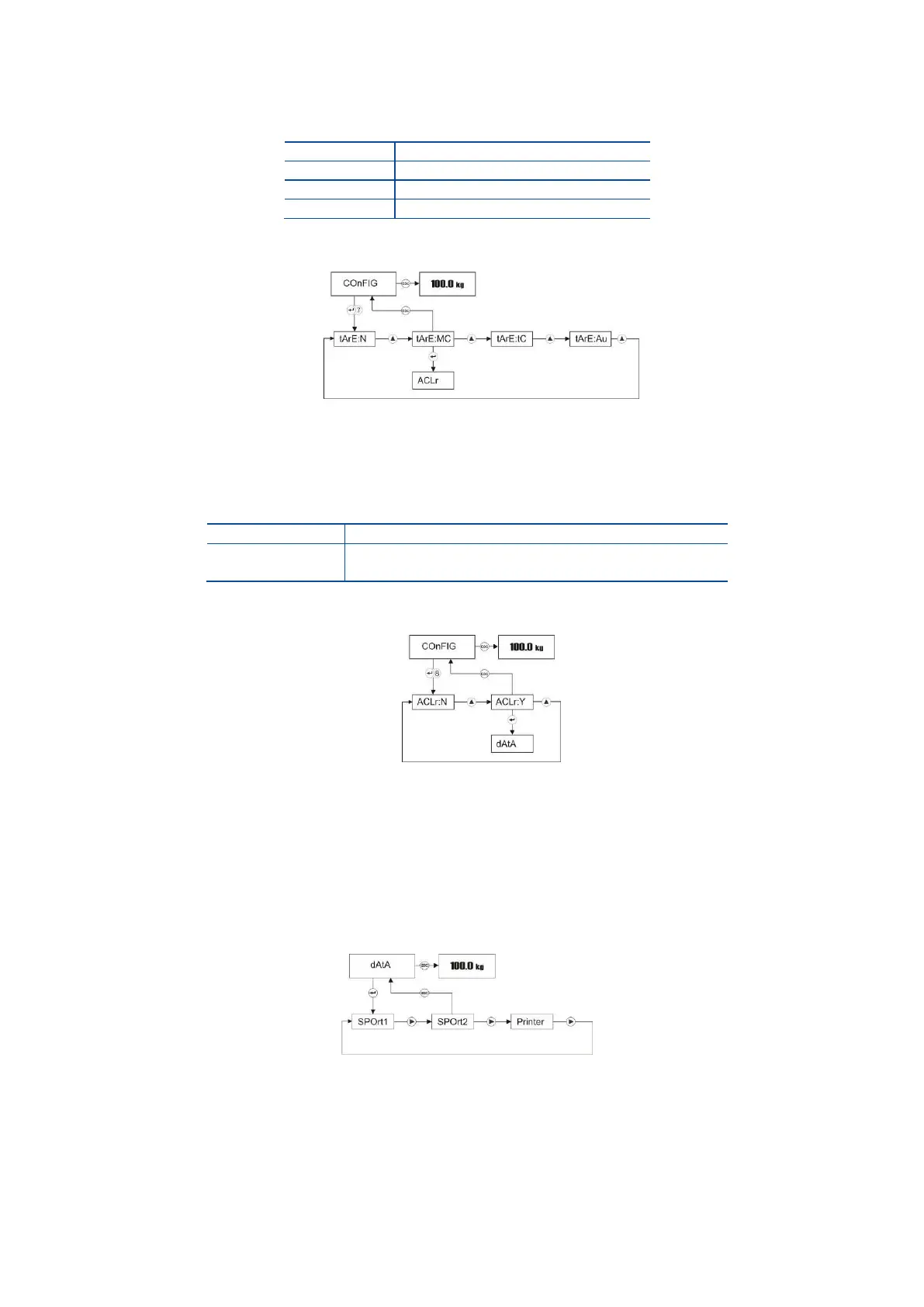
Taring feature of the scale can be programmed in this parameter for taring with key or auto taring
Press Enter key 7 times in Configuration menu to access taring function adjustment.
Press Enter key to enter the next item or press Esc key to return to the previous step after selecting
taring function of the scale by ▲ key.
Auto Clear Tare
This feature of the scale can be programmed in this parameter for auto clear tare.
Press Enter key 8 times in Configuration menu to access this function adjustment.
Press Enter key to enter the next item or press Esc key to return to the previous step after selecting
this function of the scale by ▲ key.
5.2.8 Serial Data Outputs:
To access the Data Outputs menu, press ADV key longer than one second until [ PLUPrO ] message
appears on the display. Press ► key several times until [ dAtA ] prompt appears. Serial data output and
printer data formatting related parameters are in this menu.
Press Enter key to enter the Serial port-1 setting or press ► key to access other menus.



 To Next Page