FT-107 Weighing Terminal, Technical Manual, Rev. 1.0.0, August 2019 Page 24 of 46
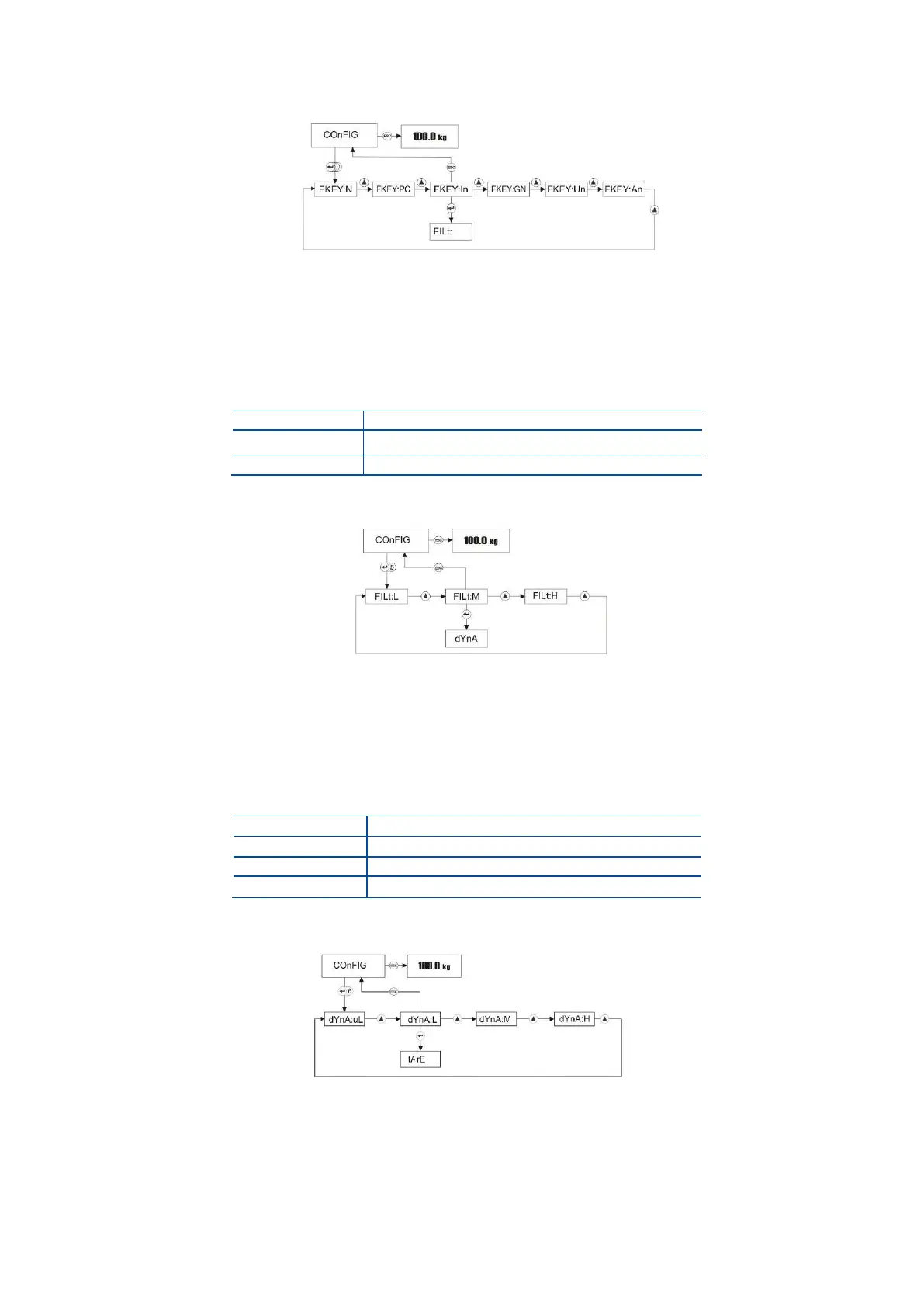
Press Enter key 4 times in Configuration menu to access F key item.
Press Enter key to enter the next item or press Esc key to return to the previous step after selecting
F key function by ▲ key.
Stability Filter
You can change the digital filtering in this parameter to compensate the environmental effects on the scale
performance or for faster response.
Faster response with low filtering
Medium settling time (recommended)
Slow response with high filtering
Press Enter key 5 times in Configuration menu to access filter adjustment.
Press Enter key to enter the next item or press Esc key to return to the previous step after selecting
digital filtering by ▲ key.
Animal Filter
You can change the dynamic filtering in this parameter to compensate the animal movement on the scale.
Higher filtering gives more reliable result for very dynamic loads.
Very Low filtering (1.6 second)
Low filtering (3.2 second)
Medium filtering (4.8 second)
High filtering (6,4 second)
Press Enter key 6 times in Configuration menu to access dynamic filter adjustment.
Press Enter key to enter the next item or press Esc key to return to the previous step after selecting
dynamic filtering for animal weighing by ▲ key.



 To Next Page