FT-107 Weighing Terminal, Technical Manual, Rev. 1.0.0, August 2019 Page 20 of 46
5.2.4 Manual APW entry:
FT-107 indicator has 100 memory locations for counting various materials. The data entry to the CLU
memory is carried out in Advanced functions menu by pressing ADV key longer than one second.
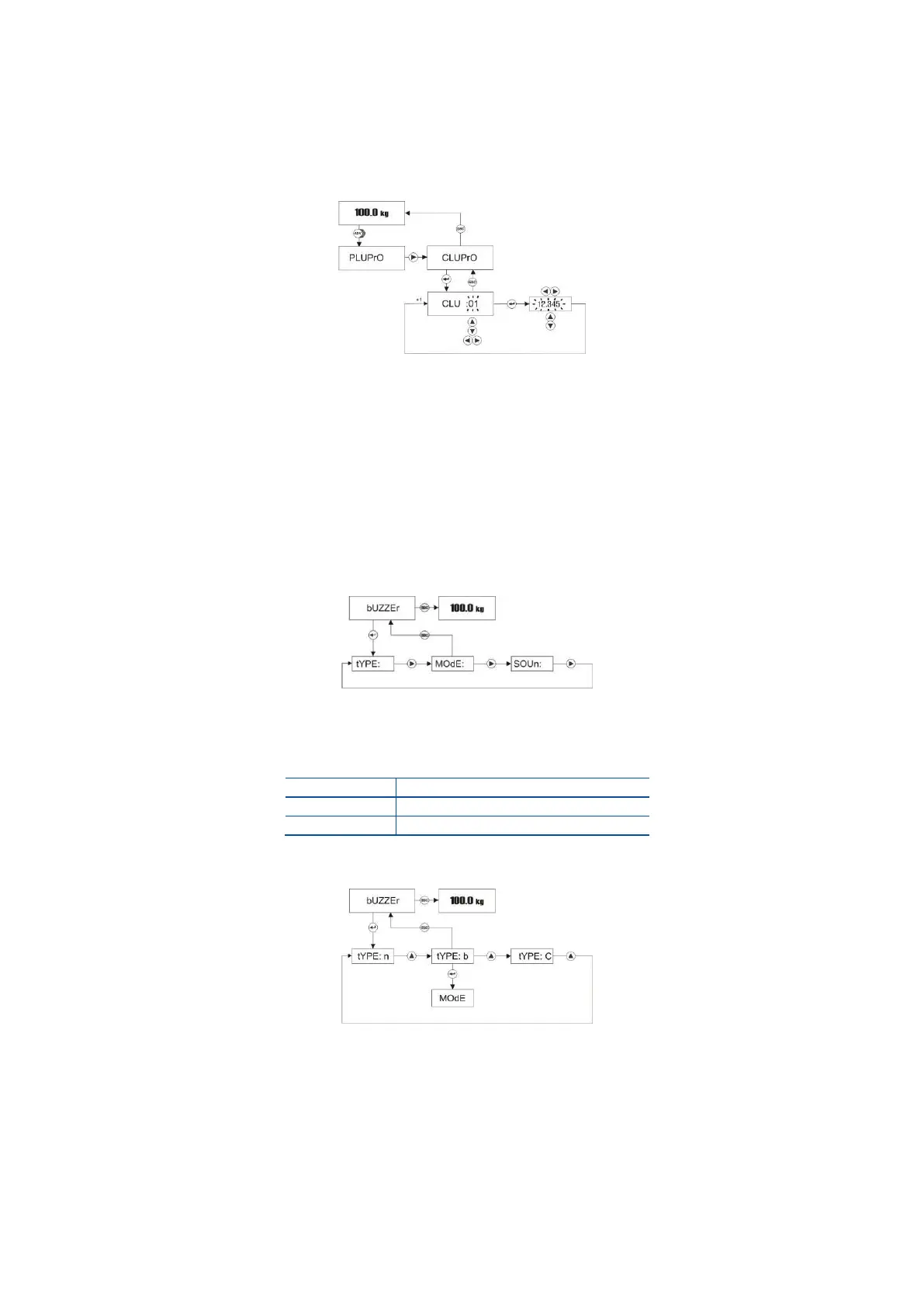
Follow the diagram below to entry the APW (average piece weight) of the material into the CLU memory.
CLU code increases or decreases by pressing ▲ or ▼ keys. The APW value’s digit can be selected by
pressing ► or ◄ keys and the digit value can be increased or decreased by pressing ▲ or ▼
keys.
Press Esc key 2 times to return to operation.
5.2.5 Buzzer Menu
To access to Buzzer related functions menu, press ADV key longer than one second until [ PLUPrO ]
message appears on the display. Press ► until [ bUZZEr ] prompt appears.
Buzzer Sound type at Checkweighing
The buzzer sound can be programmed as a continuous or only a 3-seconds warning as shown below.
Press Enter key to access Buzzer sound type item at [ bUZZEr ] prompt.
Press Enter key to go to the following item or press Esc key to go previous step after selecting
buzzer sound type by ▲ key.



 To Next Page