FT-107 Weighing Terminal, Technical Manual, Rev. 1.0.0, August 2019 Page 21 of 46
Buzzer Mode at Checkweighing
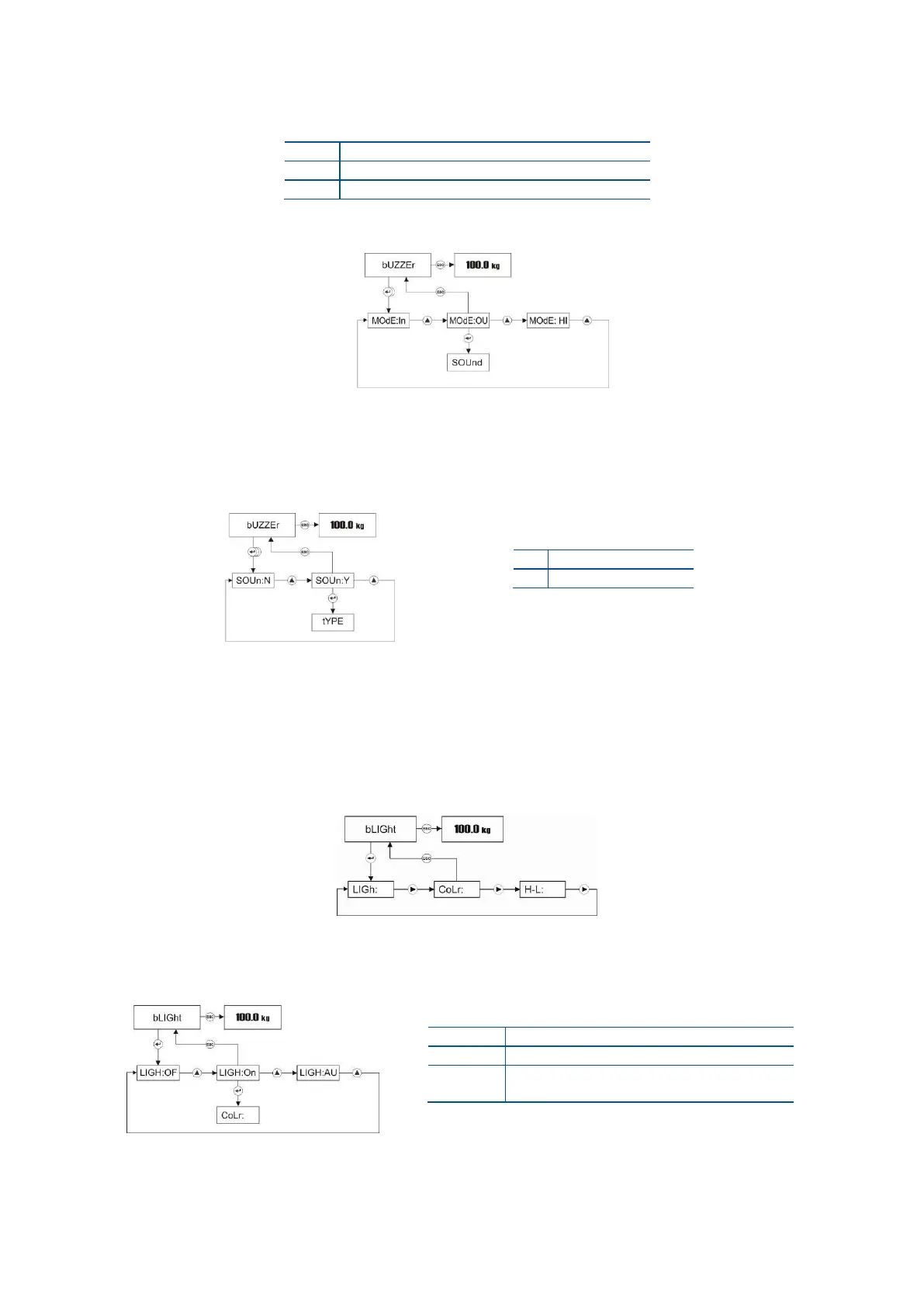
Buzzer warning can be done as shown in the table below.
Press Enter key 2 times in Buzzer menu to access the warning mode item.
Press Enter key to enter the next item or press Esc key to enter the previous step after selecting
warning mode by ▲ key.
Keypad Sound
Buzzer sounds after pressing any key. Press Enter key 3 times in Buzzer menu to access this item.
Press Enter key enter the next item or press Esc key enter the previous step after selecting keypad
sound by ▲ key.
5.2.6 Backlight Menu (only FT-107S) :
To access the Backlight menu, press ADV key longer than one second until [ PLUPrO ] message appears on
the display. Press ► key several times until [ bLiGht ] prompt appears. You can program the backlight
operation, backlight color at basic weighing and back light warning at over – under operation in this menu.
Backlight
Press Enter key in Backlight menu to access the backlight adjustment item.
Press Enter key to enter the next item or press Esc key to return to the previous step after selecting
backlight by ▲ key.



 To Next Page