FT-107 Weighing Terminal, Technical Manual, Rev. 1.0.0, August 2019 Page 22 of 46
Color
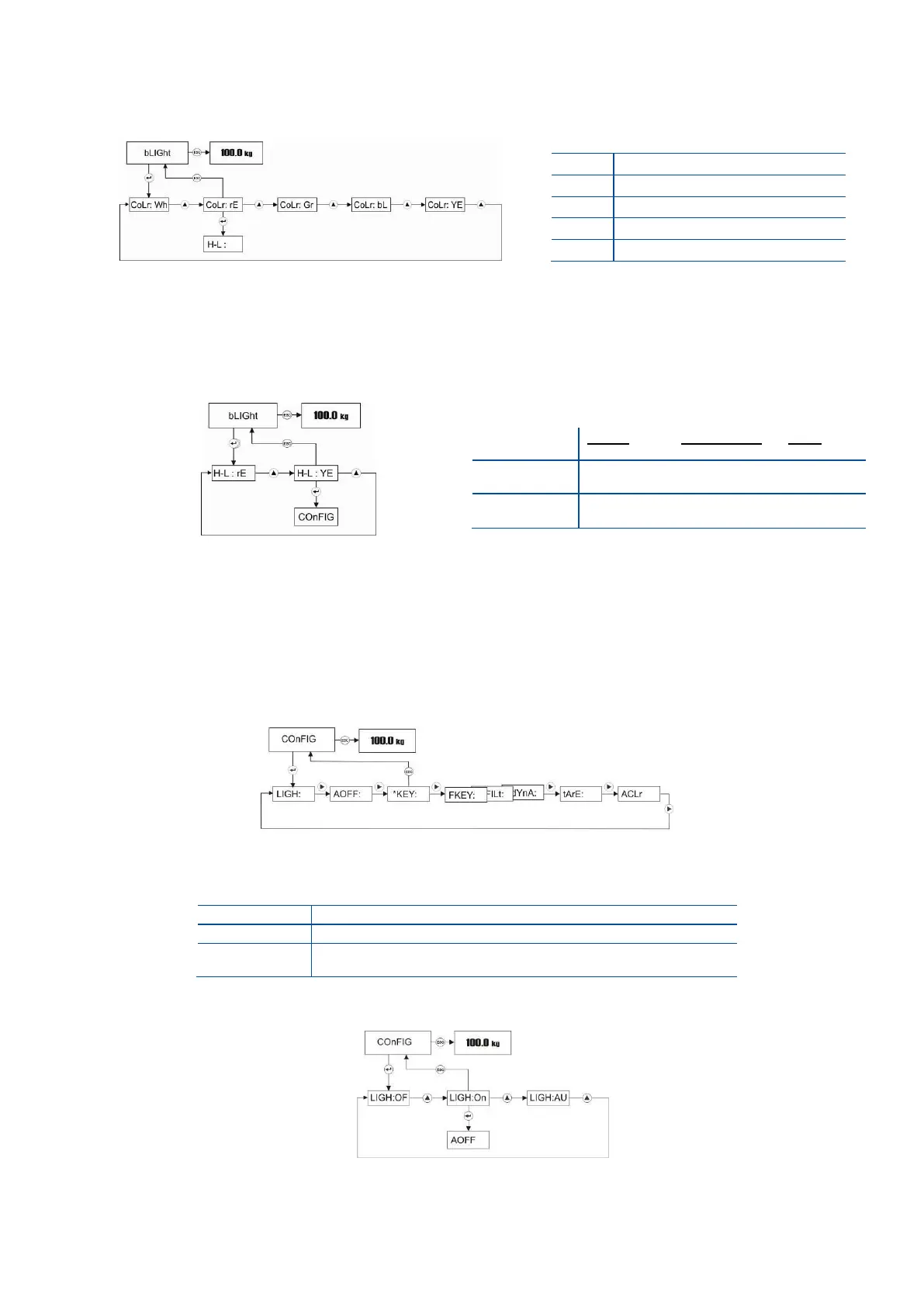
You may program backlight color in this item as shown below.
Press Enter key to enter the next item or press Esc key to return to the previous step after selecting
backlight color by ▲ key.
H-L Color
You may program backlight color in check weighing operation.
Press Enter key to enter the next item or press Esc key to return to the previous step after selecting
backlight color by ▲ key.
5.2.7 Configuration Menu:
To access to Configuration menu, press ADV key longer than one second until [ PLUPrO ] message
appears on the display. Press ► key several times until [ COnFIG ] prompt appears.
Backlight (only FT-107)
You may program backlight operation in this item as seen below.
Press Enter key in Configuration menu to access the backlight adjustment item.
Press Enter key to go to the following item or press Esc key to go previous step after selecting
backlight by ▲ key.



 To Next Page