FT-107 Weighing Terminal, Technical Manual, Rev. 1.0.0, August 2019 Page 28 of 46
5.2.10 Date and Time
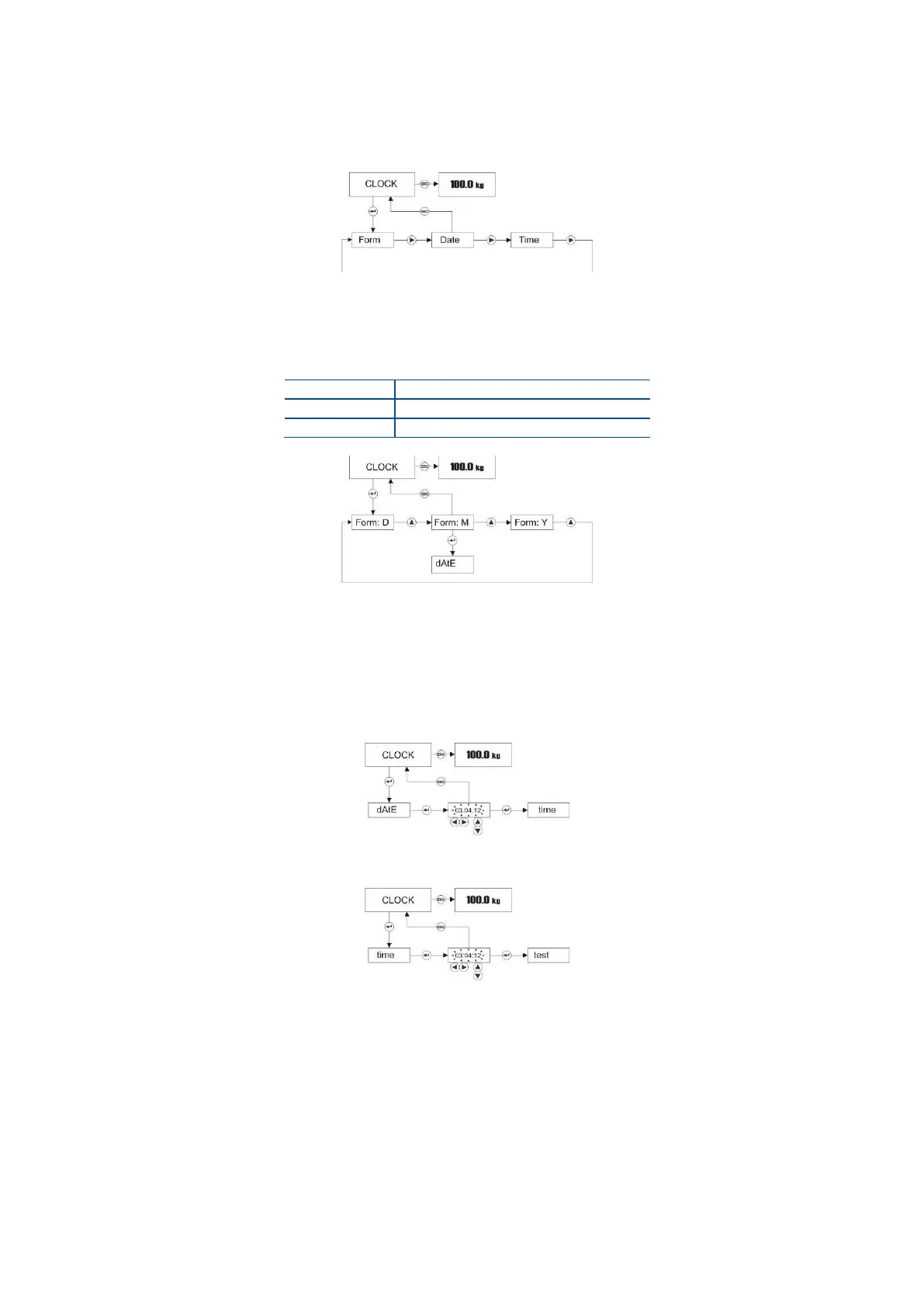
To access the Clock menu, press ADV key longer than one second until [ PLUPrO ] message appears on
the display. Press ► key several times until [ CLoCk ] prompt appears. Clock related items are in this menu.
Press Enter key to enter the Date format item or press ► key to access other items.
Date Format
Press Enter key at [ CLoCk ] prompt to adjust the date format for your country in this item.
Press Enter key to enter the next item or press Esc key to return to the previous step after date
format setting by pressing ▲ key.
Date
Press Enter key several times in clock menu until the date prompt seen. You can change the date as
shown below by navigation keys.
Press Enter key to access time adjustment.
Press Enter key to enter the next item or press Esc key to return to the previous step after time
adjustment with navigation keys.
Test Menu:
Test menu helps the service technician to find the problem source faster.
iCount
iCount is a value related with the ADC conversion to help the service engineer to follow the scale
performance in high resolution without dead load compensation.
Press Esc key to return to [ tESt ] menu. To return to the operation, press the Esc key for the
second time.



 To Next Page