FT-107 Weighing Terminal, Technical Manual, Rev. 1.0.0, August 2019 Page 26 of 46
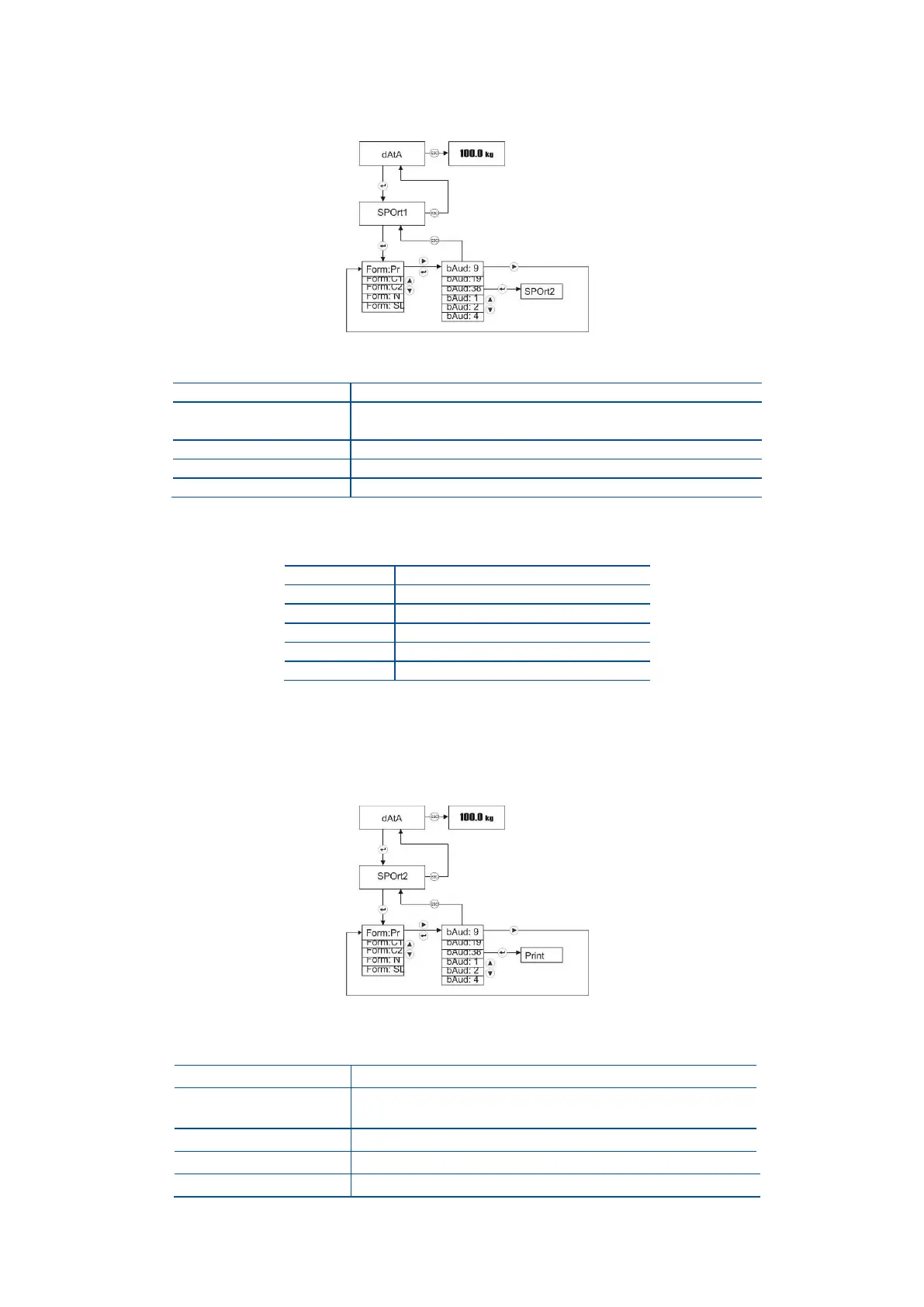
Serial Port-1 settings
To change Serial port-1 settings, press Enter key at [ SPOrt1 ] message.
The first step is the data format. The display indicates two digits at the right of the data format.
Continuous-1 Page 43
(select for remote display connection)
Continuous-2 (for PC) Page 43
Single line printer (for PC)
After changing the data format with ▲ key, press Enter key to enter the next step, baud rate
adjustment. Two digits on the right of the display indicates the baud rate as;
Press Enter key to enter the next item or press Esc key to return to the previous step after selecting
baud rate by ▲ key.
Serial Port-2 settings (option)
To change Serial port-2 settings, press Enter key at [ SPOrt2 ] message.
The first step is the data format. The display indicates two digits at the right the data format.
Continuous-1 (Page 43)
(select for remote display connection)
Continuous-2 (for PC) (Page 43)
Single line printer (for PC)



 To Next Page