Section 4: Using the Model 9100: AC Voltage Function 4.4-9
Final Width = 215mm
4.4.5.1 AC Voltage Resolution Thresholds
The different voltage resolutions are distinguished by two characteristics:
• Maximum and minimum values available.
• Absolute resolution of the least-significant digit.
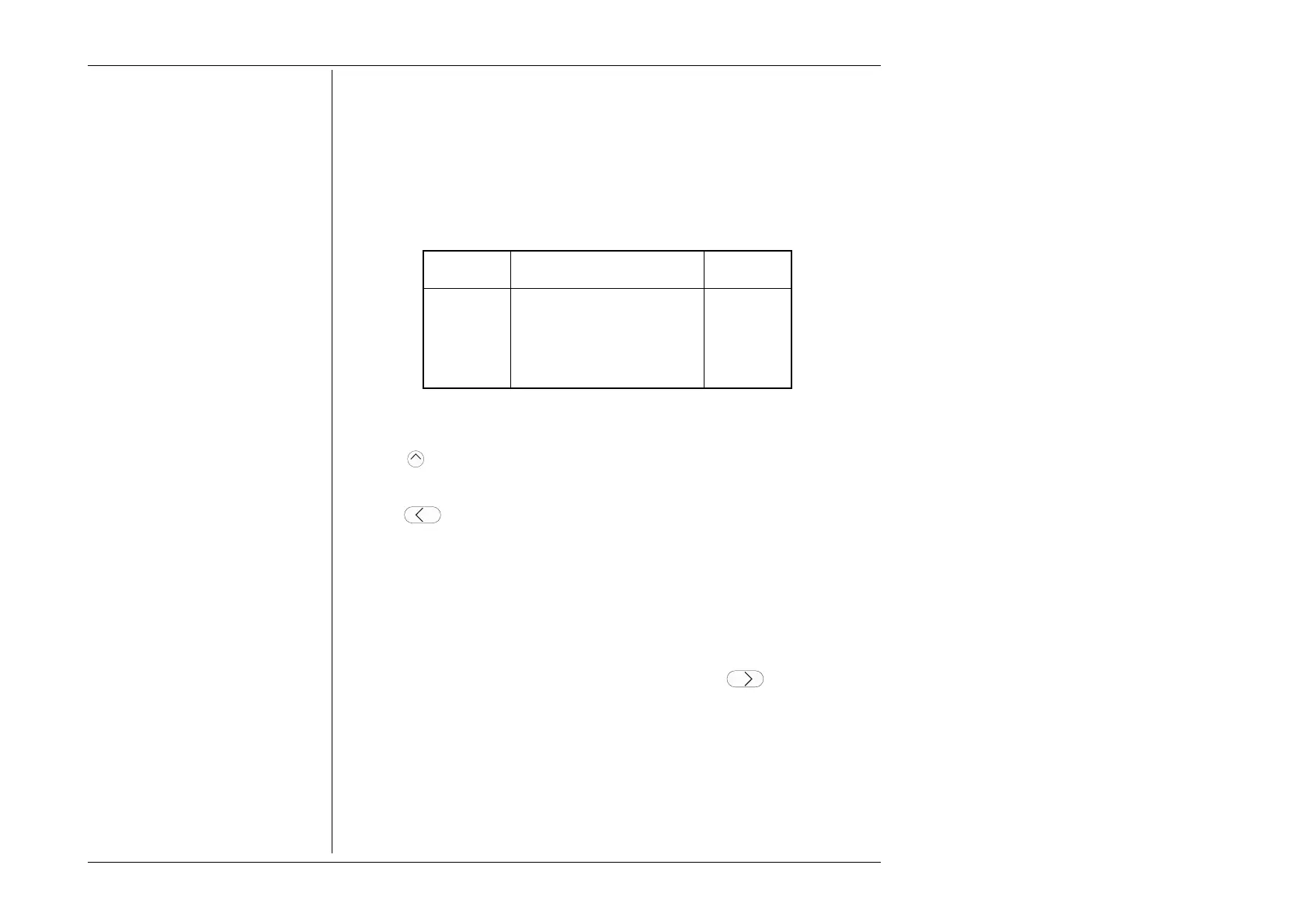
The following table shows the spans of output values in the AC Voltage function, for
'sinusoidal' waveshape only, against their associated resolutions:
4.4.5 Crossing Thresholds
Absolute Span of Values Nominal
Resolution Span Value
1µV 000.000 mV to 320.000 mV 300mV
10µV 0.00000 V to 3.20000 V 3V
100µV 00.0000 V to 32.0000 V 30V
1mV 000.000 V to 320.000 V 300V
10mV 0000.00 V to 1050.00 V 1000V
Rules, built into firmware, govern passage across thresholds between resolutions:
Increasing Output Voltage
Using the
key in Digit Edit facility; an audible warning will be given if the new value
is too large for the present span of values, with a reminder ('
Up range required
') on the
screen. The user must change to the next lower resolution, with a larger span of values,
using the
key. This rule applies whether OUTPUT is OFF or ON.
When using either the
X10
screen key or the Direct Edit facility; if the new value is too
large for the present resolution, a lower resolution will be activated with a larger span of
values. No warning will be given. This rule applies whether OUTPUT is OFF or ON.
Decreasing Output Voltage
Using Digit Edit; values down to zero lie within all spans. An attempt to set a negative
value will not be enabled, and an audible warning will be given, accompanied by a
reminder ('
Minimum value
') on the screen. If the required value lies between steps of the
present resolution, the user must increase resolution using the
key, also reducing
the span of values. This rule applies whether OUTPUT is OFF or ON.
Using either the
÷10
screen key or Direct Editing; if the required value lies between
increments of the present resolution, a greater resolution will be activated with reduced
span. No warning will be given. This rule applies whether OUTPUT is OFF or ON.
'Out of Range'
Refer to Sub-Section 4.4.6.



 To Next Page