Page 17
Flymaster Live C User Manual
5.
OPTIONAL FLARM AWARE SERVICE ACTIVATION
When you acquire a Live C equipped with the FLARM module no extra
service needed. This means that you will be visible to other instruments
that are able to receive Flarm positions (RX).
If you want to have FLARM AWARE service (also receive FLARM position from others and
have potential collision warnings) in your instrument you need to activate the optional
FLARM aware service. To do that, go to our website (www.flymaster.net), and under
“accessories” you can buy the product “Flarm Aware”.
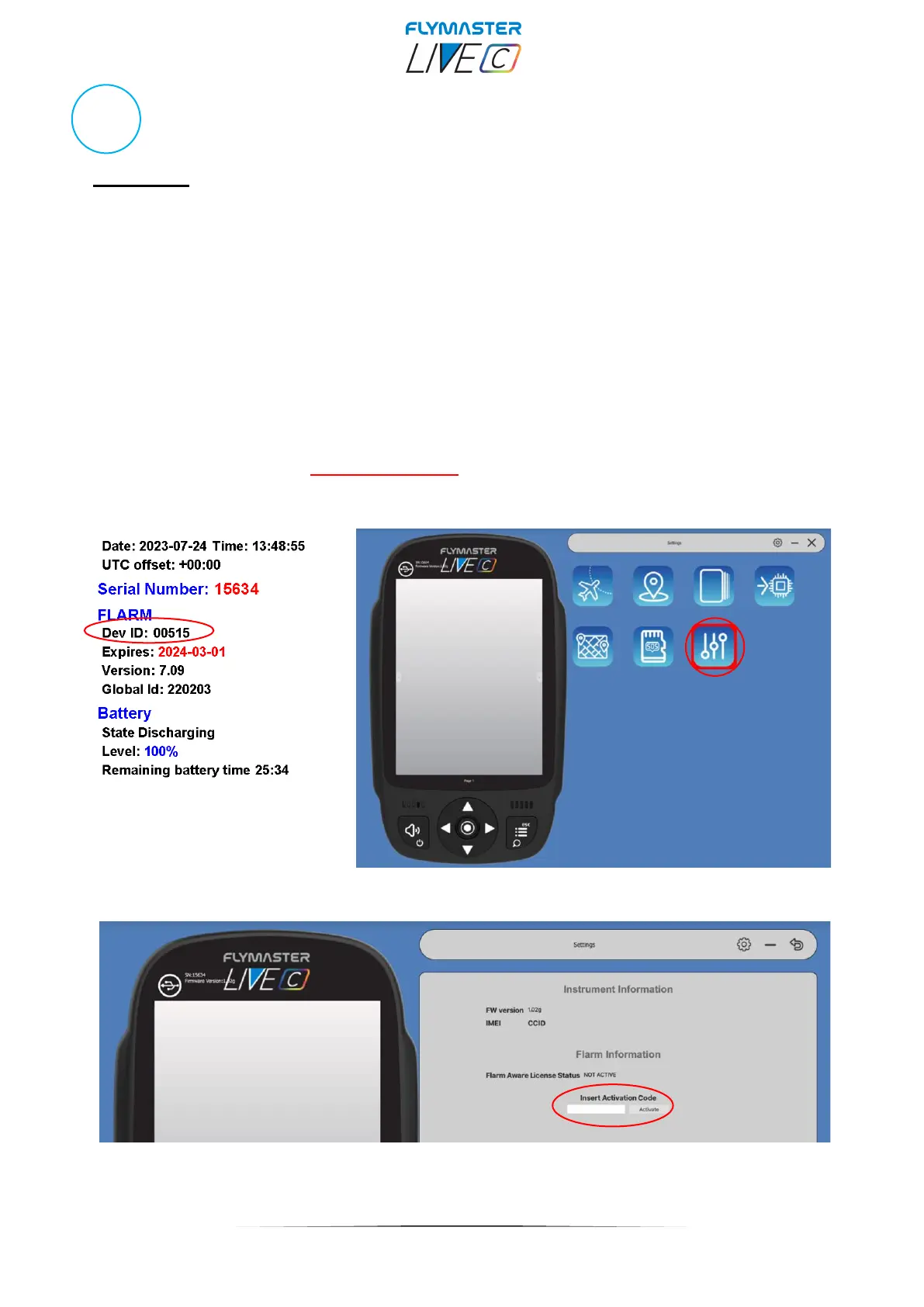
You must fill in the “Dev. ID” (Flarm Serial number, which can be seen on the instrument,
under “Device Info” option. THIS IS NOT THE INSTRUMENT SERIAL NUMBER.
After receiving a confirmation email with the activation code, you must enter it in Flymaster
Instrument manager, with the instrument connected.
The cost is 50 Euros for a lifetime activation.



 To Next Page