Page 28
Flymaster Live C User Manual
Default Pages
Flymaster LIVE C allows you to design up to 8 pages (portrait and landscape mode) using the Flymaster
Instrument Manager. In flight mode you can change pages manually using the Enter key. In Flight mode long
press Enter to show page shortcut menu. On the following pages we will show which pages Flymaster
designed and which will be default to the instrument.
The description of each data field is available in this user manual in the section “available data fields”.
The description of each object is available in this user manual in the section “objects”.
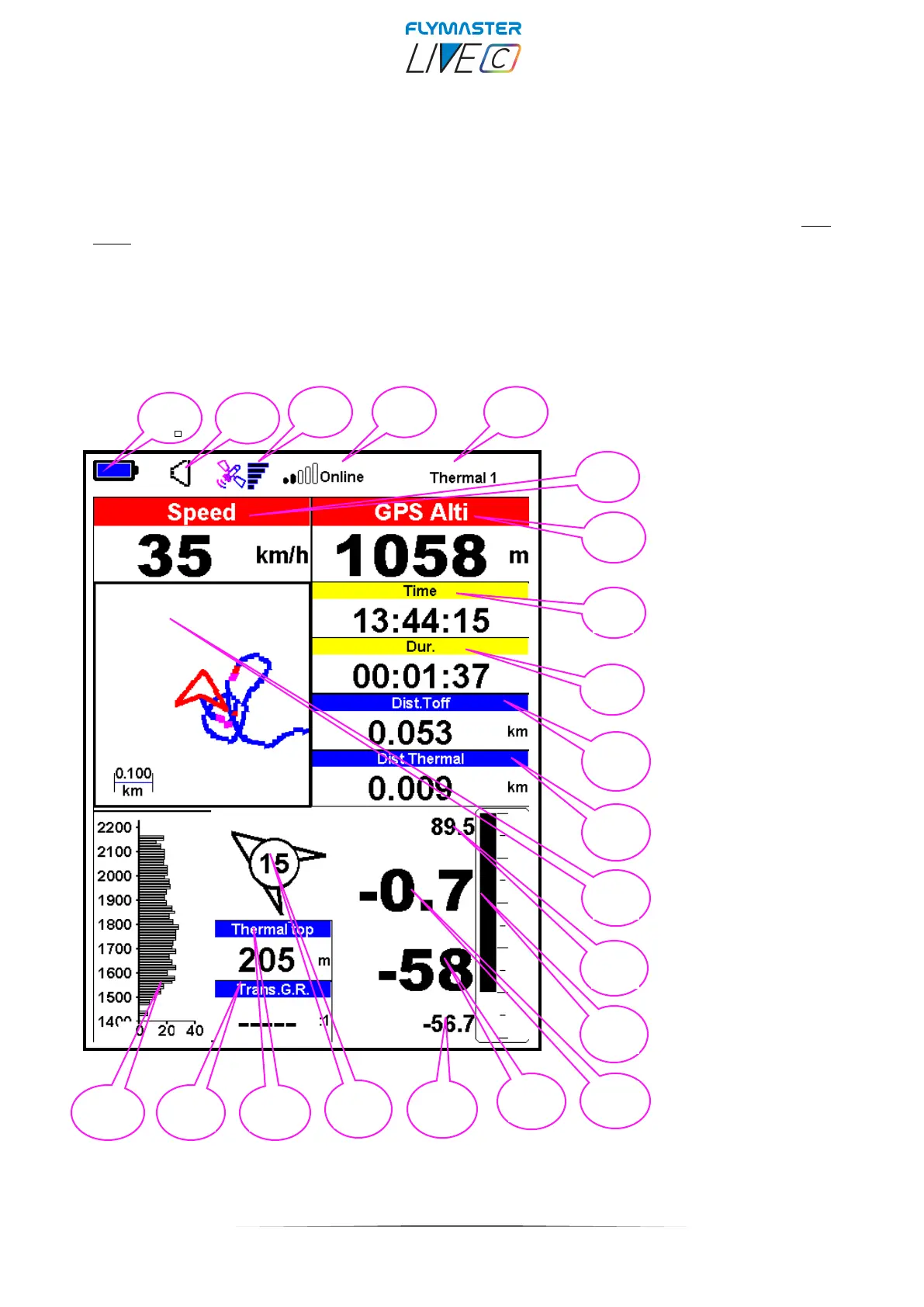
Page 1 - Thermal 1
1 – Battery level
2 – Sound level
3 – GPS Status
4 – Com. status
5 – Page info
6 – Ground Speed
7 – GPS altitude
8–Time
9 – Flight duration
10 –Dist. To Take-off
11 – Dist. To thermal
12 – Thermal widget
13 – Max. Climb
14 – Analog Vario
15 – Ave. Vario
16 – Alt. Gain/loss
17 -Max. Sink
18- Wind Arrow
19- Thermal top
20 – Trans. G.R.
21 – Thermal profile



 To Next Page