11
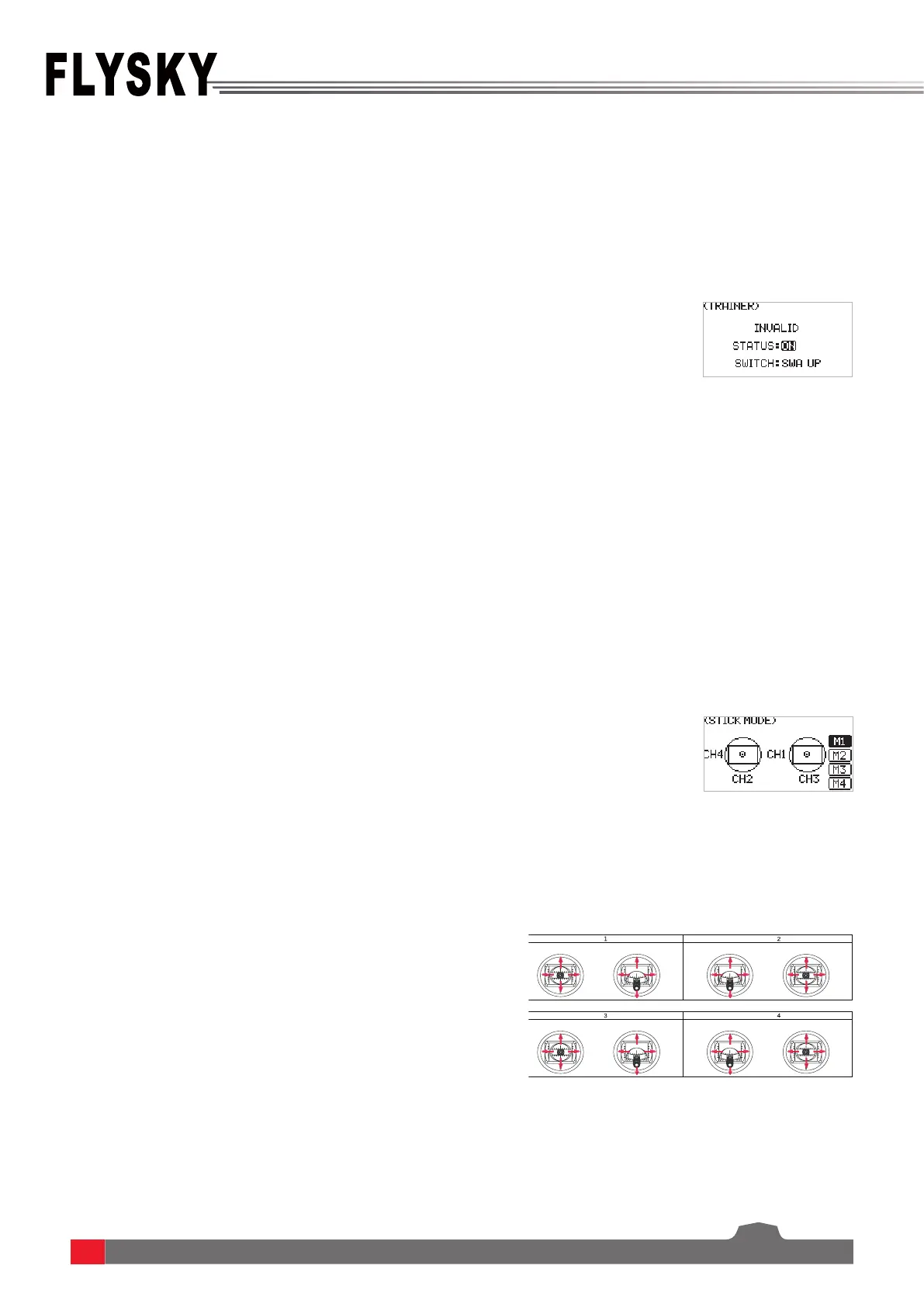
This function is suitable for beginners. The trainer can make instruction and training for the students under
supervision, to avoid the risks caused by beginners in the learning process.The trainer function can be enabled by
selecting Status: ON. Then, users can set a switch to control the trainer function. When the switch is on, the trainer
controls the aircraft. When the switch is o, the student controls the aircraft. For example, if the trainer and the
student use two FS-ST8 transmitters for teaching and training. The trainer's FS-ST8 transmitter needs to be set to
ON for this function with a control switch, and the student's transmitter does not need to be set.
The transmitter provides four stick mode, you can set it according to your habit. CH1 represents Aileron, CH2
represents Elevator, CH3 represents Throttle, CH4 represents Rudder.
Mode2(M2) is the de fault mode. Changing between modes
2/4 (M2/M4)and modes 1/3 (M1/M3)will necessitate changing
the throttle gimbals position. You need have to open up the
product, see [8.3 Swapping Gimbals] for details.
6.1.2 TX SET - TRAINER
6.1.3 TX SET - STICK MODE
Function settings:
1. SelectSTICK MODE andpressScroll Wheel toenter.
2. Selectan appropriateitembyscrollingScroll Wheel
and pressScroll Wheel tonish.
3. Testthefunctiontoconrmallthechanneldirectionis
thesameastheactuallyexpecteddirection.
4. Themechanicalstructuremayadjustasneededafter
themodeisselected.Namelythethrottleneedstobe
adjustedfromself-returntonon-self-returnandvice
versa.Inaddition,inthemodeofthrottlenon-self-
return,thethrottlepositionshouldbeadjustedwhen
itisfromlefttorightandviceversa.Forotherchanges,
theadjustmentisnotrequired.
Function settings:
1. SelectTRAINER andpressScroll Wheel toenter.
2. SetON orOFFtoturnonorturnousingScroll Wheel.
3. Setaswitch.Inthemenu,selectaswitchandits
correspondingpositiontonish,oryoucantogglethe
correspondingphysicalswitchonthetransmitterto
nish.
Notes:
1. Use a trainer cable to connect the two transmitters which are
for the trainer and the student. Make sure the trainer cable
connected well before using this function.
2. VALID will be displayed on the top of this menu, when trainer
transmitter and student transmitter are connected successful.
Elevator
Mode
Throttle
Rudder
Aileron
Mode
Elevator Throttle
Rudder
Aileron
Mode
Mode
Throttle Elevator
Rudder
Aileron
Throttle Elevator
Rudder
Aileron


 To Next Page