21
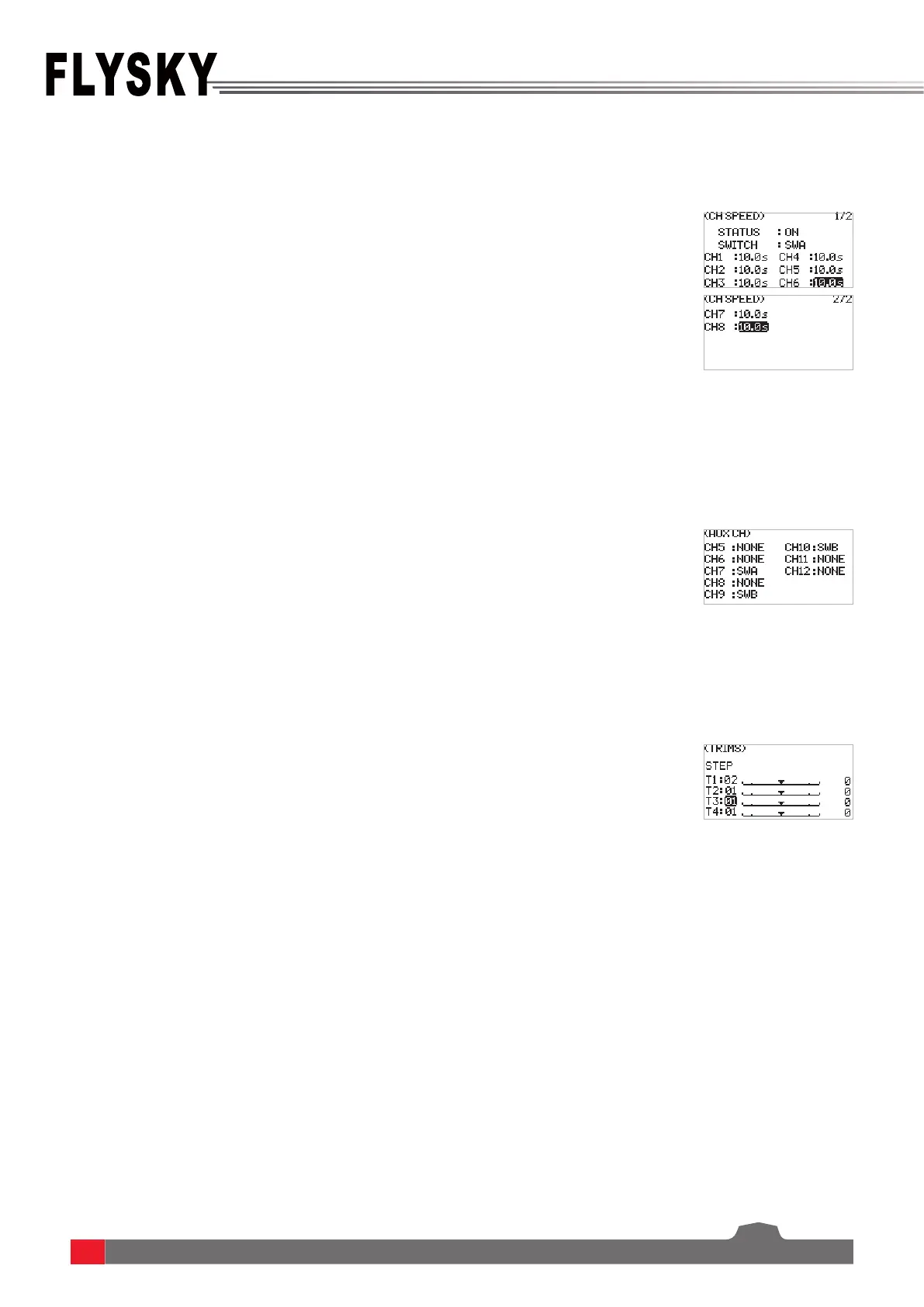
This function can be used to adjust the output speed of some channels for a specic model. For example, in the
landing gear retraction, users may want it to be opened slowly, therefore, you can slow down the output speed of
the corresponding channel.
For some models with complex functions, we provide up to 10 channels of output, 6 of which are auxiliary channels
for the most eective control of multiple functions in dierent ways. The AUX CH(auxiliary channel) function is used
to set the control settings for CH5 to CH10, assigning targeted controls to the channels for operation.
To set the step value of the trims.
MIXES is enabled for some models that require two channels to act in linkage. For example, you can perform rudder
compensation so that the aircraft will not lift its nose when throttling up. This transmitter provides up to 8 groups of
mixes.
Function settings:
1. SelectCH SPEED andpressScroll Wheel toenter.
2. SetON orOFFtoturnonorturnousingScroll Wheel.
3. Setaswitch.Inthemenu,selectaswitchanditscorrespondingposition
tonish,oryoucantogglethecorrespondingphysicalswitchonthe
transmittertonish.
4. Setaspeedvalue.PressEXITtosaveandexit.
Function settings:
1. SelectAUX CH andpressScroll Wheel toenter.
2. SelectaauxiliarychannelandpressScroll Wheel toentertheswitch
assignedmenu.
3. Setaswicth.PressEXITtosaveandexit.
Function settings:
1. SelectTRIMS andpressScroll Wheel toenter.
2. SelectatrimyouwanttosetandpressScroll Wheel.
3. SelectanappropriatevaluethenpressScroll Wheel.PressEXITtosaveand
exit.
6.4.4 GENER MENU - CH SPEED
6.4.5 GENER MENU - AUX CH
6.4.6 GENER MENU - TRIMS
6.4.7 GENER MENU - MIXES
STATUSTosetwhethertoenablethefunction.
SWITCHTosetaswitchwhichistocontroltheMIX.
M(Master)Tosetamasterchannel,thischannelwillcontroltheslavechannel.
S(Slave)Tosetaslavechannel,thischannelwillbecontrolthemasterchannel.
NOR(Normal)Tosethowmuchtheslavechannelwillmovewhenthemaster
channelmovesinHIGHend.Theadjustmentrangeisfrom-100%to100%.Ifthe
valueissetto50%,whentheoutputofthemasterchannelis100%,theoutput
oftheslavechannelis50%atthetime.
REV(Reverse)Tosethowmuchtheslavechannelwillmovewhenthemaster
channelmovesinLOWend.Theadjustmentrangeisfrom-100%to100%.Ifthe
valueissetto50%,whentheoutputofthemasterchannelis-100%,theoutput
oftheslavechannelis-50%atthetime.



 To Next Page