25CI400A/W • 25HI400A • 50CI400A/W • 50HI400A 31
Dispenser troubleshooting
Before calling for service
1. Check for ice in the ice storage area.
2. Check that congealed ice is not causing a jam.
3. Check that all switches and circuit breakers are on.
4. Check that all drains are clear.
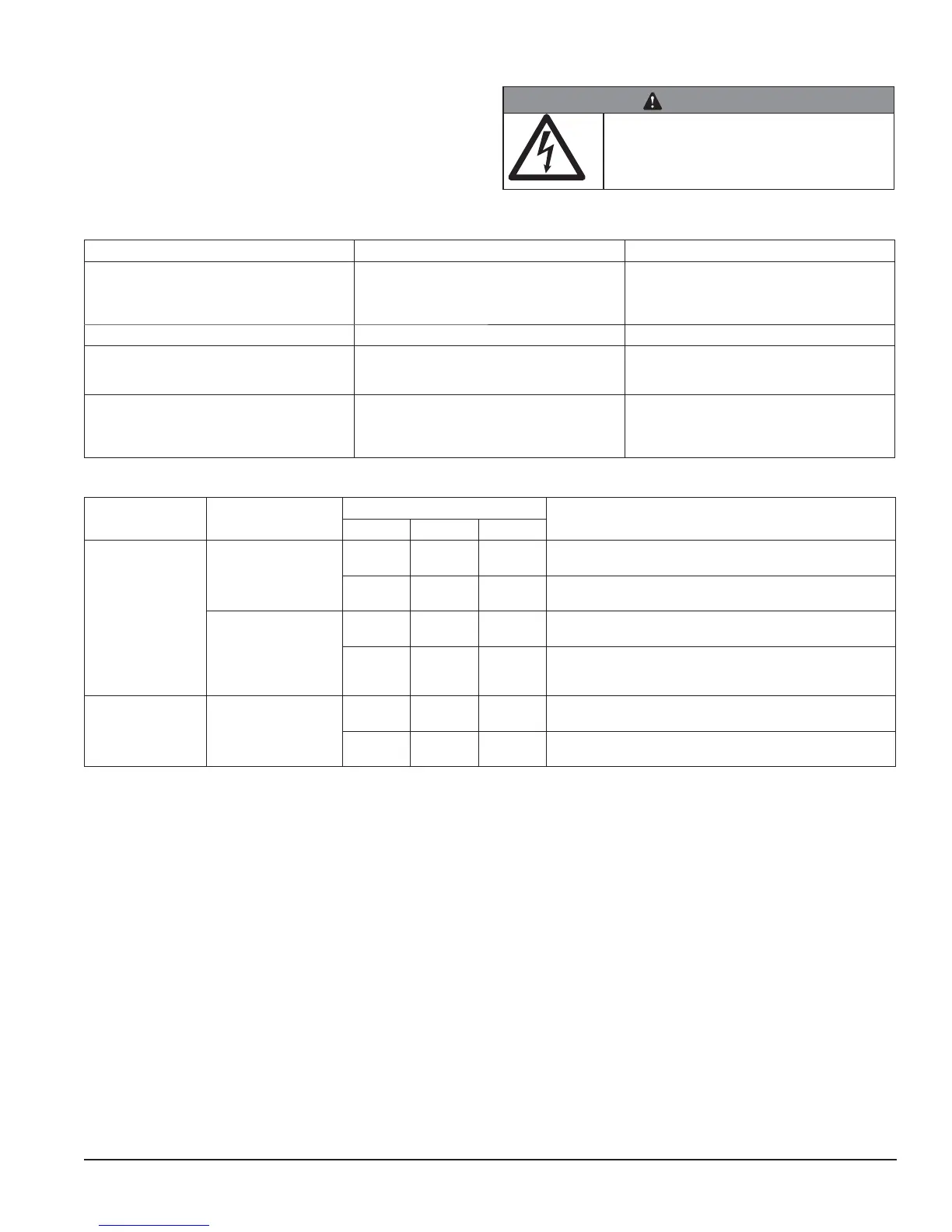
WARNING
• Disconnect power to unit before putting
hands or arms in storage area or attempting
any repair or service to equipment
Lever model troubleshooting guide
Problem Indicators Corrective Action
Does not dispense ice. 1. Power switch off or faulty.
2. Faulty dispense switch.
3. Wheel motor malfunction.
1. Check switch – turn on or replace if faulty.
2. Replace switch.
3. Check motor and capacitor and replace
Dispense wheel rotates continuously. Dispense switch contacts are burned out. Replace dispense switch.
Ice machine runs continuously. Faulty or incorrectly positioned bin stat. Check for proper positioning. If stat does not
open when ice is placed on capillary tube,
replace stat.
Does not dispense water. 1. Faulty water solenoid valve.
2. Faulty dispense switch.
3. Power switch off or faulty.
1. Replace water solenoid valve.
2. Replace dispense switch.
3. Check switch - turn on or replace if faulty.
SensorSAFE model troubleshooting guide
Problem Action
SensorSAFE Board LED Status
Corrective ActionPWR CLN ICE/WTR
Does not dispense
ice and/or water.
Check LEDs on the
SensorSAFE control
board.
OFF OFF OFF Check circuit breakers and power switch. Restore power or
replace defective switch.
ON ON OFF Press clean switch on lower left side of electrical enclosure
to return board to normal operation.
Place cup under drop
zone (in front of lens)
ON OFF OFF Troubleshoot appropriate lens/sensor and replace if required
(see lens/sensor troubleshooting).
ON OFF ON Verify power on appropriate output terminal (WTR or WM)
on control board and replace board if required. If board tests
okay, troubleshoot appropriate dispenser component.
Dispenses ice
and/or water
continuously.
Check LEDs on
control board.
ON OFF ON Troubleshoot appropriate lens/sensor and replace if required
(see lens/sensor troubleshooting).
ON OFF OFF If there is power on any output terminal 9WTR or WM) on
control board, replace board.
Board guide
LEDs, when illuminated, indicate the following: PWR (board power), CLN (cleaning, no dispensing cycle), ICE (ice
dispensing activated), WTR (water dispensing activated).
Terminals: LI (incoming power, hot), L2 (neutral terminals), WTR (power terminal for water solenoid), WM (power
terminal for wheelmotor), CLN (terminals for clean cycle switch).
Lens/sensor troubleshooting
1. Turn dispenser power switch off and remove splash panel.
2. Disconnect wires from WTR and WM terminals on board.
3. Gently remove sensor/mounting block from splash panel.
4. Inspect lens and sensor. Clean if necessary.
5. Restore dispenser power and test sensor by passing hand in front of sensor.
6. If LED on board turns on, sensor is operational. Re-assemble dispenser.
7. If LED does not come on, switch sensor leads on board and retest.
8. If opposite LED comes on, replace defective board.
9. If opposite LED does not come on, replace defective sensor.



 To Next Page