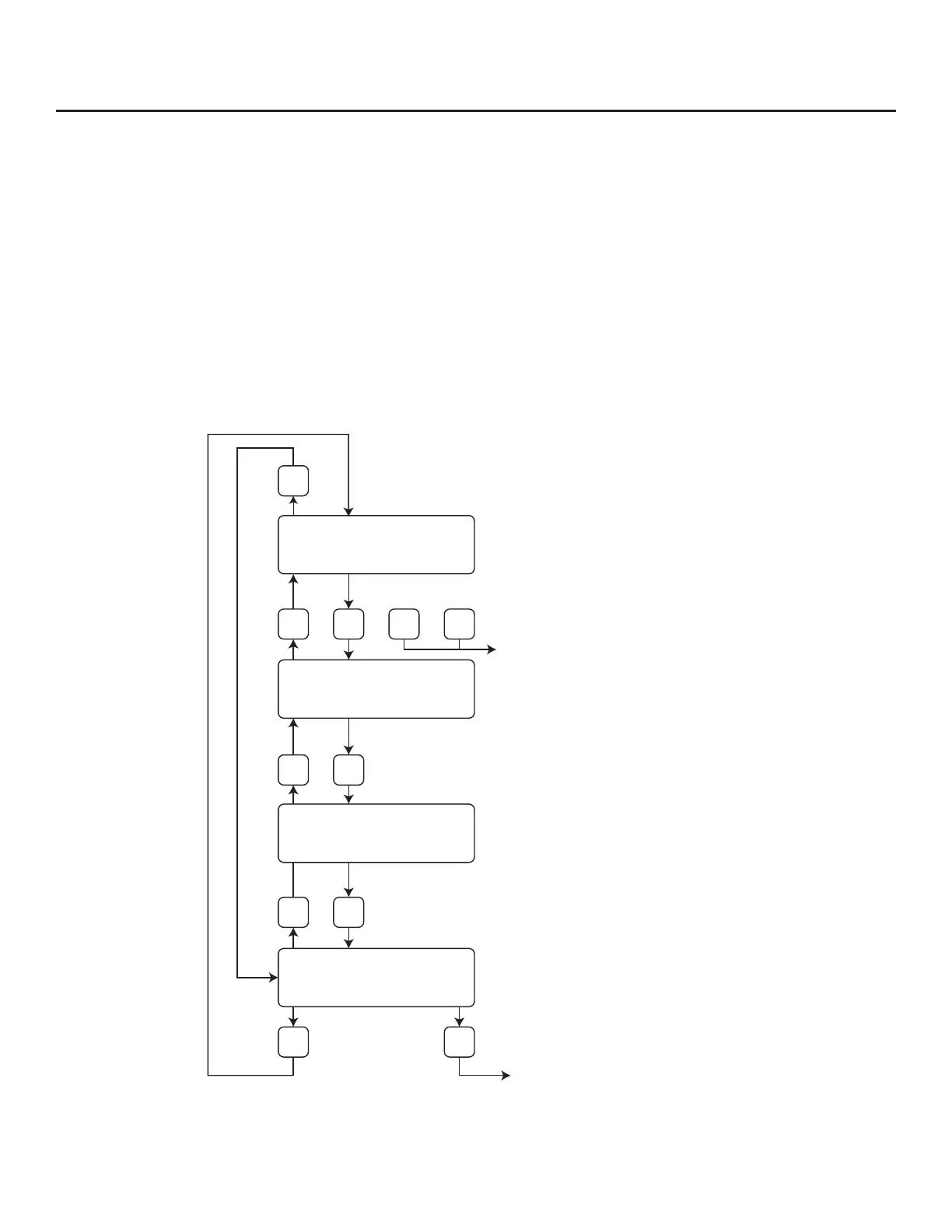
Measurement Mode Display Screens
In the measurement mode, there are four dierent display screens (display 1, 2, 3 and a prompt
screen to enter the programming mode). Two display screens are user programmable (refer to
Display Setup p. 63). Scrolling through the display is accomplished by pressing the F1 or F2 key to
view the next or previous screen.
Pressing the F1 and F2 keys at the same time enters the Log Menu and Engineering Menu screens.
Pressing the F3 and F4 keys at the same time brings up the Reset Total screen prompt.
Fig. 4.2: FT3 Measurement Mode Display Screen Navigation
Operation | 51
Model FT3
Operation
F1 key: Moves up one screen
F2 key: Moves down one screen
(User programable screen)
(User programable screen)
Enter “Reset Total” screen
when F3 & F4 are pressed at
the same time
(Fixed screen)
Enter programming screen
Requires password.
Default is 1234.
Display #1
Display #2
Display #3
Display #4
(Fixed screen)
F1
F1
F1
F1 F2
F2 F4
F2
F2 F3 F4
1456.5 SCFM
123456 SCF
Elp = 14.6 HR
88.5˚ F
Alarm = None
Elp = 14.6 HR
Set Parameter?
No Yes



 To Next Page