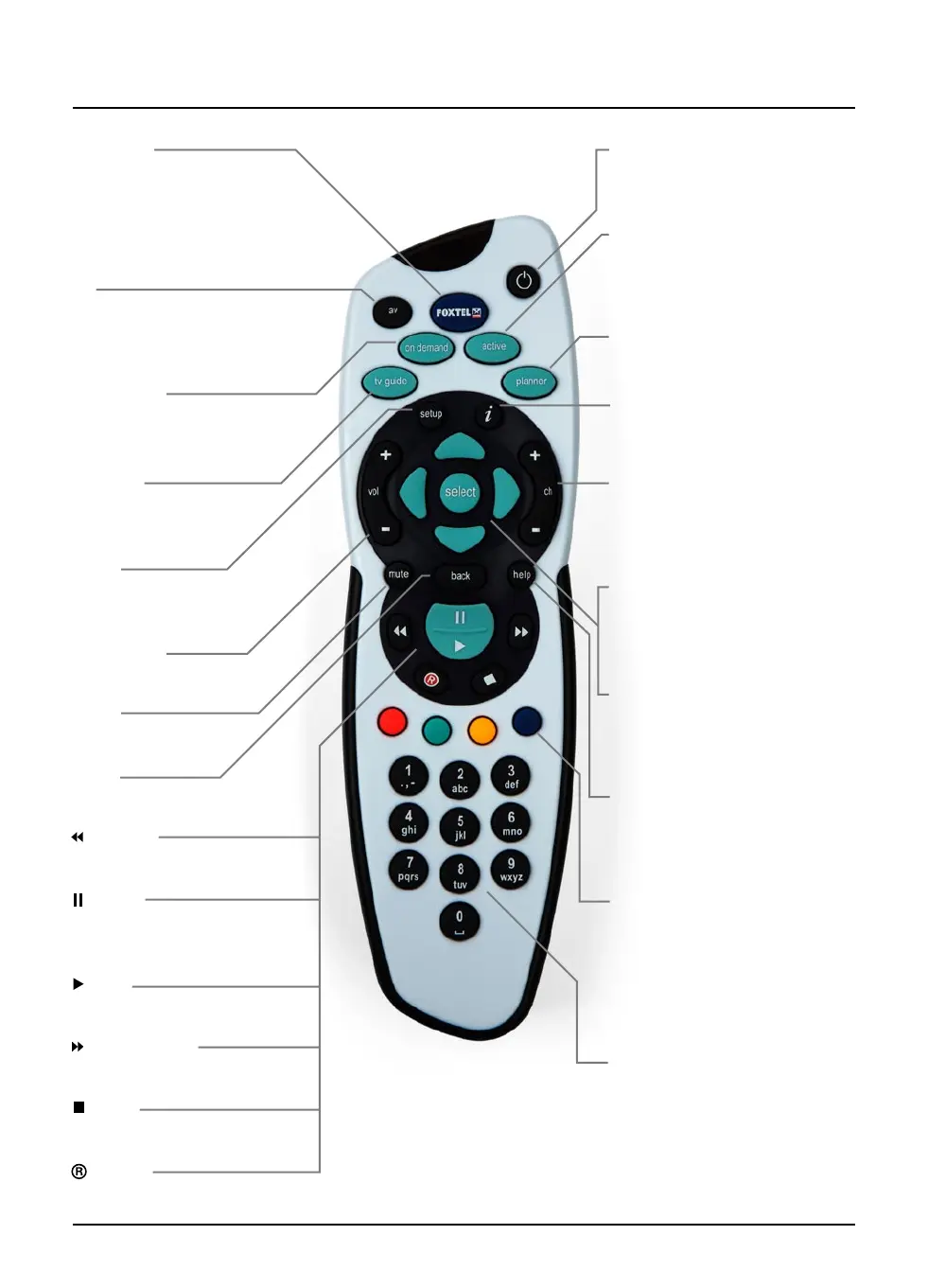
The FOXTEL Remote Control
FOXTEL
Takes you from the TV Guide (or
any FOXTEL Guide screen) to the
last channel you were watching
Takes you back to FOXTEL after
you have been using ‘AV mode’
av
Switches to ‘AV mode’, to use
your VCR, or other item connected
through the FOXTEL iQ
on demand
(box office on some models)
To order movies and events from
the FOXTEL Box Office
tv guide
Displays the FOXTEL Guide’s
programme listings
setup
Displays the Setup screen, to
alter the FOXTEL iQ’s settings
vol + and –
Changes the volume up or down
mute
Turns the sound on or off
back
Jumps back to the previous screen
rewind
Rewinds the programme
pause
Pause the programme or starts a
‘Live Pause’ recording
play
Plays a recorded programme
fast forward
Fast forwards the programme
stop
Stops playback of the programme
record
Records the programme
S
Puts the FOXTEL iQ into or out of
standby
active
Displays the Active menu for
FOXTEL’s range of interactive
services
planner
Displays the Personal Planner
i
Displays more information about
a programme
ch + and –
Changes channel and pages up
and down through listings in the
TV Guide and Personal Planner
arrow buttons
U, D, L, R
Moves the highlight around the
screen
select
Confirms a choice or makes a
selection
Also displays the i-search banner
help
Tunes to the Customer Care
channel or displays help
information
colour buttons
Use to select the matching colour
option shown on screen, or as
explained in this User Guide. Also,
the red button launches an active
service when you see the red
button on your TV screen
number buttons (0-9)
Use to change channel, enter
numbers and select on-screen
options



 To Next Page