VYPER
™
VARIABLE SPEED DRIVE
OPERATION
100-210 IOM (JUL 09)
Page 40
PROGRAMMING VYPER™ / QUANTUM™LX
COMMUNICATIONS
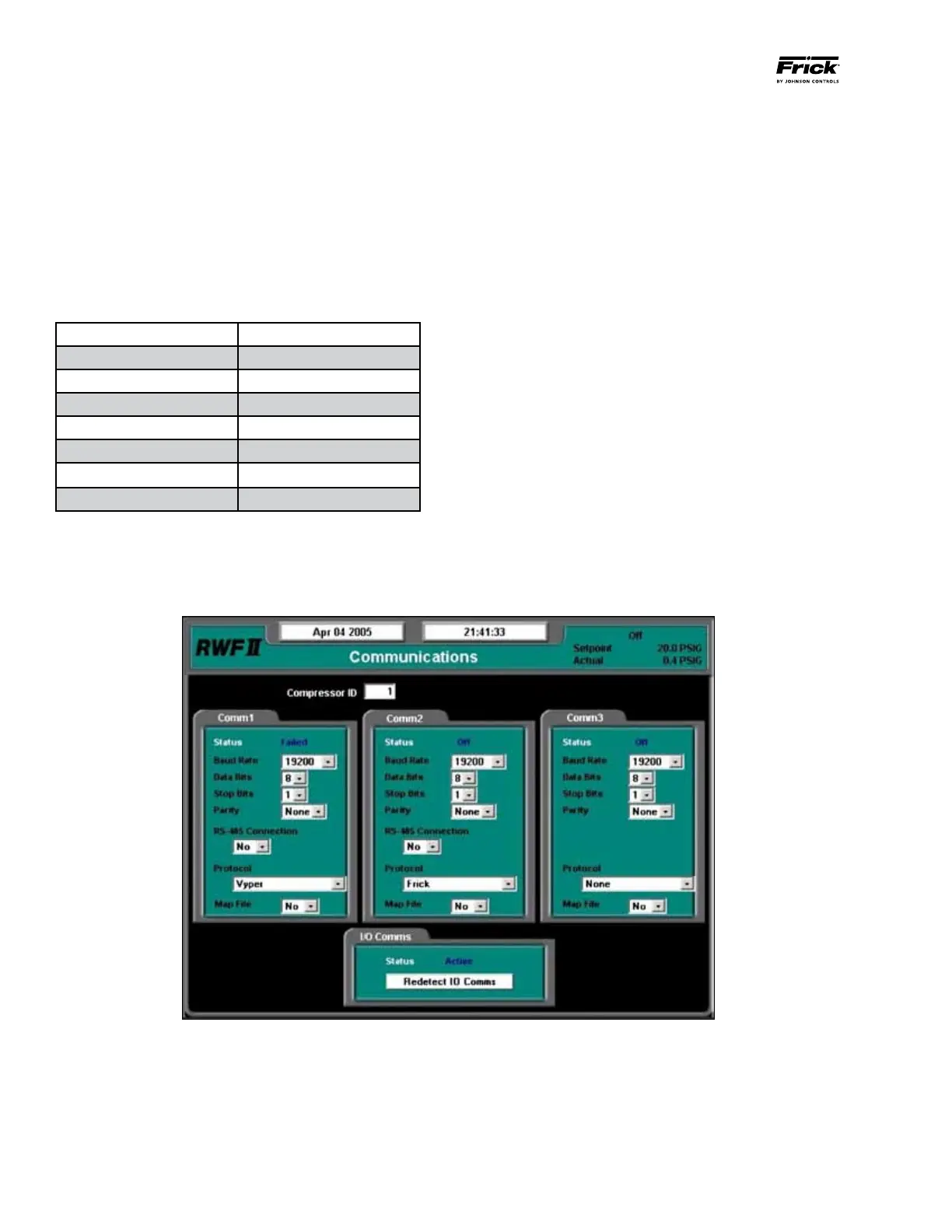
Step 1: (See Figure 39) The communication rate between
the Vyper
™
and the Quantum
™
LX requires programming.
Advance to the Communications Screen by pressing the
[MENU] key and then selecting “Setpoints” and “Commu-
nications”.
Step 2: (See Figure 39) Use the cursor arrow and [Tab] keys
to navigate between setpoints. Use the keypad to program
the parameters listed in Table 12 under “Comm1” (Callout
1) at the Communications Screen. Press the [Enter] key to
accept each setpoint.
Step 3: Press the [Submit] key to accept the changes to
Comm1 and return to the operating status screen.
Figure 39 - Communications Screen
1
Comm 1 Parameter Setpoint
Baud Rate 19200
Data Bits 8
Stop Bits 1
Parity None
RS-485 Connection No
Protocol Vyper
Map File No
Table 12 – Comm1 Setpoints


 To Next Page