VYPER
™
VARIABLE SPEED DRIVE
OPERATION
100-210 IOM (JUL 09)
Page 51
Compressor Safeties Screen
To prevent the Slide Valve from unloading beyond a high
setpoint level (97%) and permit rapid compressor response
under load, make the following setting adjustments on the
Compressor Safeties Screen:
Step 1: Press the [MENU] key and then selecting “Setpoints”
and “Compressor”. Press the [ENTER] key to advance to the
Compressor Safeties Screen.
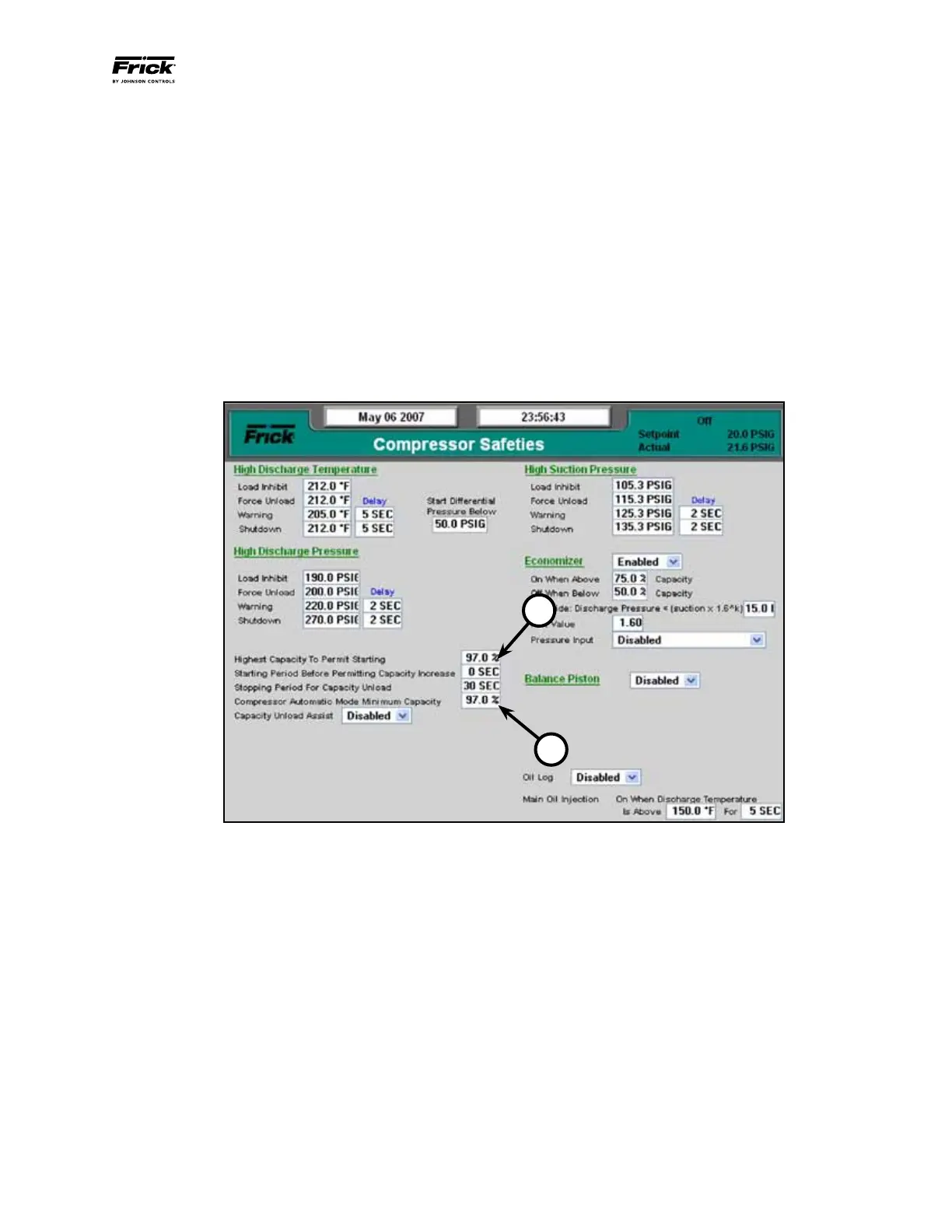
Step 2: (Refer to Figure 61) Use the cursor arrow and [Tab]
keys to navigate to the “Highest Capacity To Permit Start-
ing” (Callout 1) and “Compressor Automatic Mode Minimum
Capacity” (Callout 2). Use the keypad to program the set-
points to “97%”. Press the [Enter] key to accept the value
for each field.
Step 3: Press the [Submit] key to accept the changes and
return to the operating status screen.
Figure 61 - Compressor Safeties Screen
1
2


 To Next Page