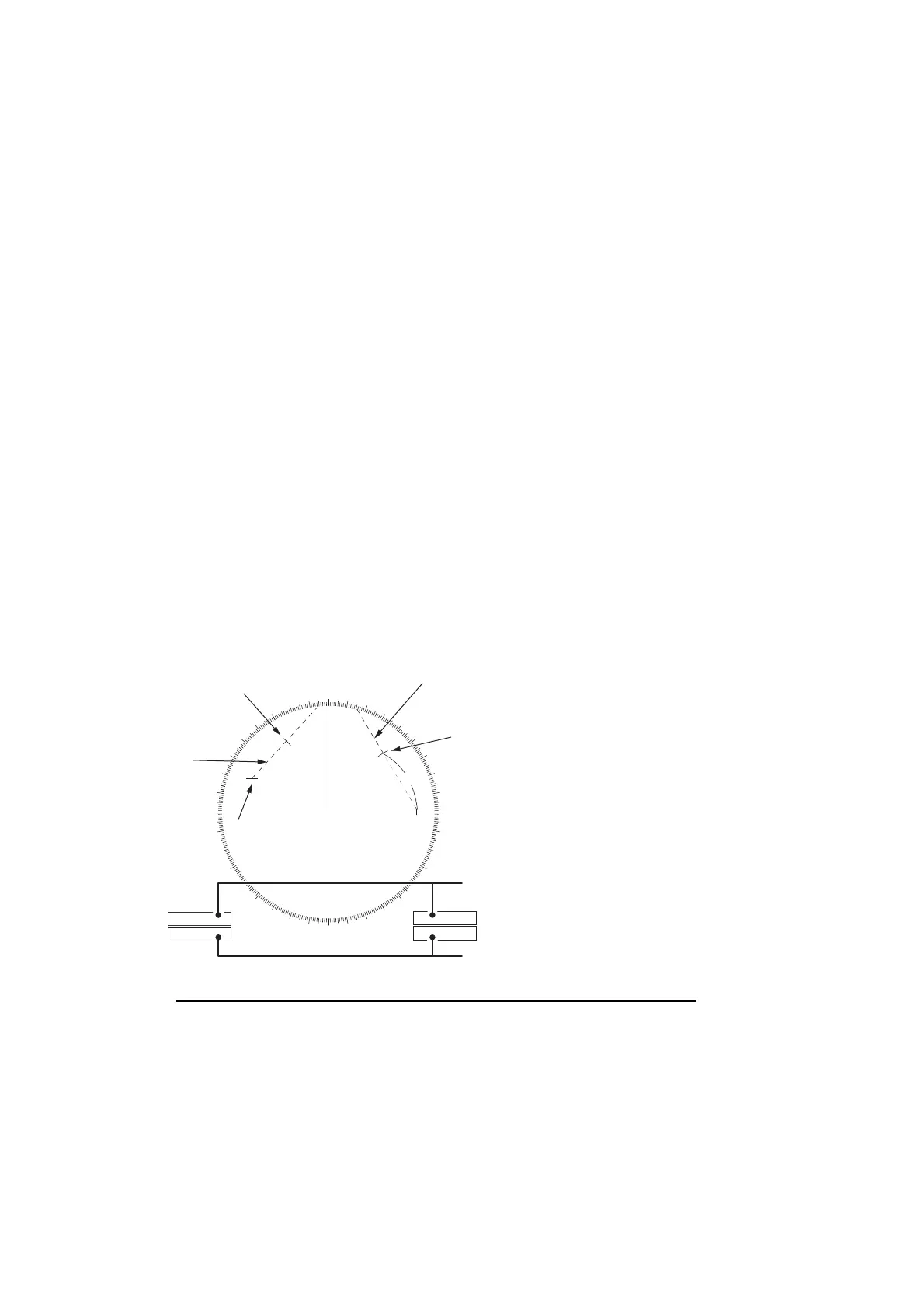
1. OPERATIONAL OVERVIEW
1-40
1.33.2 How to set the origin point reference for EBL OFFSET
The origin point of the offset EBL can be ground stabilized (geographically fixed), north
stabilized (true) or referenced to own ship’s heading (relative).
1. Open the [MAIN MENU].
2. Select [NAVTOOL], then push the ADJUST knob.
3. For IMO radars, select [EBL•VRM•CURSOR], then push the ADJUST knob.
For non-IMO radars, select [EBL•VRM], then push the ADJUST knob.
4. Select [EBL OFFSET BASE], then push the ADJUST knob.
5. Rotate the ADJUST knob to select [STAB GND], [STAB HDG] or [STAB NORTH]
as appropriate, then push the ADJUST knob.
6. Close the menu.
1.34 How to Measure Range and Bearing Between
Two Targets
How to measure range and bearing from the [CURSOR] menu
This procedure uses EBL1 and VRM1 as an example and is written on the premise
that neither of the EBLs or VRMs is active.
1. Place the cursor on the EBL1 box, then press the left button. EBL1 is now active.
2. Place the cursor inside the operational display area, then press the right button.
The [CURSOR] context menu appears.
3. Select [EBL OFFSET], then push the ADJUST knob. The cursor is displayed with
a red surround. The [EBL OFFSET] mode is now active.
• [STAB GND]:
• [STAB HDG]:
• [STAB NORTH]:
Reference to latitude and longitude. Origin position is always
fixed regardless of your ship's movement.
Reference to heading. The relationship between origin posi-
tion and own position is kept always.
Reference to North. The origin position changes with North
position.
000
010
020
030
040
050
060
070
080
090
100
110
120
130
140
150
160
170
180
190
200
210
220
230
240
250
260
270
280
290
300
310
320
330
340
350
EBL
origin
R2
Target 2
No.1
EBL
No. 2
EBL
Range
Marker
EBL1
EBL2
>140.0
°
R<
335.2
°
R
VRM1
VRM2
>0.50NM<
0.98NM
Range
Marker
Target 4
Target 3
Target 1
Range/bearing between targets 1 and 2
Range/bearing between targets 3 and 4










 To Next Page