4. AIS OPERATION
4-9
4.7 Target Data
You can display an AIS target’s data by selecting it on the display, when the AIS func-
tion is set for [AIS DISP FILT].
4.7.1 How to display target data in the data display area
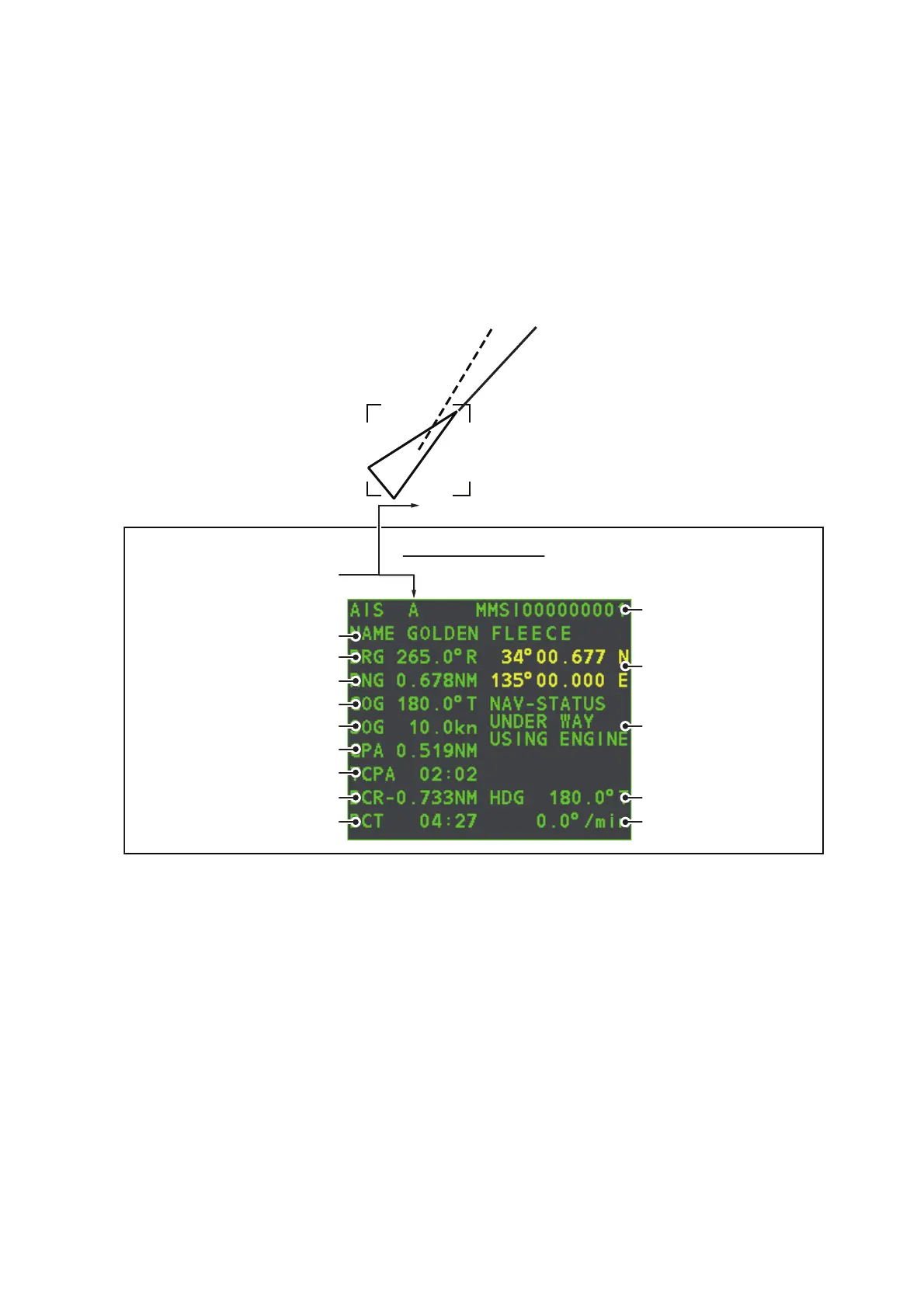
Place the cursor on a desired AIS target and press the TGT ACQ key. The target is
highlighted with a square box and the selected AIS target’s data is shown in AIS target
data box in the data display area, on the right side of the screen.
4.7.2 How to remove target data from the display area
Place the cursor on a desired tracked target and press the TGT CANCEL key. The
select target’s data is no longer displayed in the data display area.
Location of target data box
Target’s MMSI ID
Name of target ship
Bearing to target
Range to target
Target’s course
Target’s speed
Target’s CPA
Target’s TCPA
Target’s bow cross range
Target’s bow cross time
Target’s co-ordinates
Target’s heading
Target’s rate of turn
Target’s nav status
A
AIS target data box










 To Next Page