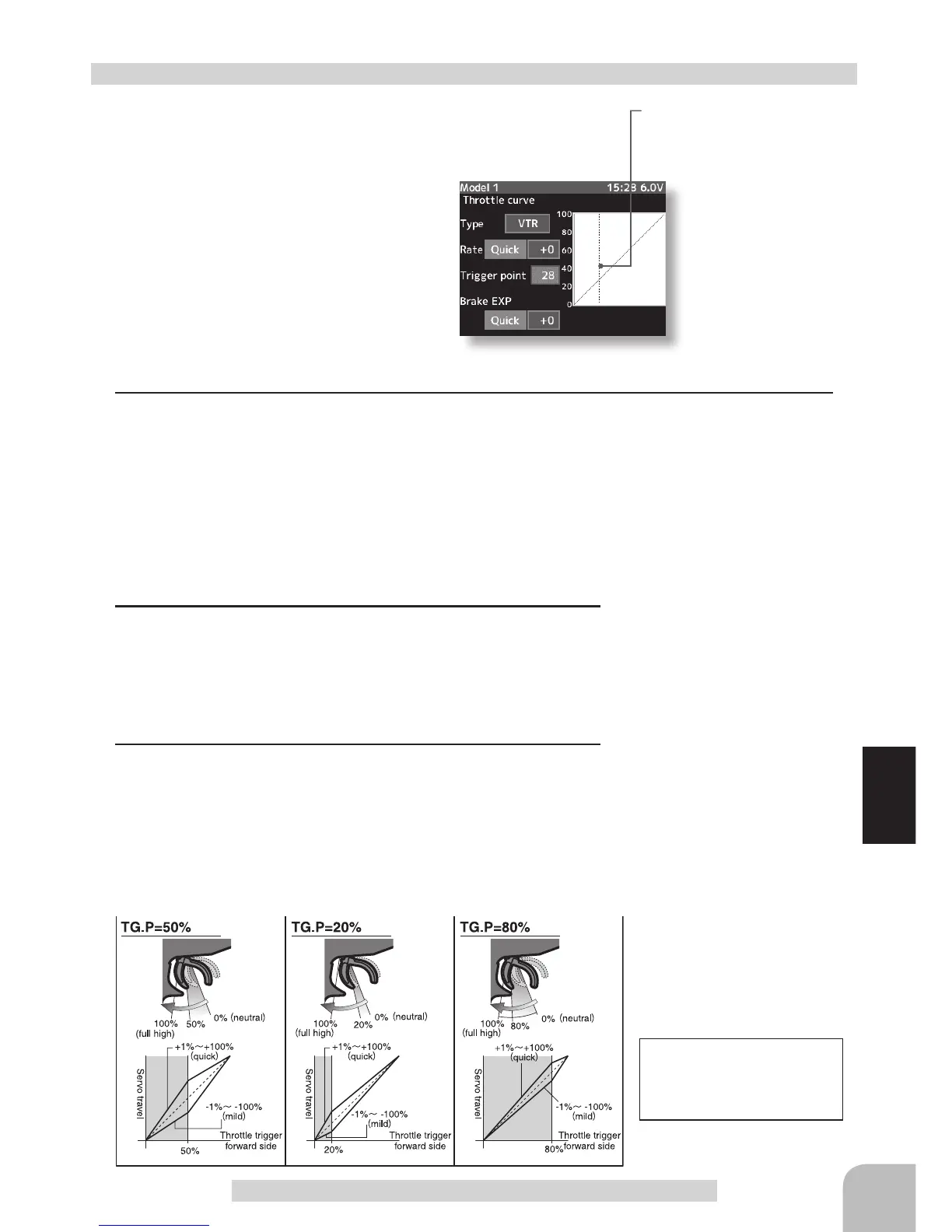
Setup items
Typ :Forward side curve selection
Rate :Forward side rate
Trigger point :Curve switching point
Brake-EXP :Brake side rate
Setup item selection
- Select by (JOG) button up or down operation.
Curve type Select button
- Select with the (+) or (-) buttons.
59
Throttle curve
Switching point
A vertical cursor line that shows
the curve switching point is
displayed on the setup screen
Adjustment method for VTR curve
(Preparation)
- Select the "Type" to be set by (JOG) button operation.
Adjustment range
Rate :-100 ~ 0 ~ +100%
Trigger point :20 ~ 80%
Brake-EXP :-100 ~ 0 ~ +100%
For the VTR curve, only the
high side can be set. The
brake becomes the EXP
curve.
Adjustment buttons
Adjust with the (+) and (-) but-
tons.
- Return to the initial value by
pressing the (+) and (-) buttons
simultaneously (approx. 1 sec).
Initial value:
Rate and Brake-EXP "0"
Trigger point "50"
With the plus (+) or minus (-) buttons, select "VTR"
1
Forward side adjustment
Select the "Rate" to be set by (JOG) button operation. Use the plus (+) button to adjust for
a faster response. Use the minus (-) button for a slower or mild response. -Plus (+) button-
the higher the number goes on the positive side, the faster the response will be at center of
throttle response. -Minus (-) button- the higher the number
goes on the negative side, the milder or softer it is in the
center of the throttle response.
2
Curve switching point adjustment
Select the "Trigger point" to be set by (JOG) button opera-
tion. Use the plus (+) or minus (-) buttons to move the point
you prefer. This gives you the opportunity of switching the
curve point in relation to the throttle trigger position.
3
Brake side adjustment
Select the "Brake EXP" to be set by (JOG) button operation.
Use the plus (+) button to adjust for a faster brake response
or use the minus (-) button for a slower or milder brake re-
sponse. When the setting item "Quick or mild" is selected
and the (JOG) button is pressed when the rate is other than "0", quick/mild are reversed.


 To Next Page