EasyManua.ls Logo

FutureLogic GEN3 Evolution - USB to RS232 Interface Cable

FutureLogic GEN3 Evolution
56 pages
Print Icon
To Next Page IconTo Next Page
To Previous Page IconTo Previous Page
Loading...
Operators and Technicians Manual
2011 2014 FutureLogic, Incorporated. All Rights Reserved. MNL Page 12 04/10/2014
MNL-000067 REV.X03
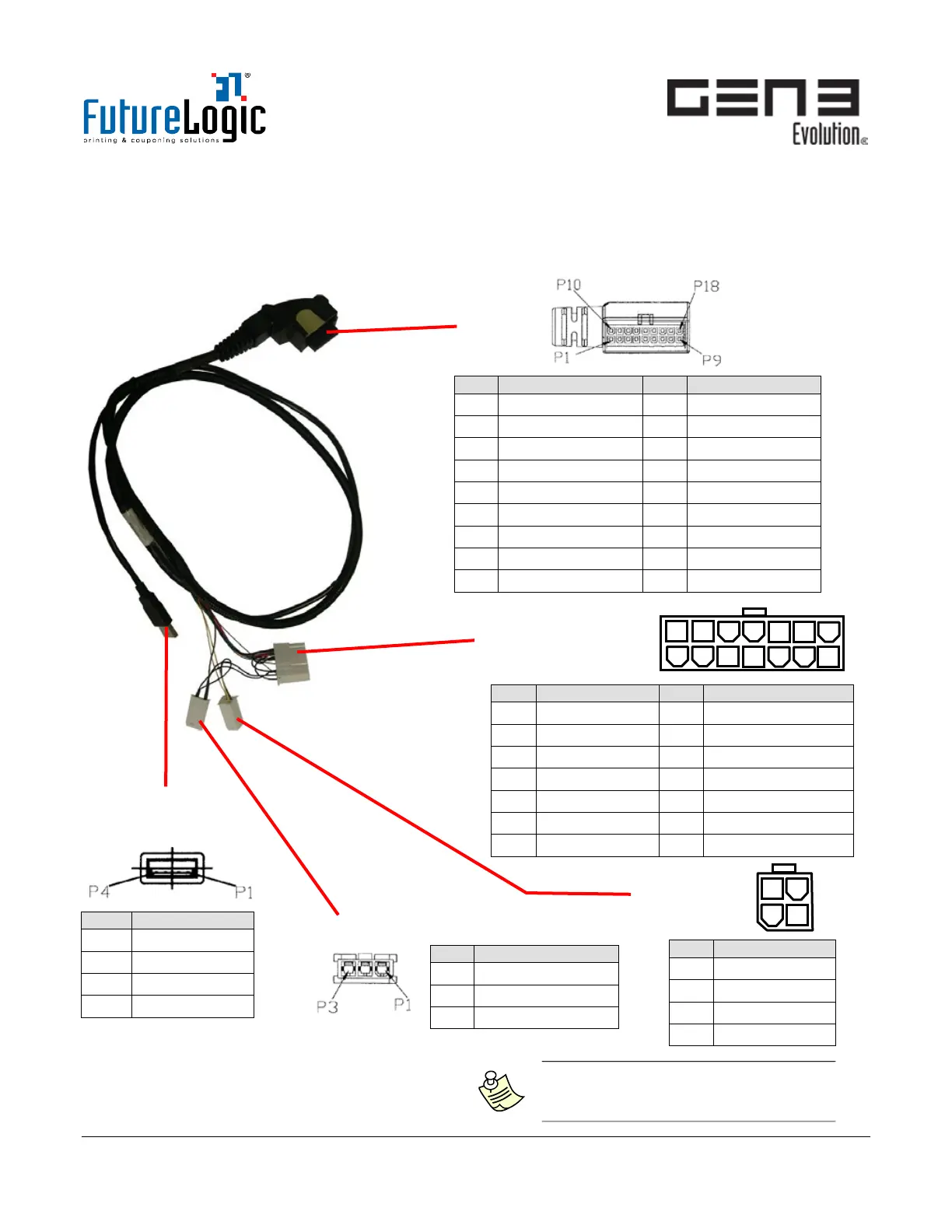
USB/RS232 Interface Cable
The Interface Cable connects the printer through the Base Port and to the machine through the RS232
Power/ COMM Connector (14-pin).
There are three additional connectors to which connection is optional: USB, Auxiliary Bezel, and Auxiliary
Comm Port (RS232).
Figure 5-3 USB/RS232 Interface Cable
Base Port
Bezel LED Control Port
USB Port
(Series A)
Auxiliary
COMM Port
RS232 Power/COMM
Port 14 Pin
1
3
2
4
P/N 350
-00268-100
1
14
8
Pin
Function
Pin
Function
1
DGND
10
RX2/SCL
2
DTR 232
11
TX2/SDA
3
No Connect
12
RX1 232
4
Switched +24V
13
TX1 232
5
USB N
14
No Connect
6
USB P
15
No Connect
7
MRESET
16
No Connect
8
+24V
17
USB +5V
9
RTS 232
18
USB GND
Pin
Function
Pin
Function
1
MRESET
8
+24 VDC
2
No Connect
9
Switched +24VDC
3
No Connect
10
DGND
4
No Connect
11
RX1 232
5
DGND
12
TX1 232
6
+24 VDC
13
DTR 232
7
DGND
14
RTS 232
Pin
Function
1
DGND
2
RX2/SCL
3
TX2/SDA
4
No Connect
Pin
Function
1
Switched +24V
2
No Connect
3
GND
Note: For the Bezel LED Port on the
cable, no Intermitted or in rush current
exceeding 1.5A is allowed.

Pin
Function
1
USB BUS +5V
2
USB N
3
USB P
4
GND

Table of Contents

Other manuals for FutureLogic GEN3 Evolution

Related product manuals