Operators and Technicians Manual
2011 – 2014 FutureLogic, Incorporated. All Rights Reserved. MNL Page 3 04/10/2014
MNL-000067 REV.X03
3 Standard Operation
Introduction
This chapter covers the standard usage of the GEN3 Evolution printer.
Product View
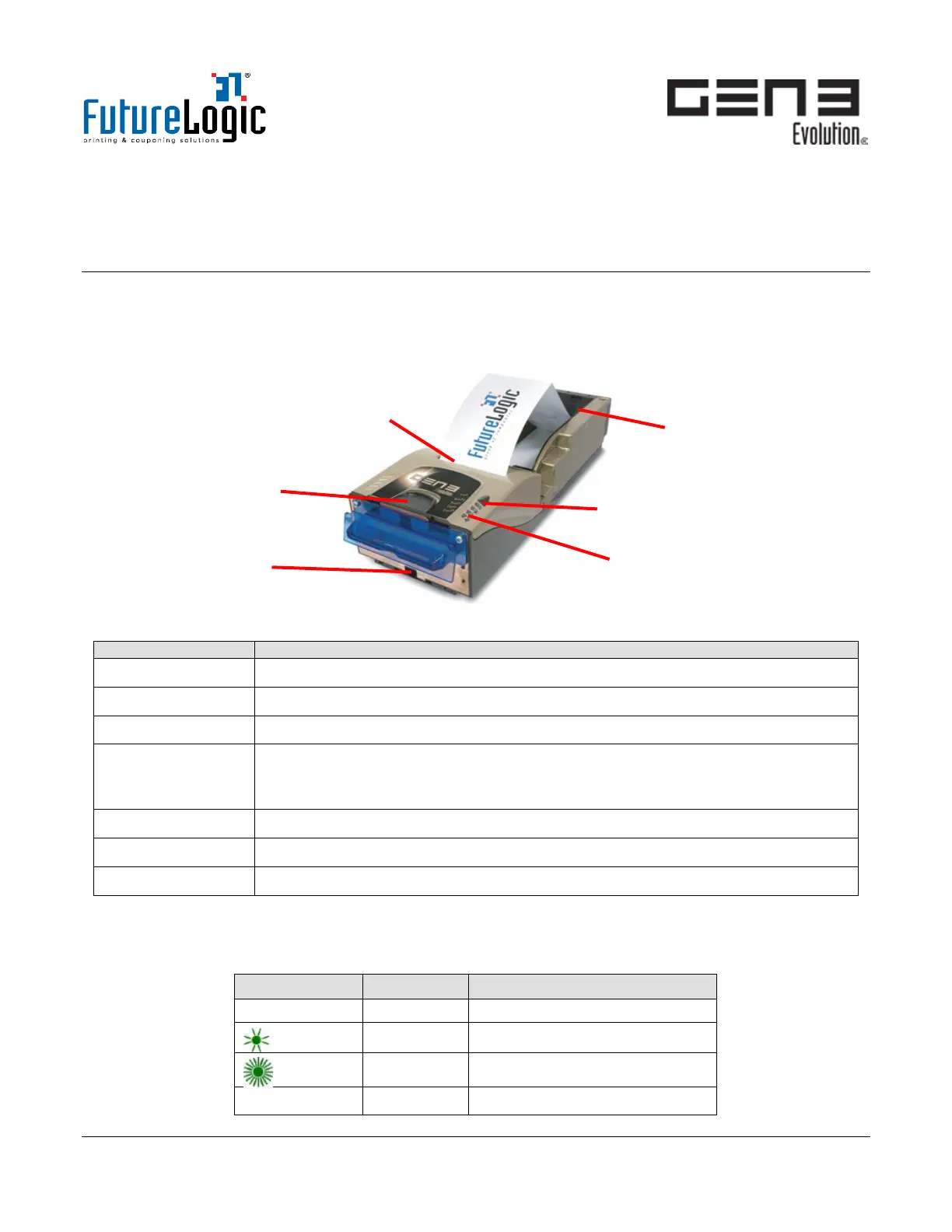
Figure 3-1 GEN3 Evolution Printer Components
Ticket In Slot Use to load ticket stock with automatic alignment.
Lid Release Lever Push to access the Print Head, Paper Path, Feed Rollers, and Ticket Release Lever.
Ticket Out Slot Use to access printed tickets.
(Optional) Bezel
and Bezel Light
Use to attach the Bezel to the printer or mount to align the Bezel with the
printer Ticket Out Slot when the game or kiosk door is closed. See also Bezel
Light on page 3.
FEED Button Use to feed paper or print Configuration Tickets (see page 6).
LED Status Lights Use to determine the printer status. See also page 4.
Ticket Tray Use to hold up to 450 tickets.
Bezel Light
The front Bezel Light determines the printer state without opening the game or kiosk. For the current
ratings of the Bezel Ports, see page 11.
Bezel Display Status Description
ON Printer idle and ready
Slow flash Tickets low or printer error
Fast flash Ticket printing / take ticket
○ OFF Printer or game is switched off
Ticket Tray
(450 tickets)
Bezel



 To Next Page