RX series User Manual
CorelDRAW Plug-In A-3
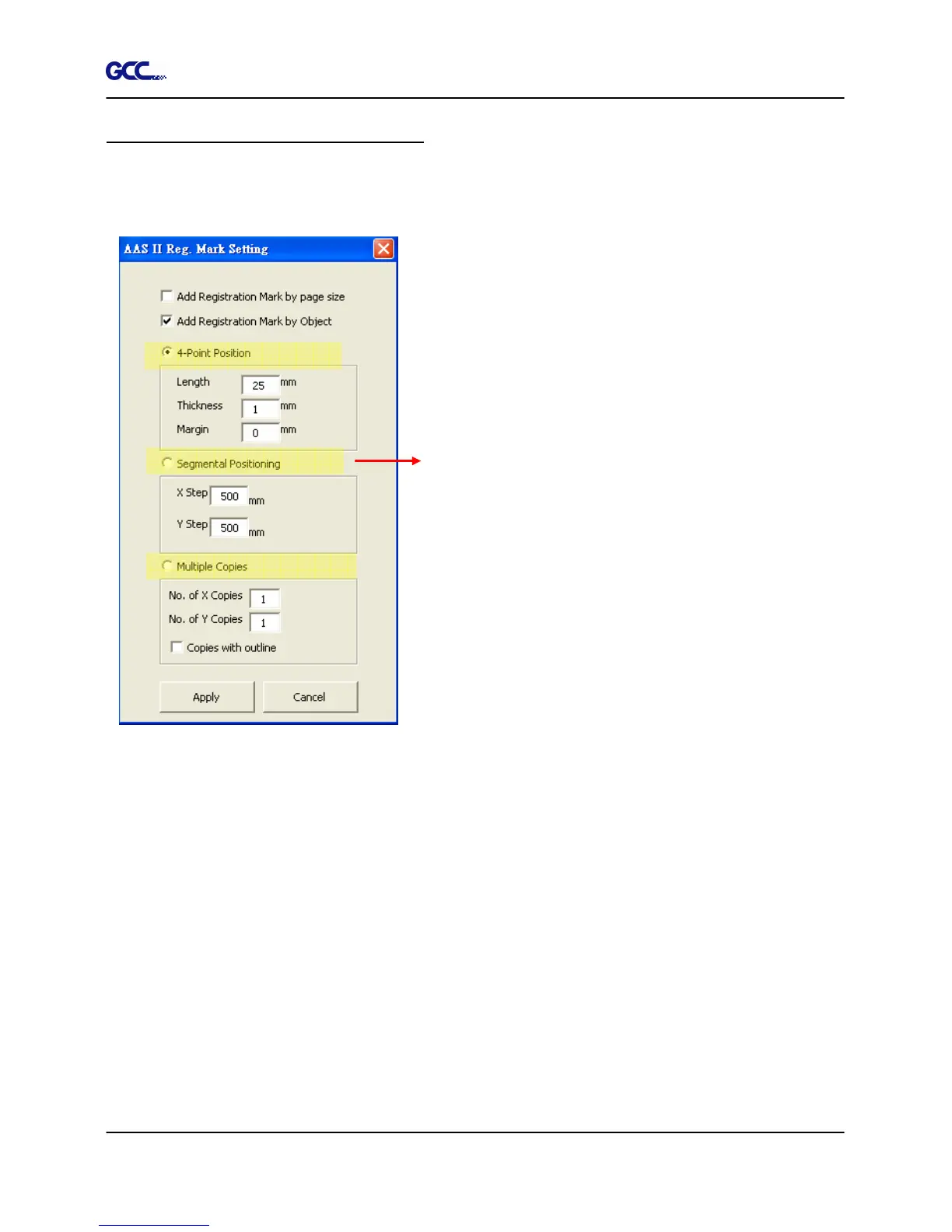
Add Registration Mark by Object
If you tick “Add Registration Mark by Object”, you will be offered three options of registration
marks as shown below.
Note: The values entered in the “4-Point Positioning” section (length, thickness and margin) will
still be applied when you tick “Segmental Positioning” or “Multiple Copies”.
4-Point Positioning
Length: The length of marks
Range: 5mm~50mm
Optimized Setting: 25mm
Thickness: The line thickness of marks
Range: 1mm~2mm
Optimized Setting: 1mm
Margin: The distance between marks and images
Range: 0mm~50mm
Optimized Setting: 5mm
Segmental Positioning
X Step: The distance of intermediate position on the X axis
Y Step: The distance of intermediate position on the Y axis
Range: 200mm~600mm
Optimized Setting: Less than 500mm
Multiple Copies
No. of X Copies: The numbers of copies on X axis
No. of Y Copies: The numbers of copies on Y axis
Range: 1~50
is needed for data transmission.)
Numbers of X Copies * Numbers of Y Copies = The total
amount of image copies
Copies with outline:To show outlines of image graphics







 To Next Page