GEDA
®
Temporary Construction Hoist PH 650
Operating Manual Page 37 of 64 BL148GB2017 / 11
Button "Stop Next Landing" illuminates. The car only moves slowly and
stops at the next landing below.
Stop at the actual position
Press the STOP button. The car stops at the current position
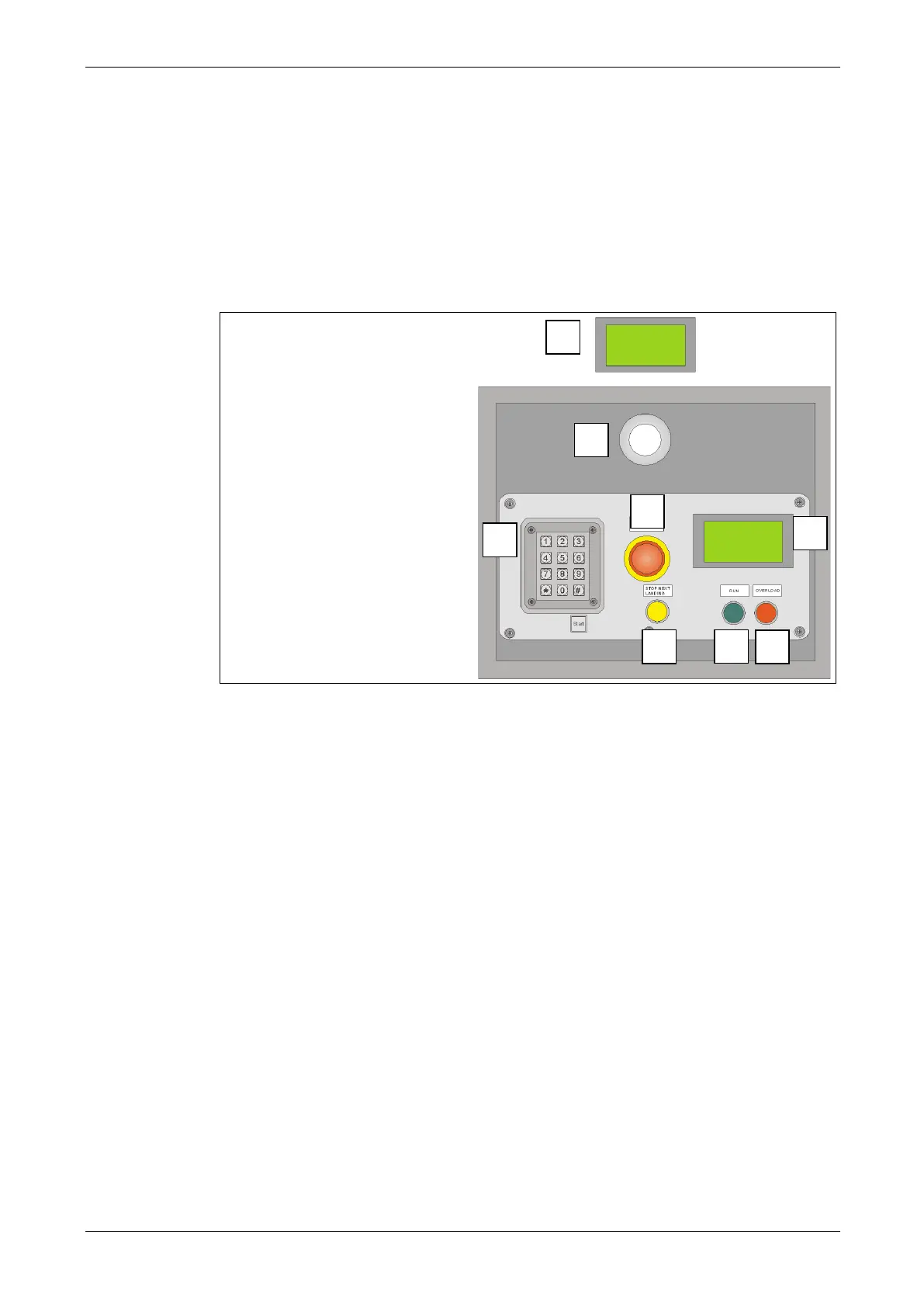
10.3.2 Control in the car - landing preselection
1 = actual landing display
Error code and
diagnostic display
2 = Car emergency lighting
3 = EMERGENCY STOP
4 = Key field
0-9 = Landing level
selection
# = Start button
* = No function
5 = Stop Next Landing (SNL) Stop at next landing level
(only when landing approach bar is installed)
Illuminated when operated.
Press and hold EMERGENCY DOWN button.
after approx. 30 seconds, the car moves to the ground station.
6 = Ready for operation control light
OFF = not ready for service (refer to error code on the diagnostic display)
ON = Ready for operation
7 = Overload warning light
ON = Overload
Flashing once per second = Lubrication empty
Flashing twice per second = refer to error code on the diagnostic display
8 = Landing display of the travel destination



 To Next Page