Rev. 00 03/19
32
Start-up OptiStar 4.0 (CG24-CP)
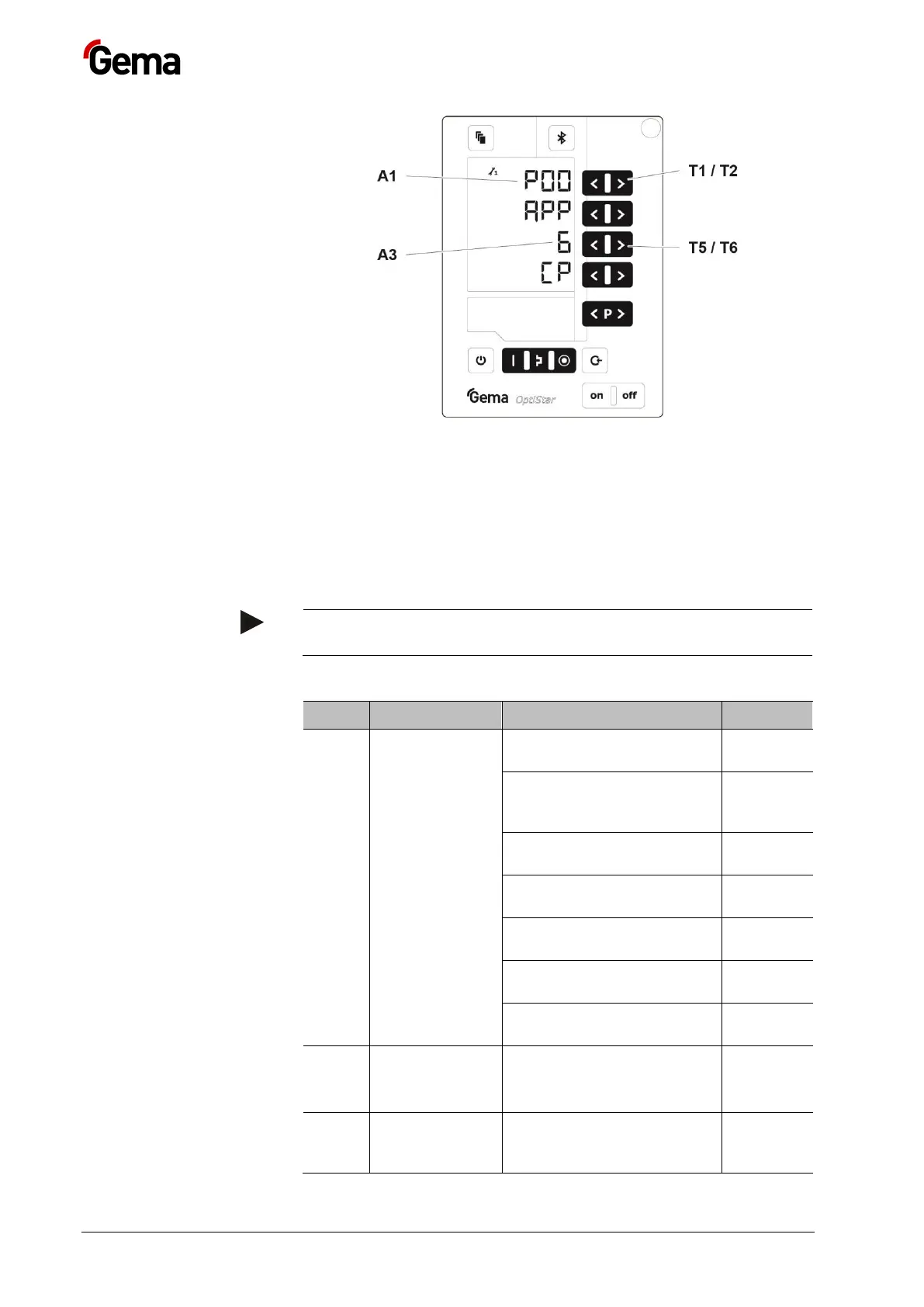
3. The system parameter number is shown in the display A1 with a P
placed in front
4. Set the corresponding system parameter value with the T5 or T6
key.
– The value of the adjusted system parameter appears on
corresponding display A3
5. Scroll to the next or previous system parameter with the T1 or T2
key
Selection is cyclical, i.e. after the last system parameter, the first
starts again and vice versa.
6. Select parameter values according to the following table
0: Fluidizing device
type F (CG21)
1: Box device with
vibrator Type B
(CG21)
2: Stirrer device Type S
(CG21)
3: Automatic device
(CG20/CG20-C)
4: Stirrer device with
fluidization (CG21)
5: Application pump
(CG23-P)
6: Application pump +
CAN bus (CG24-CP)
0: P in = 5.5 bar
1: P in = 6 bar
2: P in = 6.5 bar
Unit of
measurement
(air)


 To Next Page