GKB 4CH/8CH VFire Server
72
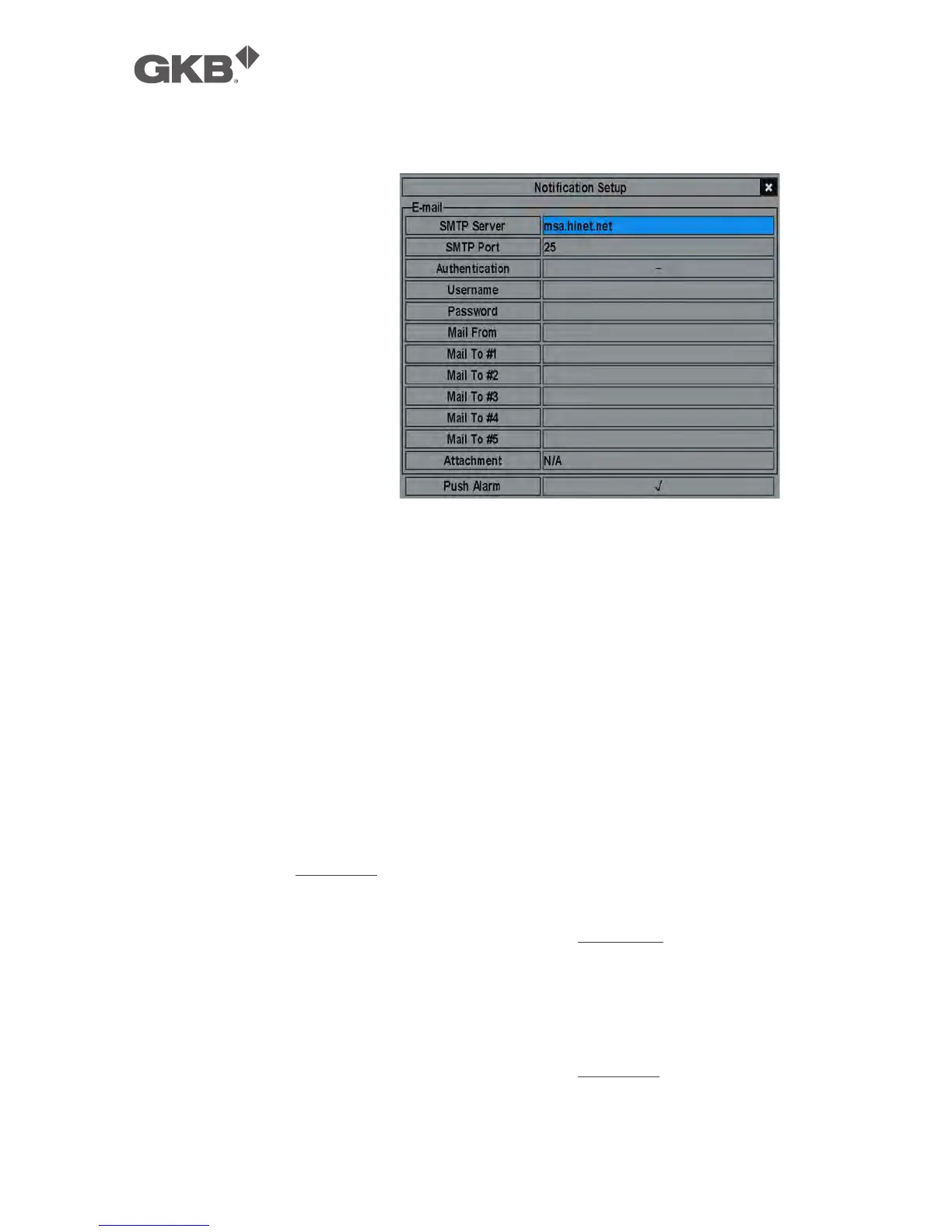
6.10.1 Notification Setup
In Network Setup, press
ENTER to call up Notification
Setup as shown when the
highlighted option is
Notification.
The Notification Setup
allows the administrator to
set notification (email &
push alarm) related
parameters. When an
event occurs and
Notification/E-mail is
enabled for the
corresponding action, a
notification will be sent based on the parameters set.
The general operations are as below:
n ▲▼ (Mouse: Left click)
Press these buttons to select the items.
n ESC (Mouse: Right Click)
Press this button to escape from this screen, and return to Network Setup
display. If the Save dialog is shown, press ENTER to exit and save, ESC
(Mouse: Right Click) to exit without saving.
Following is a brief description for each item and its specific operations:
n SMTP Server – SMTP mail server name. Please follow the Text Input method
described in Section 4.1 to modify this item.
n SMTP Port – the SMTP port for e-mail transmission. The default value is 25.
Please follow the Text Input method described in Section 4.1 to modify this item.
n Authentication – whether the SMTP mail server requires authentication. Press
ENTER or +/- to check/uncheck this item.
n Username – username if the SMTP mail server requires authentication.
Please follow the Text Input method described in Section 4.1 to modify this item.



 To Next Page