GKB 4CH/8CH VFire Server
56
6.6.1 HDD Format/Clear
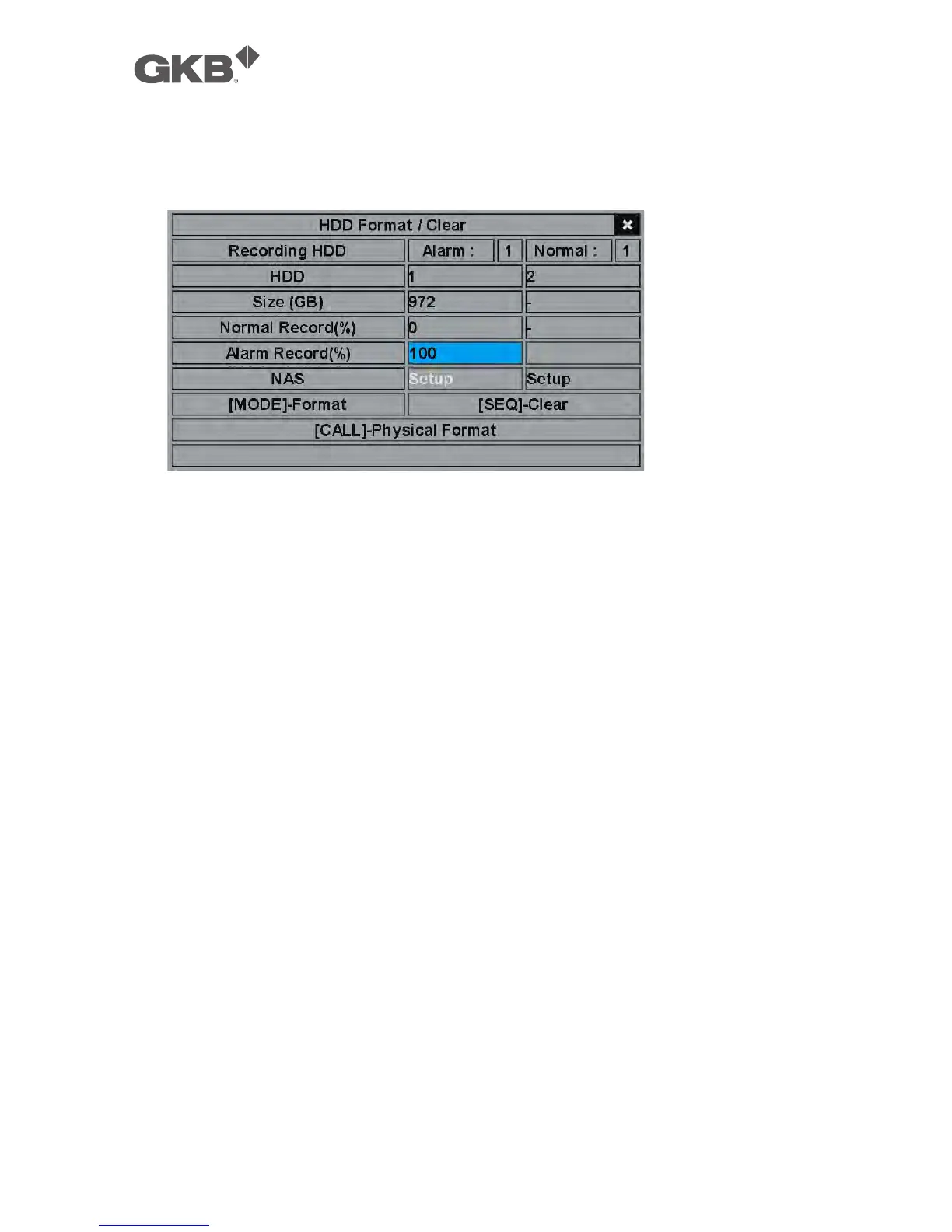
In HDD Setup display, press MODE to call up HDD Format/Clear screen as shown.
The HDD must be formatted before it can be used to record video/audio. The
HDD Format/Clear screen allows the administrator to format and/or clear each
HDD, and set the size for Alarm Record partition and Normal Record partition for
each HDD. Please make sure there’s no remote user before formatting the HDD.
Please note that if NAS device is connected and setup correctly, it will be always
the last storage in the HDD list.
The general operations are as below:
n MODE => Format (Mouse: Left click)
Press this button to format the HDD. A confirmation dialog will be shown on
the screen, press ENTER to confirm, or ESC to cancel. Please note that it would
take about 40 seconds to format a brand new 160GB HDD.
Note: If the HDD has not been formatted, it will be formatted and partitioned
with default record size, 100% for Alarm and 0% for Normal. If it has
been formatted, it will be formatted according to the Alarm REC Size (%)
and Normal REC Size (%) displayed on the screen, but the previously
recorded contents within the new size won’t be cleared and will be
accessible.
n SEQ => Clear (Mouse: Left click)
Press this button to clear the HDD. A confirmation dialog will be shown on
the screen, press ENTER to confirm, or ESC to cancel.
Note: If the HDD has not been formatted, it will be formatted and partitioned



 To Next Page